

Admin login
-
I recently purchased a domain mapping for stylebymonicagarrett.com to go to margauxdesignstudio.com. Now I can’t seem to login into WordPress as admin to edit my blog. I notice I have several login names for WordPress & I am not sure why. Is there a way to consolidate my login to one name & password to access ALL my blogs? I have a total of 4.
My papercutindustries.com/blog moved to stylebymonicagarrett.com initially. Now stylebymonicagarrett.com is moved to margauxdesignstudio.com. I won’t be editing any blog except margauxdesignstudio.com & the flockla.wordpress.com. Sounds like a riddle but I am so confused & don’t know what to do.
I can’t access the Admin Dashboard to edit stylebymonicagarrett.com (redirects to margauxdesignstudio.com now).
Can you help or direct me to someone who can?
The blog I need help with is: (visible only to logged in users)
-
Hi there,
I see that you have multiple sites – a couple WordPress.com sites and a couple WordPress.org self-hosted sites – which is the reason for the multiple logins.
Currently we are the support team for WordPress.com. We are essentially two separate entities. To clear up any confusion, WordPress.com and WordPress.org are two different entities. At WordPress.com, we provide hosting, support, and tons of features for blogs. Users also have the option to purchase a variety of upgrades to customize the look and feel of their blog. WordPress.org is a software for self-hosted sites. With WordPress.org, users are provided access to all backend files and can upload custom themes and plugins.
Check here to learn more about the difference between WordPress.com and WordPress.org:
So currently, your WordPress.com site: margauxdesignstudio.wordpress.com has 3 domain mappings attached to it: lifestyledchic.com, margauxdesignstudio.com, and stylebymonicagarrett.com.
If you are using WordPress.org, which is the site I see here:
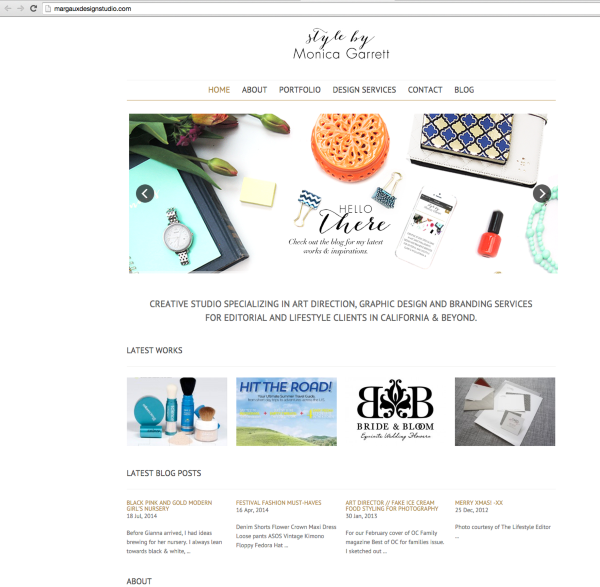
Then you will no longer need those three domain mappings. I believe this would be the login for your self-hosted site:
http://margauxdesignstudio.com/wp-login
If you want to continue using that, I can cancel all your domain mappings and you will have to go to the domains’ registrars and set your nameservers to your self-hosted site’s nameservers.
If you want margauxdesignstudio.wordpress.com to continue to point to your self-hosted site: margauxdesignstudio.com, all you will need is one Site Redirect upgrade:
Please let me know if you have any questions about this.
-
Hi Grace! Thank you so much. I am so overwhelmed with confusion over this.
You are correct! I do not need nor want the three domain mappings.Where do I access the domains’ registrars to change my nameservers? -mg
-
The domain registrar is where you purchased the domain. You can check the whois of any domain to find the registrar.
The registrar for margauxdesignstudio.com and stylebymonicagarrett.com is GoDaddy as seen here:
https://who.wildwestdomains.com/whoisstd.aspx?domain=margauxdesignstudio.com&prog_id=wildwestdomains
Contact them and have them update the nameservers to your self-hosted site’s nameservers.
Once everything is up and running what I can do is remove all the domain mappings and then switch out the recent auto-renewal of margauxdesignstudio.com’s domain mapping for the Site Redirect upgrade (they are the same price). This will redirect any traffic to margauxdesignstudio.wordpress.com to your site: lifestyledchic.com.
If you don’t want the Site Redirect, I can provide you a full refund. Let me know what you would like to do!
-
Hi Grace,
You have been such a help to me! This is what I would like to do:
I need to remove all the domain mappings I have. I want to only redirect margauxdesignstudio.wordpress.com to margauxdesignstudio.com/blog only. All other sites won’t be needed.
I don’t need lifestyledchic.com or stylebymonicagarrett.comWill this affect my login information?
-
Hi Monica,
Thanks for the confirmation. I have switched out your most recent domain mapping for a Site Redirect, which will redirect margauxdesignstudio.wordpress.com to margauxdesignstudio.com/blog as requested. I have also removed all the domain mappings as well.
This will not affect your login for your self-hosted site.
Cheers!
-
Hi Grace,
The screenshot you took & asked me about earlier, I can’t find that blog anymore. I believe it is stylebymonicagarrett.com but the redirects have it lost somewhere. Can you let me know where that went? -
HI there,
Currently I see this when I go to the domain: stylebymonicagarrett.com:
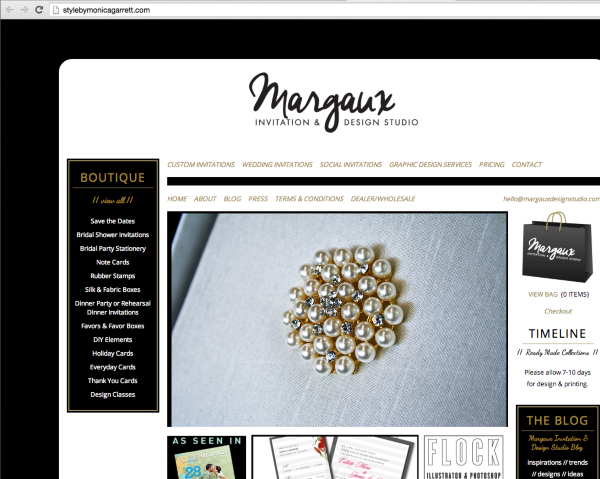
The Site Redirect I added was this:
margauxdesignstudio.com/blog
Please contact the host of that site to see what happened as I am seeing a Database Error. I do not have any access to the backend files of that site so the only people who can help you with that would be your host.


- The topic ‘Admin login’ is closed to new replies.


 WordPress.com Forums