Ads causing a location popup on iOS
-
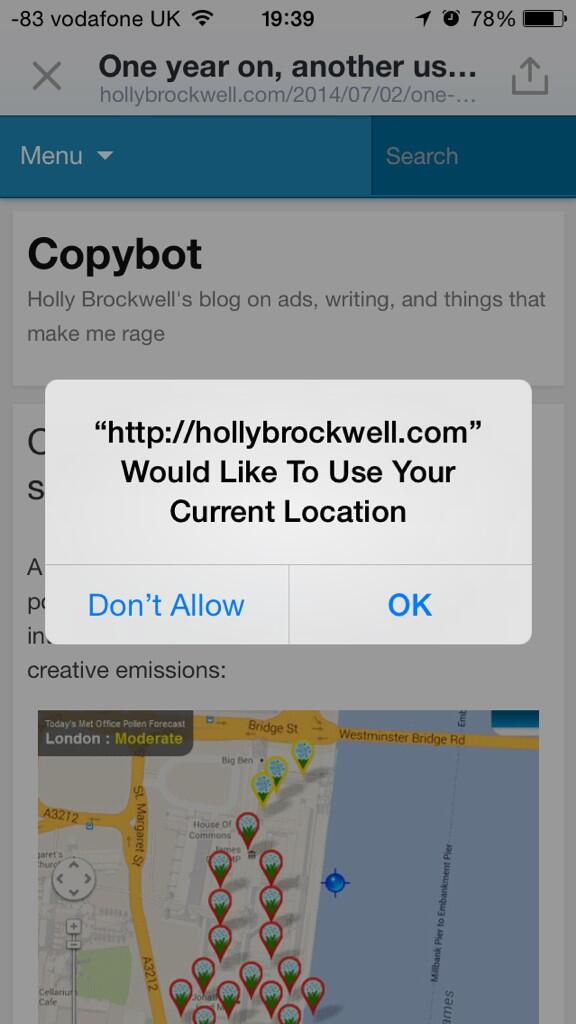
When an iOS user views my blog on their mobile, they get a popup saying “hollybrockwell.com would like to use your current location” (see screenshot: https://pbs.twimg.com/media/BrkIK7lIUAAxCLR.jpg).
Using Ghostery, we’ve worked out that the problem is the MoPub advertising network (presumably through WordAds, which I have enabled on the site) and when you switch off MoPub, the problem goes away: http://imgur.com/a/UMkPL
Please could you fix this? It’s irritating my iOS users, who are a large part of my readership.
The blog I need help with is: (visible only to logged in users)
-
Hi Holly,
I’m currently trying to recreate the issue. Thanks for providing such a detailed report with screenshots. It really makes this easier! A few questions:
- Do you receive the location message every time you visit the site when MoPub is not switched off?
- Does this happen in multiple browsers on your mobile device or only in one (Safari for example)?
Thanks for the additional information!
-
Hello,
1) It happens every time the page is loaded, but if you keep choosing ‘Don’t Allow’ the prompts eventually stop in that browser.
2) I’ve reproduced in Safari, iOS Chrome, Twitter’s UIWebView, Apple iOS emulator (via BrowserStack) & Chrome iPhone emulator
-
Hi Holly,
Have you been able to reproduce this on a mobile device directly (you mention iOS Chrome but wasn’t sure if you were using an emulator)? I haven’t been shown this on either Safari or Chrome even after multiple refresh attempts. We suspect this might be a result of the emulator, and that the rest of your visitors using mobile browsers would not be experiencing the pop-up.
-
It was using normal Chrome on a normal iPhone that the issue was first discovered – if you look at the first screenshot you can see it’s just an iPhone, not an emulator.
Are you in the UK? Maybe it only happens here?
-
Hi Holly,
We’re working on reproducing the message and narrowing down the cause. I’ll get back to you as soon as I have more information!
-
Thanks. I also found someone else having the same issue: https://en.forums.wordpress.com/topic/blog-asking-for-user-location?replies=11
-
-
Hi Holly,
This should be fixed now. If you see that location pop-up again, please let us know! :)


- The topic ‘Ads causing a location popup on iOS’ is closed to new replies.
 WordPress.com Forums