

Advanced Image settings
-
I am trying to find the advanced settings for images but they seem to be gone. I am attempting to edit an image in a post by increasing the horizontal space so that the text isn’t right up on the image. It seems that the new update doesn’t not allow for this. Could you please help me figure this out? Thank you.
The blog I need help with is: (visible only to logged in users)
-
There were some recent changes to the Visual Editor and Image Editor including the removal of the Advanced Settings for images. You can read more about those changes here:
It looks like you’re currently adding padding to your images through CSS. For example, this code adds 4px:
img.alignleft {
display:inline;
margin:0 7px 2px 0;
padding:4px;
}
Creating this:
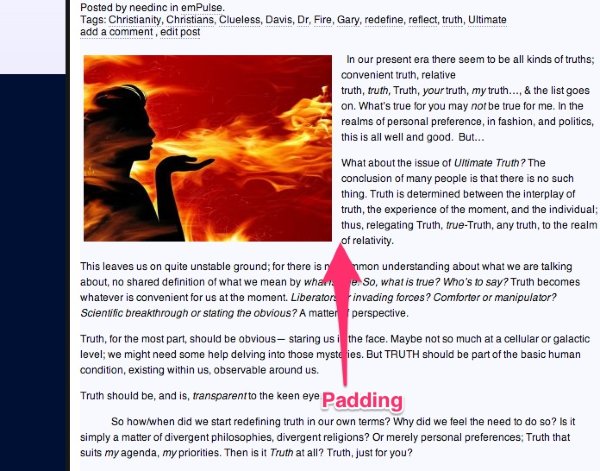
Are you trying to increase the amount of padding around your images? This can also be accomplished by modifying the HTML in the Text Editor as shown here:
<img class="alignleft size-large wp-image-15505" src="URL" width="584" height="389" hspace="5" vspace="5" />In that code, the hspace and vspace correspond to horizontal and vertical spacing.
Would that work for what you’re looking for?
-
It’s a bit more complicated than I’m used to. I often have to change the padding for each blog entry, due to the nature of the blog. Will advanced settings return? It was a great feature that really made my life do much easier. In fact it was one of my favorite features. Would love to have it back. Thanks for the advice. I’ll see what works.
-
As of right now, the Advanced Image Settings are not set to return. However, that may change in the future.
Let me know if you have any trouble with the workaround through HTML!
-
Thank you. I used the HTML option and it worked fine. Hopefully I can rember how to do it each time. Hopefully the advanced option returns someday. Thanks again for your help.
-
Not a problem! We’ll look at potentially bringing back some of the Advanced Option features in some fashion in the future.
Let me know if you need any additional help with the HTML.


- The topic ‘Advanced Image settings’ is closed to new replies.
 WordPress.com Forums