

After weeks or months my Excel embeds suddenly fail
-
This has happened before. Today it is this page:
http://billbennett.co.nz/2015/02/04/unlimited-fibre-broadband-plans/
At the moment there’s an embedded Excel table that doesn’t show. In it’s place is a white box and the message This item won’t load right now..
By the time you read this message I may have repaired the damage even if I don’t get to solve the underlying problem.
There’s no rhyme or reason behind these breakdown. They work for a while, some work for months or even years, and then out of the blue I get an email from a reader telling me the link is broken.
I normally repair the problem by editing the HTML and inserting a new embedded link. That fixes things for a while but eventually the link will break again. Is there a better way to stop this from recurring?
The blog I need help with is: (visible only to logged in users)
-
Hi there. I see you embedded it via Microsoft, so I’m wondering if this could have something to do with their switch from SkyDrive to OneDrive and the shortcode not converting correctly.
The sample-embed on the OneDrive Excel support page appears to have the same problem, so I’m tagging this for staff to follow up. Please subscribe to the thread and be patient while waiting for their reply.
-
Hi @billbennettnz,
As @kokkieh mentioned, I believe this has to do with the switch from SkyDrive to OneDrive. When I changed out the src URL for the Excel support page from http://skydrive… to http://onedrive…, it seemed to work alright. It looks like your page is already fixed, but if this happens again, can you try switching out the URL?
-
I had the problem last year on some other posts when Skydrive changed to Onedrive. So in that sense you are right.
However the latest problem is wth a table that was only created last month.
My guess is there was another behind he scenes change at OneDrive. I suspect this could happen again with future changes. It’s probably a Microsoft issue, but one WordPress should be aware of.
-
Definitely! I didn’t see any other breaks on our documentation page. If you notice this happen again on your site, could you reply back here and let us know?
-
@jeremeylduvall
I thought I’d mention the sample embedded document on the support page still doesn’t display for me. I tested in the latest Chrome, Firefox and IE11 and clearing the cache made no difference. Where the embed should be it keeps showing the “This item won’t load right now” message, same as on the post the OP linked above. -
Thanks @kokkieh – It seems to have gone back down. I updated the page again (didn’t change the embed at all) and the spreadsheet appears to be back up for me:
I’ll keep an eye on this to see if it goes back down.
-
I have had a similar problem at:
https://newtonexcelbach.wordpress.com/2015/02/24/7-year-report/starting on 24th Feb, only I don’t get a message, just a blank.
The link works with Chrome and with IE11 and Win7, but not with IE11 and Win 8.1.I can get the link to display by adding WordPress to the compatibility view list, but then other things don’t work.
Any suggestions?
-
The embed seems to be working on my side in 8.1 on IE11 as shown here:
Is this still appearing broken on your side? Do you have any add-ons installed? You can check under Tools -> Manage Add-ons.
-
Jeremy – Thanks for the reply.
I have tried disabling all add-ons, but it still doesn’t work in IE 11. I also tried disabling everything except Flash Player with no success.
One way to get it to display is right click and select “inspect element”, then close the element inspection window. Sometimes that works first time, sometimes it takes two goes.
-
That’s odd. Can you try clearing your browser cache in IE? Instructions here:
-
I cleared the cache but no change.
One other strange behaviour; if I open that post by clicking on the header or “read more”, then hit the IE back arrow, sometimes it takes me back to the previous screen (as normal), but sometimes it takes me direct to the table in Onedrive.
Here is the text view of the link:
I just changed the AllowInteractivity to True, previously it was False
-
It looks like this may not have come through correctly:
Here is the text view of the link:
I don’t believe the back behavior and the table not displaying are related. Let’s try to get the table appearing correctly first. I think the best path forward at this point would be to try resetting Internet Explorer:
http://windows.microsoft.com/en-us/internet-explorer/reset-ie-settings#ie=ie-11
In my tests, the embed appears to be working correctly in the default installation of IE. I’m not entirely sure what setting is causing this not to work correctly, but I’m hoping returning to the defaults fixes the behavior. Can you try following the instructions above? Just a note, the IE reset isn’t reversible.
-
Jeremey – I have reset Internet Explorer, including personal settings, but the display is still the same.
I also tried turning off the Norton Internet security, but that also made no difference.
-
Just to confirm @dougaj4, can you visit the following link and let me know what it says at the top?
https://www.whatismybrowser.com/
I just want to make sure I’m testing with the same conditions.
-
That’s a useful site! I get:
Internet Explorer 11 on Windows 8.1, Toshiba
Browser is up to date
JavaScript enabled
Cookies enabled
Flash 16.0 installed
Java not detectedExtra Info: 32 bit compatibility layer
Do not track is enabled -
Howdy!
I was able to replicate this in Windows 8 on IE 11, looked good on Chrome and Firefox.
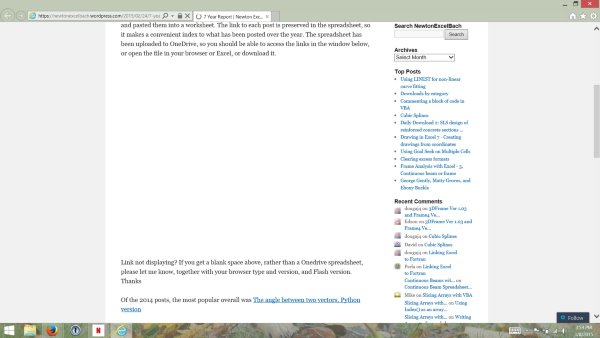
When you load it up on IE 11, does the page also appear to never fully load? For me the “working” symbol never went away from the tab. I think that may be the core of the issue and if you could confirm that it may help.
-
@alexjgustafson – I don’t know if this will help, but I do want you to be aware that dougaj4 does have a concurrent thread running at https://en.forums.wordpress.com/topic/link-to-onedrive-does-not-display
Thanks for your help!
-
When you load it up on IE 11, does the page also appear to never fully load? For me the “working” symbol never went away from the tab
alex – yes that’s exactly what I get. It doesn’t seem to harm performance on other tabs, or even scrolling through the tab with the link, but the working symbol keeps going, no matter how long I leave it.
-
Thanks for the heads up Jen. :)
Let’s close this thread up and keep it going here:
https://en.forums.wordpress.com/topic/link-to-onedrive-does-not-display
Susan and I talked we’ll keep looking at it together in that thread. :)


- The topic ‘After weeks or months my Excel embeds suddenly fail’ is closed to new replies.
 WordPress.com Forums