

Align comment section and image size
-
Hey!
OK so I’m having trouble with two things.
First of all, I can’t for the life of me seem to correctly align the comment section with the rest of the page. It’s most obvious on the About page here: http://maemw.com/about/ but occurs everywhere. The comment count and “← Older Comments” need, just like the rest of the comment section, an 80px margin on both left and right side.
Also it needs to be fixed; now when someone writes a comment that’s too long, it goes outside the margin and leaves an ugly horizontal scroll bar… Anyone got any tips on how to fix this?
Secondly – the images. I have the image size set on 800 px but when uploaded in a post they are scaled down to 799 px which reduces the quality A LOT.
Help is greatly appreciated! Thank you!
/Maja
MAEMW.comThe blog I need help with is: (visible only to logged in users)
-
Can you test these styles to fix your comment count and “← Older Comments”
First one is a modification to your existing style.
.comments-title,#respond h3{ background-color: #FFF; font-size: 16px; position: absolute; text-align: right; text-transform: none; top: -12px; margin-left: 40px; } .nav-previous a { margin-left: 40px; } -
The width property in the following style is creating the scroll bar. Do you really need 800px width here? I think it is alright to remove the width.
.comment { min-height: 90px; width: 800px; margin-left: 40px } -
YOU are a king. The comment section looks way better now, thank you so much!
About the photos. If you press them they are all 800px wide, but in the actual posts they are 799px (try print screen and you can see it there)…
-
-
I checked the images at http://maemw.com/ and http://maemw.com/2015/02/15/athens-monday-p-ii/ in a couple different browsers and the images look like they are displaying at 800px to me as well.
-
If you press them they are indeed 800px, but in the actual posts 799px. I promise, I’ve looked this over like twenty times just to be sure…! Here’s a screenshot where it’s maybe seen a little clearer: https://majaelsas.files.wordpress.com/2015/02/screen-shot-2015-02-15-at-14-49-45.png …
-
In the actual posts, I really am seeing them at 800px not 799px. Let me try to show what I’m seeing in a screenshot:
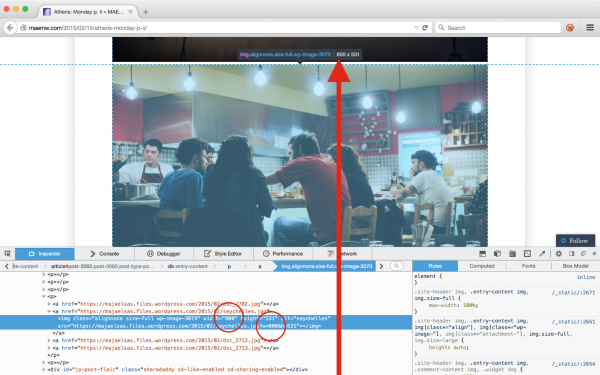
This view is from Firefox 35 on a Mac at a browser width of 1280 (fairly common) using the built-in web inspector to see the image width both in the page source as well as the calculated number.
How are you determining that the images are showing at 799px on your side?
-
How are you determining that the images are showing at 799px on your side?
Nevermind that last request. :) I see your screenshot now. It looks like you are hand-dragging some tool over the top of the image to see the size. I think it’s inaccurate. :) Can you try looking at the page source? I think it’s more correct.


- The topic ‘Align comment section and image size’ is closed to new replies.
 WordPress.com Forums

