aligning a set of photos
-
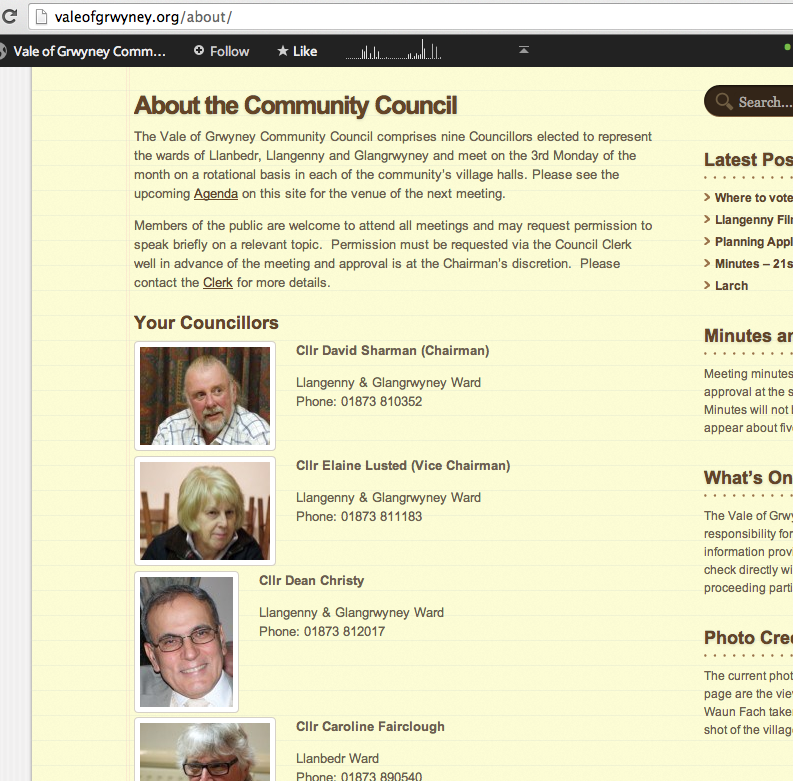
Every time I edit one of my pages the photos go out of line and appear on screen set in a diagonal line with the text not always lined up. The page features a set of 8 mugshots of a committee which I want to keep in order and aligned to the left of their respective names. . By adding extra spaces on the Edit page I can get it to work, but as soon as I revert to the Edit page it all goes wrong again. All the pictures are set as Align Left
The blog I need help with is: (visible only to logged in users)
-
Hi there! I think you mean your community council page, yes? It looks correct when I view the page: https://i.cloudup.com/TLO1Ka19Nq.png
Did you figure it out in the meantime, or are you seeing something different?
-
Thanks. Yes it’s OK on screen, but only because I have to re-align every picture and caption each time I make a change on the Edit page by putting in extra spaces, which disappear every time one moves from the Edit screen. I think there must be something in the way I have set up the pics that is making it do that, but can’t work out what. Each photo is Aligned Left and all approx the same size.
-
Since the live page looks fine, I can’t really tell what’s going on with it when you have the issue. Can you create a draft page that has the same content, edit it so it shows the problem, and save it (don’t publish)? Let me know when this is ready and then I can go in and take a look at what’s happening.
-
Bizarrely when I copied and pasted to a draft page it came out with a different problem. I think I’ll go back to scratch and re-do the page to see if that makes any difference. Keep watching this space!
-
Hi
I see that it has gone all diagonal on me again. I tried copying and pasting to a new post but it didn’t replicate the problem (just threw up a different one!) and I tried clearing the photos and names and re inserting from scratch, but it keeps reverting to what you should be able to see now. Ian
-
I’d like to assist you with this issue.
Could you please link me to a post where you are experiencing this issue, so I can take a look?
-
Hello Jackie
It’s this post that’s the problem. http://valeofgrwyney.org/about/ I can make it look right but everytime I go back to the page to make any additions or changes it reverts to this format. The pictures should all be aligned left with their test to the right of the mugshots.
Ian
-
That weird alignment is happening because HTML strips out extra returns/line breaks, so the next image is following the text of your previous image.
To fix this without custom CSS, you’ll have to spoof the browser into thinking there’s something there. It’s a little hacky, but this worked for me.
Make sure the text for each image is represented in 3 lines, so the spacing is the same (name, ward and telephone each on their own line). Then try adding the following before each < h4 > tag in the Text editor, adding it twice before the entry for Fairclough:
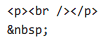
(Sorry, the forums kept eating part of the HTML code)
If you want a better solution, you might purchase the Custom Design upgrade and then post for some CSS workarounds in the CSS Customization forum, https://en.forums.wordpress.com/forum/css-customization
-
Thanks Jackie
Working from the e-mail notification I only got half of the HTML and so I was a bit confused for a while. Then I checked out the link above and it works. Whew!! Thanks very much
Ian
-
-
Hi again
It worked perfectly yesterday, but when I went back to the page to make an change to the text above the pics I noticed that the new code had disappeared and I had to add it back in to get the alignment again. Why doesn’t the code stay saved?
-
What I posted was a pretty hacky workaround. Your best bet is to use custom CSS for your images, or at the very least, modify the layout with HTML tables (which isn’t particularly user-friendly) or span tags.
-
-
Here’s a tutorial you could try:
http://www.htmlgoodies.com/tutorials/tables/article.php/3479851Sorry I don’t have any other quick fixes for you. HTML is alternately a godsend and a pain in the neck. :)
-
Thanks but I nicked the code off another website I run, which is all in HTML
Thanks for your help, I think this is resolved now.
Ian
-


- The topic ‘aligning a set of photos’ is closed to new replies.
 WordPress.com Forums