

Alinear shortcode youtube a derecha y texto a su izquierda
-
En un post. ¿como puedo alinear el shortcode de vídeo youtube a la derecha para que quede el texto a su izquierda?. El vídeo siempre ocupa el 100% de su fila y lo he intentado también con Table y 2 columnas pero la primera columna con texto baja una fila.
Mi web es laventaperfecta.comThe blog I need help with is: (visible only to logged in users)
-
Hi Francisco,
I have translated your message via Google Translate:
[In a post. How I can align the shortcode youtube video on the right so that it is the text on the left?. The video always uses 100% of its row and I’ve also tried with Table and 2 columns but the first column with text down one row.
My website is laventaperfecta.com]—
You can align right the Youtube video shortcode by going into the Text Editor. Add this to your editor:
<div style="float:right;margin-right:22px;" data-mce-style="float: right; margin-right: 22px;">ADD YOUTUBE SHORTCODE HERE</div>So it should look something like this:
<div style="float:right;margin-right:22px;" data-mce-style="float: right; margin-right: 22px;">[youtube=http://www.youtube.com/watch?v=HGB3C5GL6Kg&w=180&h=110&]</div>When you add this in between your text like this:
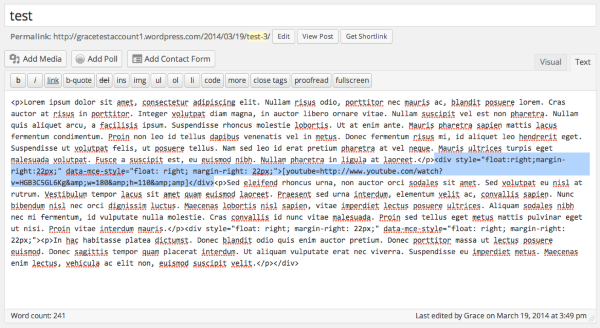
It will look like this:
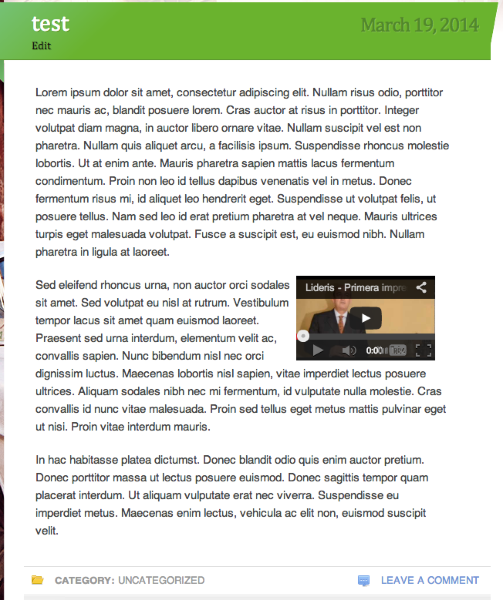
Hope this helps! Feel free to reach out if you have any questions!


- The topic ‘Alinear shortcode youtube a derecha y texto a su izquierda’ is closed to new replies.


 WordPress.com Forums