

Alphabetizing links
-
Is there a way to alphabetize a set of links within a category? I use my page with elementary students and it would be great if the links were in ABC order.
The blog I need help with is: (visible only to logged in users)
-
Hi!
It looks like one of your Links widgets (the top one) is already setup to display links alphabetically. You’ll just want to delete the bottom (duplicate) one by clicking the Delete link on the expanding widget as shown here:
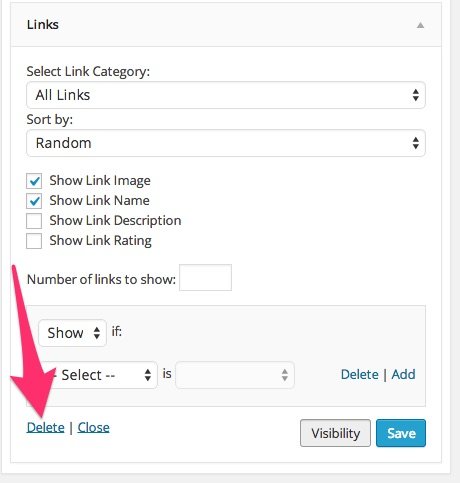
That can be done from your Widgets page here:
-
Thanks!
i see that the grade levels are alphabetized but within each class they seem to move about and are not in the same order from visit to visit. This can be very confusing for kids under 10 (and their teachers!).
Any ideas?Susan
-
Hi Susan!
I noticed you still had the double link widgets in their so I went ahead and removed the “random” one and left the alphabetical one intact.
I’m afraid the only way to arrange the link categories is alphabetical. So, in order to setup the alphabetical category listing, you would need to change your category names by placing an “A” or “B” in front of them like this:
A) Pre-K
B) Kindergarten
C) Grades 1-3
That’s the only way to achieve the alphabetical category listing.


- The topic ‘Alphabetizing links’ is closed to new replies.
 WordPress.com Forums