

Ampersand Theme Blog page Image Width not large enough
-
I could have sworn at one point my blog pages were showing large images of my work but now they only show at medium size. I don’t know if I did something wrong or if I’m just remembering wrong, but I’m not happy that I can’t display my blog post art larger.
I tried changing the width by setting the page as “Full Width” (one column no sidebar) but it wouldn’t take and I got some weird results when I previewed it (the art of the home page showing at the top). I would prefer to have the sidebar on the blog page but I really need my images to be at least “Large” size.
I also tried using the featured image but it too is only about 500 across. Meanwhile there’s a big chunk of screen real estate not being used to the left of the blog post.
Is there a way to make the images larger–at least 700 across but preferably 900 or did something go wrong with my theme?
The blog I need help with is: (visible only to logged in users)
-
FYI I also posted this in the Ampersand theme forum but if this is something that CSS upgrade could fix, I will buy CSS and would appreciate knowing the code to use.
-
Hi Jana,
It looks like you’re currently being helped by the theme author here:
http://premium-themes.forums.wordpress.com/topic/blog-post-images-too-small?replies=6
To clarify, the theme does offer full-width page templates. However, that feature isn’t available for your blog page, which I believe is the page you referring to:
The blog archive page will automatically have a sidebar. However, the full width page layout is available on other pages as showcased by your page here:
http://janasjournal.com/how-to-buy/
The theme author looks like he’s willing to provide the necessary CSS to widen the column in the thread linked above. Since he’s the expert on the theme, I’m going to let him provide the CSS. However, if you have any additional questions with the theme, please let me know!
-
Thank you. I’ve purchased the upgrade. Meanwhile, do you know how to turn off comments on Attachment pages? I can’t find a setting for it.
Thanks!
Jana -
Hi Jana,
Great! It looks like the theme author is going to provide the CSS so that should be taken care of pretty quickly. Regarding the comments on attachment pages, if you navigate to the “Edit Media” page for an image (Media -> Library -> Edit ), there should be an option for Allow/Disallow Comments as shown here:
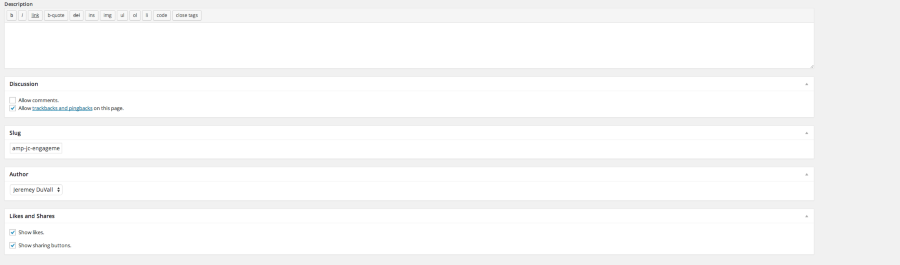
That should remove the comment box. Can you give that a try?
-
I didn’t have those options on my attachment page edit screen but then I noticed at the top “Screen Options” and remembered reading about that before. I clicked it and checked “comments” and that displayed the comments option on my attachment page and then I was able to turn off comments there. You might want to add this note to the other thread about comments on attachment pages that you closed so that others might find the reminder to use the Screen Options menu if they don’t see the Comments setting option.
-
Ah! Great point Jana. The Discussion Settings are often hidden behind the Screen Options tab. I’ll make a note of that in the other thread. I’m glad you were able to get this resolved!


- The topic ‘Ampersand Theme Blog page Image Width not large enough’ is closed to new replies.
 WordPress.com Forums