

Animation over Project images not visible on iPhone
-
Hello,
I have created my site and when I view it on my mobile (iPhone 6), the animation over the images under Projects isn’t working properly. No text appears when my finger touches the image. The text is visible on my iPad and computer.
How do I fix this?
The blog I need help with is: (visible only to logged in users)
-
Hello there!
I took a look at your site on an iPhone 6 and an iPhone 5. I am able to see the down arrow on your header that kicks off the animated entry into the site.
Do you not see the white arrow on your phone? If you do, what happens when you click the arrow?
Could you confirm you have the most updated version of both your iOS and your browser?
Looking forward to hearing from you. Thanks very much.
-
Yes, I do see the arrow on my mobile phone. That is working fine.
Unfortunately, that is not what I was referring to. I apologize for the lack of clarity.
The issue is with the area that you call “Projects,” which I have named “Foundations” on my site. When you hover the cursor over the image on a computer, or a finger on an iPad, some text appears. In the case of the first image under “Foundations,” the text “How We Got Here” appear in white font in a white box.
The problem is that no such text appears on my iPhone.
How do I remedy this issue?
-
Whoops. I’m sorry. The text over the first image says “Where We Are.” “How We Got Here” is over the second image. This text does not appear on my iPhone when my finger hovers over the images.
Thank you for your prompt reply.
-
HI again, Michelle!
Thanks for the further explanation. We’ve checked the hover function on the iPhone 6, iPhone 5, and the Nexus5 running Lollipop. I believe we’re all seeing what you hoped:
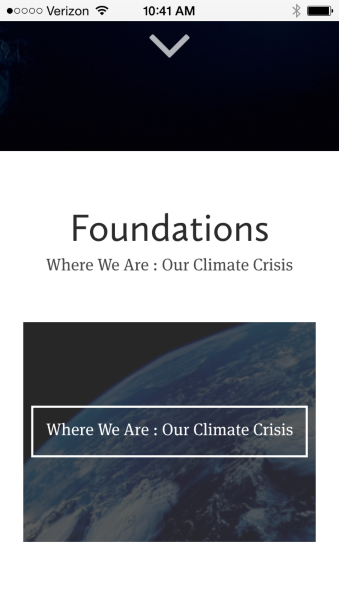
The image above is an iPhone 6 screenshot. We haven’t been able to recreate the problem you’re having.
Could you please send me your own screenshot? If you need a bit of guidance, here’s some info about taking screenshots. Just upload the image to your media library, and let me know when there’s something I should look at:
Also, please tell me the browser you’re using.
Could you confirm that your iOS is up to date, as well as your browser?


- The topic ‘Animation over Project images not visible on iPhone’ is closed to new replies.


 WordPress.com Forums