

Anyone else having problems with the New Notifications Layout
-
BTW, I see it now also shows an arrow next to comments to which I’ve replied. My thanks to whichever developer was responsible for adding that feature back.
-
Seems like there’s still some weirdness with the reply box in Firefox. I was testing previously in Chrome and Safari. Will head back to the drawing board! :)
BTW, I see it now also shows an arrow next to comments to which I’ve replied. My thanks to whichever developer was responsible for adding that feature back
Glad you like it!
-
It’s been incredibly laggy recently. I’ll go to reply to a comment and the upload time is so much longer than it used to be. It may not be, but with the icon showing time it definitely feels a lot longer.
-
Yes…. terribly laggy! Plus it has been telling me I have no activity “need some inspiration?).
-
To clarify “laggy,” is this just for replying or loading comments as well? Also, @jrosenberry1, could you clarify where you’re seeing the “Need some inspiration?” text?
-
It is laggy loading. It is laggy replying. Well, that was two days ago. As of today there’s no lag and no comments either.
The “need some inspiration” text is INSIDE the newly-notifications-free area. As in, where it used to say, “fellow blogger liked your post” it has a huge blank area – except for one sentence. “No new activity” and a link for “inspiration” that leads to freshly pressed.
Please don’t tell me to reload, reboot, update, clean cache, or anything else. Already been done.
It isn’t my computer. WordPress notifications are the ONLY place online where I have these issues.
It appears to be a perpetual WordPress problem.
No need to respond. I don’t expect useful responses anymore. Just – if you can – add my tally mark to the “unhappy” column on the bulletin boeard in the programmers’ lounge.
-
Just give us the option of using the older entire, workable, user-friendly, bug-free editing interface. One easily accessible button for “classic mode” and all the problems with disappear. What is wrong with that suggestion? Why must computer users adapt to using editing tools modified for smart phone users?
-
For what it’s worth, the notifications bar doesn’t even work well on my smartphone (droid razr)!! Keeps crashing all the time. (Don’t worry — has been reported via the razr reporting system.)
But yes. What’s wrong with keeping the PC people happy and allowing us that option?!?!?
For what it’s worth — I’ve spent big money on two blogs here at WP. I may not renew when renewal time comes around. I have, indeed, started a blog at Blogger to get the feel for it. So don’t consider my general unhappiness just another frustrated person “spouting off”. You stand to lose paying customers — not just the “free” customers you so obviously don’t find valuable.
Give us the option to skip the new notifications bar, please. Just give us the old system and keep it working regularly. Is that too much to ask?!?
-
There is no point at all, in keeping the old Notifications, and its icon, from use with the WP-Admin page. Then develop the New Notifications for use with the new UI.
Workaround – Bookmark the Notifications Archive.
https://wordpress.com/notifications
Its already being used and those who have tried it have found it preferable.
-
@jeremylduvall – I’m experiencing lag across the board. If I receive an influx of comments it takes that notification bar a few minutes to catch up. If I try and respond through it it takes it more than 10 seconds to upload.
I’m also experiencing lag is I’m forced into the new stats page or the bee post page (the incredibly condescending “beep beep boop” page.) Every time I’m offered to take that survey of why do you choose this page it’s because of speed. Somehow the new UI is so much slower. I haven’t even tried it on my phone as it wouldn’t load properly outside of the iOS app, which is still using the old systems.
-
Thanks for the reports on the lag everyone (include @geoffwhaley with stats and new editor). I’m not sure what the issue is here. The comments are uploading right away on my side. I’ll keep digging!
-
Hi Everyone!
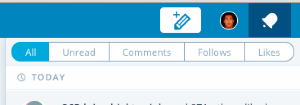
I just wanted to let everyone know that we’ve launched filters within the notifications tab. You should be able to filter by Unread, Comments, Likes, Follows, or All. Let us know what you think!
-
@jeremeylduvall
I noticed it earlier today. I especially like the ability to filter by Unread messages. Thanks. -
Jeremy – that is great to have the filters; thanks for letting us know. I can see the filters when I access WP via a browser, but not via the WP app. Is that correct?
-
-
/scratches head
So the filters only show up when in the Reader section of the New Dash but not when on other pages like My Sites?
If I log out and do the cookie dance any more than I already am it will be yesterday.
-
-
-
Thanks @fredcheng-Log out, cookies danced and a computer restart and it now works as advertised. :)


- The topic ‘Anyone else having problems with the New Notifications Layout’ is closed to new replies.
 WordPress.com Forums