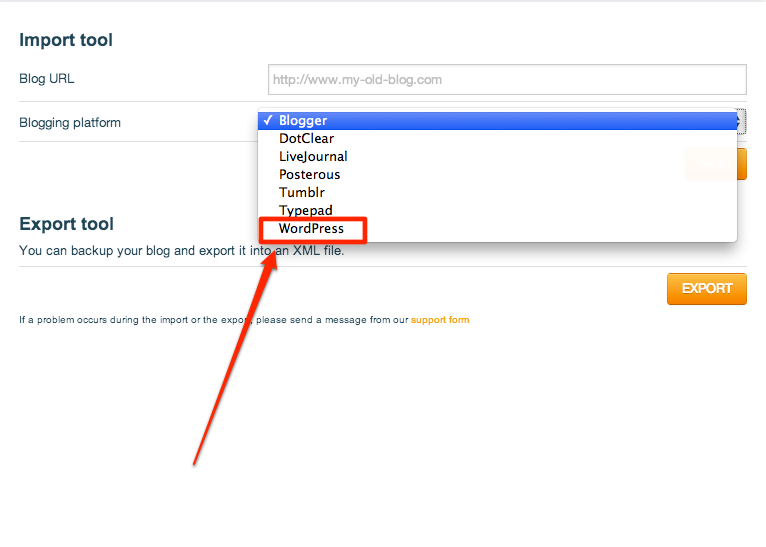
Anyone experiencing problems with importing blog via an .xml file to WordPress?
-
I’m trying to import my blog from Over-blog. I exported my blog in a form of an .xml file as that is the format Blogger exports in. Once I upload the file, it says “Your file has been successfully uploaded. We will begin processing your import right away.” However, there is no ETA or any progress I can view in WordPress.
Can anyone shed light on this issue? I need to know if I have done it correctly. If not, how can I import my Over-blog blog into WordPress. Any help would be appreciated. Thanks.
The blog I need help with is: (visible only to logged in users)
-
Which importer tool did you use to import into your WordPress.com blog?
You might try the WordPress-specific tool, as that should work for .xml export files from services we don’t explicitly list in the importer area of your Dashboard.
Please let me know if that works for you. If not, please let me know how large your export file is, and if you have one or multiple .xml files to import.
-
Hi Jackiedana!
Thank you so much for getting back to me!
So in Over-blog, I created a .xml file that is supposedly used to import into Blogger. I’m also having problems with importing the blog back into Blogger so I’m thinking there may be problems with the .xml file?
Sorry to sound so WordPress un-savvy, but I’m a little unclear on what the Word-press specific tool or where I can find it? Could you point me in the right direction please?
My export file is 3.5mb. Please let me know if you need anymore info. Thanks!
-
Let’s see if we can sort this out for you. :)
In order to import into WordPress.com, you go to your Dashboard and navigate to Tools > Import. From there, you get a list of different importer tools to choose from. One is Blogger, for example. There is an option to choose “WordPress” in that list – that is our importer tool for other WordPress sites, but it also functions as a generic importer for other files in the .xml format.
If you didn’t already try that, you might give it a whirl and see what happens. If you are still unable to import the file, I’d be happy to step in and help. In that case, could you upload the export file you have to a file sharing service like Dropbox so I could download it and try it on my end?
-
Hi Jackiedana,
I did everything you listed in your last reply & still no luck. It came up with the message “Sorry, there has been an error. This does not appear to be a WXR file, missing/invalid WXR version number.”
If you would be able to intervene, that would be great! I have placed the file into my Dropbox. What info do you need for me to access this file?
– Roxanne
-
Here’s the link:
[redacted]
Please let me know if it doesn’t work or you require more info!
Thank you, Jackiedana!
-
@roxannemedel could you please upload the actual export file, not the contents of the file, to Dropbox? I could likely use the content of the file you’ve posted, but that introduces the potential for errors, so I’d rather download the actual .zip folder or .xml file itself.
I’ve also removed the link to your previous upload so it is not publicly viewable.
-
Hi Jackiedana,
I’ve emailed you the link. Please let me know if you haven’t received it or if you need more info from me.
Thanks.
-
I’m having trouble with your import.
I exported my blog in a form of an .xml file as that is the format Blogger exports in.
While a Blogger export file should work, it’s not working in this case.
It looks like Overblog allows for a WordPress-specific export:
https://i.cloudup.com/P9jdu4hGZ7.jpgCould you please try to create a WordPress export file and try importing it again? If it still doesn’t work, please let me know.
-
My mistake, that was only for imports.
It looks like there is only a single export file option.
-


- The topic ‘Anyone experiencing problems with importing blog via an .xml file to WordPress?’ is closed to new replies.


 WordPress.com Forums