

Apostrophe Theme, Featured Content Not Available
-
I’m working on customizing the Apostrophe Theme, specifically trying to mark a post as “Featured Content”. The documentation says, “…configure the Featured Content module from Appearance → Customize → Featured Content. From there, you’ll be able to select a tag for all your featured posts.” However, there is no ‘Featured Content’ item in my customization panel. I downloaded today the template June 23rd.
The URL of my blog is http://www.soloenvenezuela.net
Thanks for your help.
The blog I need help with is: (visible only to logged in users)
-
Actually, in your case I see that you’re already running Jetpack, so I’m going to do some testing and get back to you.
-
I just tested Apostrophe with Jetpack and I’m seeing the Featured Content area in the Customizer as expected – here’s what it should look like:
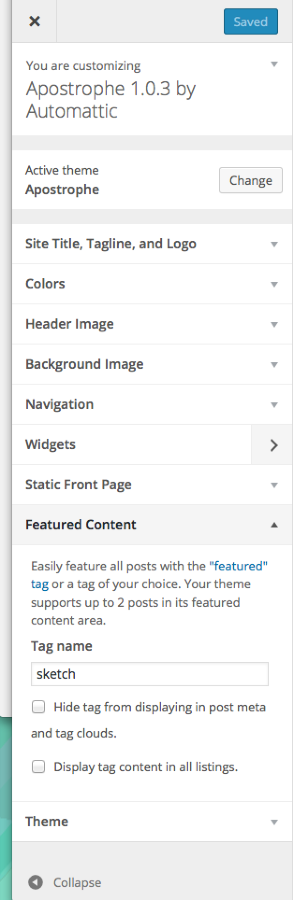
Could you please double-check that Jetpack is active when you look in your Customizer and let me know if you see it?
-
-
I think you’ll need to contact Jetpack support to figure out why the Featured Content module isn’t activating:
http://jetpack.me/contact-support/
They should be able to get you sorted out.
-
I already activated the featured posts, but the size of the images are wrong. How can i modify it ?
-
OK, I’m a bit confused, because you said you weren’t seeing the Featured Content module in the Customizer. Looks like you got that working now.
If you need help with further modifications to the theme, please post in the WordPress.org forums. These forums are for folks hosted on WordPress.com, but you’re running the WordPress software on your own hosting.
You’ll need a free WordPress.org account to post – if you don’t already have one, you can register here:
https://wordpress.org/support/register.php
Since Apostrophe isn’t in the WordPress.org theme directory, be sure you add this tag to the tags area of the post:
wpcom-theme
-


- The topic ‘Apostrophe Theme, Featured Content Not Available’ is closed to new replies.
 WordPress.com Forums