

appearance
-
How can I change the image that WordPress chooses to post with my blog when I publish it?
It randomly selects a picture from my post and puts it up there.
Thanks!Patty Benjamin
The blog I need help with is: (visible only to logged in users)
-
Hi Patty!
The easiest way to do that is to set a featured image for your post. Unfortunately, your current theme Koi does not support featured images.
Images published to social networks follow the priority listed here:
http://en.support.wordpress.com/publicize/#images-in-publicize
So, provided you’ve entered an image that is at least 200×200 (I would suggest going a bit bigger just to be on the safe side), it should pick the first image within your post. Can you give that a try?
-
Hmmm…well that may explain why it always chooses the video I put in my blog. I guess that my problem is that I don’t want the video to come up.
Ok so do I need to make the picture that I want wordpress to post the largest picture? I usually use my iPhone to take pictures, which will probably change, but do I just adjust the size of the picture before I save it?
I appreciate your help, I don’t know how to do much of anything!!
-
Hmmm…well that may explain why it always chooses the video I put in my blog. I guess that my problem is that I don’t want the video to come up.
Ok so do I need to make the picture that I want wordpress to post the largest picture? I usually use my iPhone to take pictures, which will probably change, but do I just adjust the size of the picture before I save it?
I appreciate your help, I don’t know how to do much of anything!!
-
Hi!
Video posts can be a bit tricky because Facebook scans the post and tries to determine the best way to display it. So, if you have very little content and a video within a post, Facebook will read that as a video post and display it similar to this:
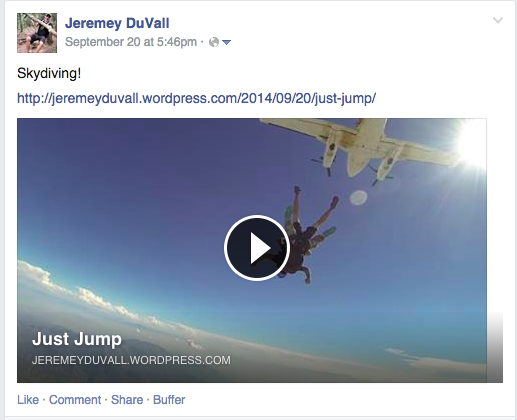
In that post, I even had a gallery of images, but it elected to display the video.
If you have some content alongside your video and large (larger than 200×200) images within the post, it should display it as an article with an image similar to this:
https://cloudup.com/cHCUVd4efxo (that post has a video at the end of it)
For your next post, can you try inserting an image near the top of the post that’s around 500×500 or so just to be safe? Pictures you take with your iPhone should definitely be that large!


- The topic ‘appearance’ is closed to new replies.
 WordPress.com Forums