

Appearance
-
Why does the name of my page appear on the content of the page?
The blog I need help with is: (visible only to logged in users)
-
To understand how the theme you used is designed please see:
detailed theme description http://theme.wordpress.com/themes/bushwick/
live demo site https://bushwickdemo.wordpress.com/ -
Thank you for your quick response! I somehow do not think it is the actual theme as I had the same problem when I used the Responsive theme in an online Internet Marketing course recently. Is there a setting under customizing the appearance or could it be because I am on the free version of WordPress?
-
Do you mean that each Page has a title in accord with what you gave it?
Example: https://alfredmielacherauthor.wordpress.com/about-the-author/
Page Title: About the AuthorIf that is what you mean, there is a workaround found you can use to remove page titles http://wpbtips.wordpress.com/2011/12/19/custom-menus/ scroll down to
Other options, special cases and tricks
f. Tabs for static pages but no page titles on the actual pages -
No, I don’t think that’s it. Did you have a look at my site? For example on the home page, there is HOME above the image. Something is definitely wrong in my settings
-
Hi Anne – are you referring to the words I’ve highlighted in this screenshot of your theme, currently running Bushwick?
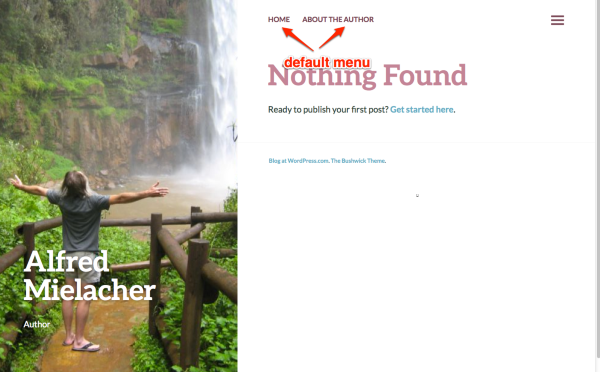
Those are coming from your custom menu, which you’ve set up under Appearance > Menus.
If you use the default menu instead of setting up a custom menu as you have, the “Home” link is displayed at the top left instead, as you can see on the demo: https://bushwickdemo.wordpress.com/
Let me know if this helps solve the mystery. Thanks!
-
Hi Kathryn
Thanks for your help! I see I have another problem in that my URL does not go to the home page… If you click on the Home tab, you will see what I am referring to. Any suggestions? -
@annecoetzee
Is this the blog in question? https://annecoblog.wordpress.com/
Or is it this one http://alfredmielacherauthor.wordpress.com/ ? -
http://alfredmielacherauthor.wordpress.com/
I think I messed up the landing page when I changed themes. How can I direct the URL to the home page? This is in addition to the page name appearing in my content… As you can see I am a bit of a rookie… -
How can I direct the URL to the home page?
You’ll need to set your Home page as the front page under Settings > Reading.
There’s a full guide on how to do that here:
http://en.support.wordpress.com/pages/front-page/If you’re also going to have a blog, follow the instructions on how to create a separate blog page.
Once you set up that part, your menu link should go to the right place.
Let me know how it goes!
-
Thanks, Kathryn. That’s sorted that out. Now can you help me get rid of Home and About the Author appearing in my content?
-
Now can you help me get rid of Home and About the Author appearing in my content?
I’d be glad to help but I think I need to understand better exactly where you’re referring to “in your content.” :-)
Could you provide a link to a specific page or post and explain where on the page you don’t want those words to appear? Thanks!
-
If you go into my site, https://alfredmielacherauthor.wordpress.com/ you will land on the Home page (thanks to you) and will see Home above my heading and the same thing on the About the Author page.
Thank you so much for your help. Here in South Africa, it is bedtime so Good Night and speak again tomorrow :) -
Ah, you’re referring to the page title! The words that are displayed in that spot are what you enter in the title field in the page, as you can see here:
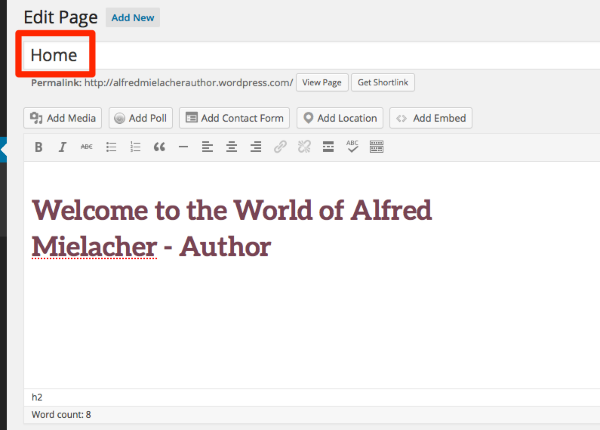
What I can suggest is moving “Welcome to the World of Alfred Mielacher – Author” into the title field, and removing Home.
If you’d like different wording in your custom menu than what you’ve set as your page title, you can always change it in your custom menu’s “Navigation Label” area:
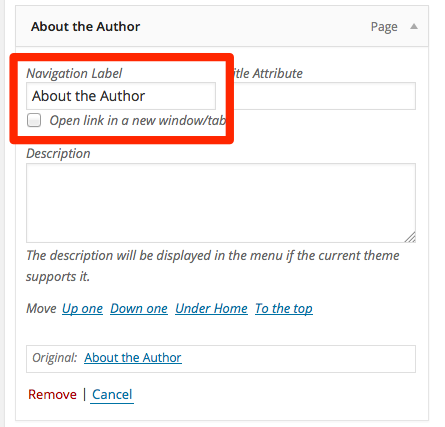
Just let me know if you need further help with it and greetings from Canada to South Africa!
-
Thanks, Kathryn, however I cannot see “Navigation Label” under custom menus in the Bushwick theme so it obviously does not support the changing of the name. I’ll have to figure something else out or change my theme…
(By the way, I was born in Canada! My parents immigrated there, I was born and then they returned to SA when I was 2 1/2 years old) -
Sorry – found it! Timechief also suggested a workaround above. I think I’ll play around a bit more as I also need to make the page title smaller and of course add copy, etc. Thanks for your help. Would you mind if I ask again if I get stuck?
-
The site’s looking good! If you get stuck again you’re welcome to start a new thread or come back here.
(By the way, I was born in Canada! My parents immigrated there, I was born and then they returned to SA when I was 2 1/2 years old)
Very cool!
Good luck finishing up your site – looks like you’re on your way now!


- The topic ‘Appearance’ is closed to new replies.
 WordPress.com Forums