

Appearance of email notifications
-
Please help. We have been working on how the SMORE blog appears in the inbox of our followers. So we have changed some settings and I’m not happy with the appearance in their mail. They do not get the picture and today they didn’t receive notification at all
PLEASE HELP US WITH THIS.
I am traveling and hope you will be able to solve this soon.
thanks!The blog I need help with is: (visible only to logged in users)
-
Hi Gail,
The image files are all in your feed here:
http://smoreforwomenblog.org/feed/
That’s where the automated email to subscribers is generated from. You wouldn’t have control over your subscriber’s email clients and their preference settings in them. Some email clients display images and videos and some don’t. Some email clients can be set up not to display any media files.
As for not receiving the email, sometimes they are delayed. Please let me know if they your followers don’t receive it in the next couple days!
-
I understand about subscribers and their preference settings, but why would they all of a sudden not be receiving them or the photos with them?
I will continue to monitor and let you know if they get them.
Since this has never happened with our blog before, I thought it must have something to do with changes we are making.
One change was to “Set the Featured Image.” -
Hi Gail,
I have added myself as a follower of your blog. I will keep an eye of for your next published post and see if I can view the image.
-
Hi Gail,
After following your blog, I did receive an email about a new published post. I realized that you set it so that your feed only shows a summary of your post and that is why your images are not appearing. Please go to Settings > Reading and next to “For each article in a feed, show” please select “Full Summary”.
-
-
Hi Gail,
I just received notice of your last post and found that everything was working properly! Your images are being displayed as seen in the screenshots below:
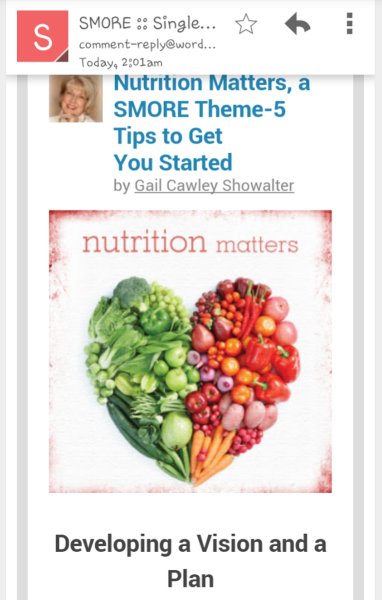
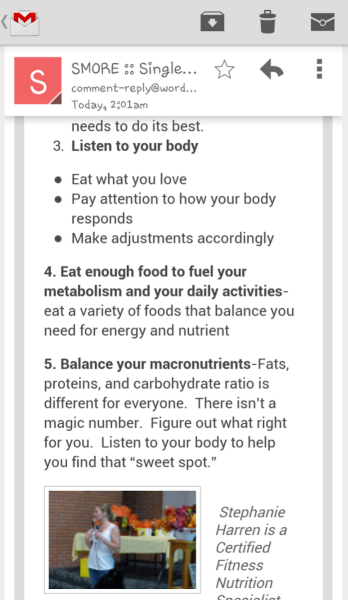
I have now unfollowed your blog!
Happy Blogging!


- The topic ‘Appearance of email notifications’ is closed to new replies.
 WordPress.com Forums