

Appearance suddenly changed?
-
My blog appearance suddenly changed. The pages moved from the left side to the top, and the background is now white instead of showing the image I chose?
The blog I need help with is: (visible only to logged in users)
-
Hi there!
I just visited your site and I see your custom background image and your pages are listed along the left side.
Has everything gone back to the way you set it up?
Let me know if I can help with anything else!
-
Hi there!
Yes, suddenly the formatting went back to normal. I have no idea how. I did notice that my iCalendar events are no longer showing for the “upcoming performances” section, and I don’t understand why? Would love assistance!
Thx!
-
Hmm. Can you check the Feed URL to make sure nothing happened there?
If it’s correct, can you try deleting the widget and recreating it?
-
The url was in there…haven’t touched it. Can you remind me how I get the url for iCalendar?
-
Getting the URL is a little different depending on who you use to manage it. We have some directions for accessing the Google calendar links here:
Let me know if you use a different provider and I can find some directions for you!
-
These directions seem to be for google calendar, and I am using the calendar on my Macbook through Apple?
-
I understand now! In your Calendar application, is the calendar listed under “iCloud” or “On My Mac” or something else?
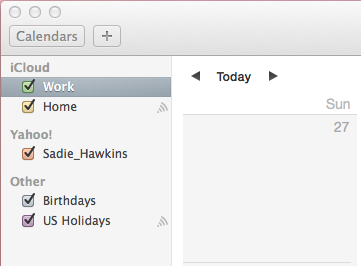
-
-
-
Okay! If you right click on the calendar in your Calendar program, you’ll see ‘Share Calendar.’ Click on that and make sure that your calendar is ‘Public’ or shared with ‘Everyone.’
Depending on what version of Calendar you’re using, either the URL will be displayed at the bottom of the sharing setting box:
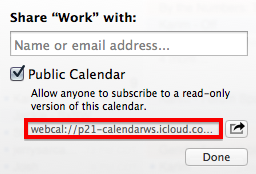
Or there will be an option to ‘Copy URL to Clipboard’ when you right click on the calendar.
Take that URL and put it into your Upcoming Events widget. Let me know if your calendar still isn’t working!
-
Eureka!! It works…and I am saving your email with how to fix it for future reference. Thank you SO much :)
-


- The topic ‘Appearance suddenly changed?’ is closed to new replies.
 WordPress.com Forums