

Archives are only one page deep
-
I was just trying to go through my archives and there is no longer a “next” link at the bottom for me (or visitors) to view older posts. The “Previous” and “Next” links appear on pages for individual posts and it’s not an issue for my homepage because I use infinite scroll. This issue appears on category, tag, and monthly archive pages.
I haven’t made any design changes to my blog in many months, so there’s no potential for interference there. Also, the theme is San Kloud and I did perform some CSS editing on the “Next” link back in spring or summer.
Thank you in advance for any help.
The blog I need help with is: (visible only to logged in users)
-
Thanks for reporting this issue. I’ve let our developers know and we’ll keep you posted here on a fix.
-
-
-
On second glance, there is a new problem now.
Could you try clicking this link?
https://bumblepuppies.wordpress.com/category/random-stuff/
The text “Category Archives: Random Stuff” should be yellow and the body/header text should be an oversize Ubuntu font. When I click through my blog, sometimes I’m getting my custom font selections and sometimes I get the default. (With my design, the default is hard to read.)
-
Hi there –
I looked at this page – https://bumblepuppies.wordpress.com/category/random-stuff/ – and I’m seeing the header in yellow and with the Ubuntu font.
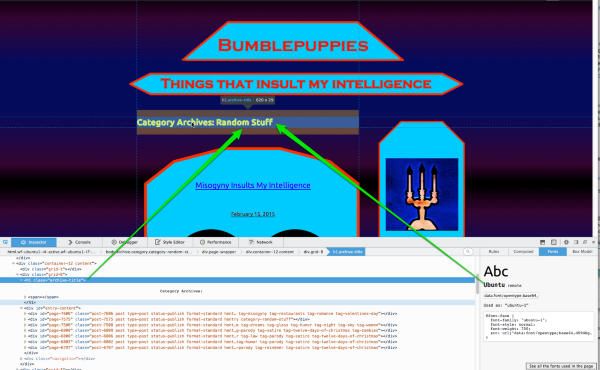
The body text is appearing in Ubuntu as well.
When I click through my blog, sometimes I’m getting my custom font selections and sometimes I get the default.
If you’re on a slower connection it’s possible that it’s taking some time for your site to connect to the Typekit server, which serves up the fonts. I just spot-checked a bunch of pages on your site and the right font showed up on all of them. Is your connection noticeably slow? Could you try it on a different network?
Could you try clearing your browser cache as well? https://en.support.wordpress.com/browser-issues/#clearing-your-browser-cache
-
Define “slower connection.” I don’t view the page load as being noticeably slow but then again I might just be used to something that most people would consider slow. It’s hard to know.
For a different network, I had to use my cell phone. I got the default text. However, I’m assuming that the cell loads slower than the computer I usually use.
As for the cache, I use a browser setting that clears the cache/history/etc. after every use. The joys of being an anonymous blogger…
And, as always, thank you for the help.
-
Could you try temporarily turning off all your browser extensions and restarting it to see if one of them is blocking your ability to connect with the Typekit server that serves up the custom fonts?
Firefox safe mode:
http://support.mozilla.org/en-US/kb/troubleshoot-firefox-issues-using-safe-modeChrome:
http://support.google.com/chrome/bin/answer.py?hl=en&answer=187443Scroll down to the section called “Temporarily disable extensions.”
If you use a different browser and aren’t sure how to turn off extensions/plug-ins/add-ons temporarily, let me know what you use and I’ll try to help.
-
To witness how slow your site loads use this tool http://tools.pingdom.com/fpt/
Take note of what you see in red in that report please and take note of what uploads first and last.Your website is slower than 97% of all tested websites.
These are the ways to reduce page loading time:
1. Edit posts and insert “the more tag” so only excerpts appear on the front page. http://en.support.wordpress.com/splitting-content/more-tag/
Alternatively, you can switch to using a theme that automatically displays front page excerpts. This is a list of active themes on WordPress.com that use the excerpt instead of full post content. Here are the themes that do provide that feature > https://en.forums.wordpress.com/topic/theme-with-automatic-excerpts?replies=13#post-1396410
2. Reduce the number of posts appearing on the front page here > Settings > Reading
Blog pages show at most _ posts3. Reduce the number of images and or media embeds displayed and/or make them all much smaller.
4. Reduce the number of widgets in the sidebar and footer areas.
You may also consider using a responsive width theme like I do. https://theme.wordpress.com/themes/features/responsive-layout/?sort=free Responsive width means the layout adapts depending on the size of the device being used to view your site. When responsive width themes are viewed on mobiles sidebars appear below the posts in order to provide as much space as possible for reading.
If you do switch to using one then disable the mobile theme here > Appearance > Mobile -
-
-
Thank you, both of you.
I started with Kathryn’s suggestion. When running Firefox in safe mode, my homepage loaded with the default font, not with the Ubuntu. I only tried this once, and only the one page.
Moving on to Timethief’s suggestion of Pingdom.
I tried Pingdom 6 hours ago, got surprising results that did not match what she reported, and decided to wait and try again to see what might happen. I ran the test five times in the past hour; two instances replicated her results and two replicated what I got the first time.
For the two instances where I got Timethief’s result, the one area where my site scored conspicuously low was “remove query strings from static resources.” I have no idea what that means.
The other instances loaded markedly faster and had nothing in red. For the three instances that matched, here’s the breakdown of time spent per domain:
0.gravatar.com 30.86%
1.gravatar.com 17.07%
2.gravatar.com 12.81%
s0.wp.com 8.99%
widgets.wp.com 8.67%
other 21.59%60% from gravatar? The only thing I have on my site that would be loading from gravatar are the mini-images next to the like box on each post. When I load my homepage, those are the last things that load. (I do have an image widget using my gravatar, but that is set to load from a wordpress URL.)
Funny thing is, the other instance showed a 7% time spent for linkedin.com and I see no reason for that to show up at all.
For the instances that loaded properly, about 65% of the time was spent on images. For the ones that loaded more slowly than 97% of all sites, I got 20 connection errors, over 50% of load time spent just waiting, and this breakdown:
CSS 39.12%
HTML 32.59%
Script 14.95%
Image 13.34%I’m not sure what to do about this. From the looks of things, it doesn’t seem to be an issue with the quantity of content (images, widgets, etc) that has to load. I might be wrong on that, though.
-
When running Firefox in safe mode, my homepage loaded with the default font, not with the Ubuntu.
That would seem to rule out browser extensions as the culprit, thanks for trying this.
Thanks for the Pingdom results. I don’t think anything there points to a cause for the Typekit fonts not loading on your site so let’s move onto some other advanced troubleshooting techniques – please bear with me as I’m going to ask you to do a couple more specific things. :-)
1. Please test your site in another browser on the same machine, for example, Chrome. Do you see the right font?
2. In the original Firefox browser, right click (or control-click on Mac) on a post title and select “Inspect Element” from the contextual menu, as you see here:
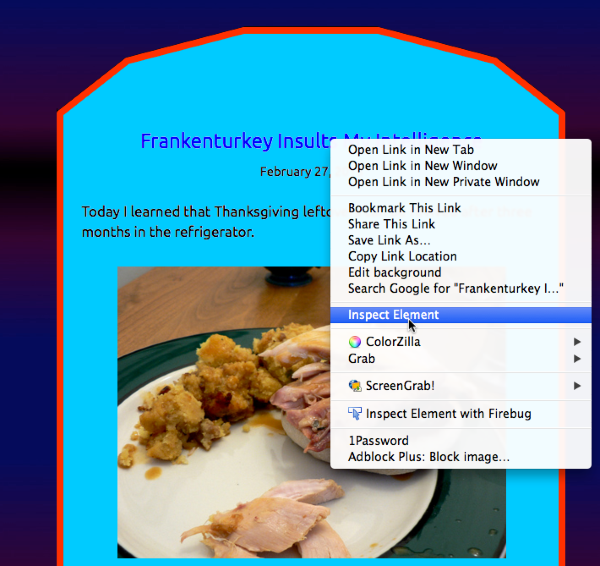
Use the inspector tool to click on the post title, and then click the Fonts tab to see what font is showing there. Here’s a screenshot:
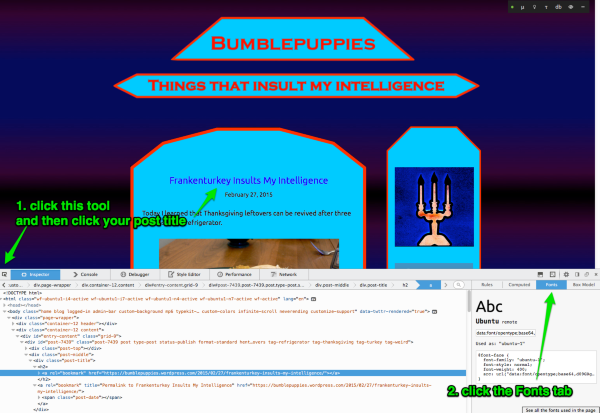
Now, take a screenshot of this entire screen, complete with the inspector showing, and upload it to your media library so I can see it. Here’s a guide on how to make a screenshot:
http://en.support.wordpress.com/make-a-screenshot/Now, close the inspector by clicking the X at the far right at the top of the inspector.
3. Next we’re going to look for JavaScript errors. In your Firefox menu, go to Tools > Web Developer > Web Console. If you see any messages there, please take a screenshot and put it in your media library.
We’ll take it from there, thanks!
-
Thanks for the new troubleshooting tasks. Here are the results:
1- I tested with Safari (also using a private browsing setting, in case that matters) and got the incorrect font.
2- The screenshot is in my media library. When I first tried the site on Firefox again, the font came up correctly. Then, I closed (and reopened) the browser and immediately returned to the site; it came up incorrectly. I did a screenshot of the time when it came up incorrectly.
3- There were no messages at web console.
-
Thanks very much for going through those steps, it’s very helpful to rule out some possible issues.
The screenshot shows the font Kreon loading, which is the backup font specified in the site’s CSS. That kicks in when Ubuntu is not available, as you can see in the site’s stylesheet:
font-family: ubuntu-1,ubuntu-2,"Kreon",Georgia,Times,serifCould you please try resetting your fonts back to the default in the Customizer by clicking the X next to each list of fonts and saving those settings. Then, reselect Ubuntu in both lists and save the Customizer settings again.
-
I did as requested, then closed/reopened Firefox and logged back in.
The font came out as Ubuntu in Firefox. Then I tried in Safari without logging into WP. Safari gave me Kreon. These two loads couldn’t have been more than a minute apart and I only tried once with each browser.
-
I’ve asked one of my colleagues to have a look at this and see if she has any other ideas about why your fonts are loading intermittently. We’ll keep you posted here.
-
We have a couple of further troubleshooting steps for you:
1. Try moving your custom CSS into a plain-text file temporarily to see if one of your styles there is conflicting. Save your empty CSS panel, clear your browser cache, and look at the site again. You could try Chrome – if that’s a browser you haven’t used before – to be sure you’re seeing the site in a “fresh,” uncached state.
2. Are you able to update Firefox to the latest version (36)? It looks like you’re on a fairly old Mac OS, but we did test in Browserstack with FF 33 and Mac 10.6 to try to emulate what you may be seeing – the fonts loaded correctly for us there.
3. Do you happen to have Ubuntu installed on your system? Check your Font Book to see. Try uninstalling the font temporarily. Sometimes there are conflicts when a Typekit font you’re using on a website is also installed on your machine, though this still wouldn’t account for why you also aren’t seeing the fonts on your phone.
4. Try looking at the site on a different machine, in a different location. For example, a friend’s computer using their ISP, or a library computer.
-
Before I try #1, I’d like to ask a question. On the old customizer, it was possible to save all the current blog settings (I think it was called a snapshot) so we could easily reload an old design if something went wrong with any revisions. Does that option still exist somewhere?
I vaguely remember something being really goofy about how I had to enter the CSS when I created this design. It had something to do with when I entered the lines that created the new shapes for text box and sidebar; if I didn’t do it in a certain order, the new images wouldn’t appear, I think. (I don’t mean their order on the CSS entry screen. I mean, in real time, the order certain lines were pasted in.) As you can probably imagine, I’m concerned about not being able to get my design back.
Anyway…
As for #2, the machine is running Firefox version 36.0.1.
For #3, my Font Book does not contain Ubuntu.
For #4, I used my mobile phone. (My blog is supposed to be set up to show the mobile theme, but that’s not what came up. Ubuntu showed on my mobile phone.) Since I’m an anonymous blogger (and intend to stay that way), my options for this are limited.
-


- The topic ‘Archives are only one page deep’ is closed to new replies.
 WordPress.com Forums