

Aside icon
-
One of my blog posts is showing differently on our menu page to all of the others. When I check the “workings” of the post on the manage blogs page, I see that this particular post has an icon next to the post title. The icon displays like a drawing of a page with lines on it. When I hover the mouse over the icon, the word “aside” displays. I’m guessing this may be the reason for the odd display on our page (compared to everything else. Can you advise please how I got it on there, and more importantly, how I get it off? Thanks.
The blog I need help with is: (visible only to logged in users)
-
Hi there,
That would be the icon for the Aside format – were you able to remove that? I went into your site and I couldn’t find that icon on any of your posts.
You can change the format by editing any post and going to the Format module as seen here:
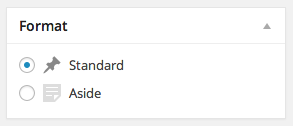
Feel free to reach out if you have any questions!


- The topic ‘Aside icon’ is closed to new replies.
 WordPress.com Forums