

Audio player changed appearance
-
@songsofhope883 – Currently, all of the download links appear to be working correctly now again. Can you let me know if you’re experiencing the same thing on your side?
-
@jeremylduvall
Yes the links are now working. Thank you WordPress. Also when I am on my home page with my posts, I click “older posts” at the bottom of the page, the player now appears on the older posts (it was absent previously). -
-
it’s working now on my site using this method:
[audio URL1,URL2,URL3, etc.]where URL# are the full path and file names of the audio. -
@songsofhope883 – Great to hear. Let me know if you run into any additional trouble!
@everyone – The audio player now supports playlists based on file URLs as Laurie mentioned. So, if you previously had a music player with the format:
[audio file url, file url, etc]
The player should be fully functional now. Please let me know if you experience any additional trouble with the audio playlist!
-
Jeremy,
Thanks a bunch!
What I’m hoping for now is the restoration of the “titles=songtitle1,songtitle2,songtitle3,[etc.]” feature. (Currently in a remote-url playlist, the filenames themselves are shown in the list, which will just confuse my listeners.) The “loop=yes” feature is now working – much thanks!
-
@Jeremy – no, because I must use the remote-url playlist –
[audio url1,url3,url3 {etc.}]I’m just sayin’ that to describe the player as “fully functional” is about 90% true. The player is generally great, but this particular feature is not quite to the point it was before. Formerly, for the remote-url playlist, the track title info was entered as a parameter in the shortcode, and it scrolled past in the progress bar to inform the listener of what he or she was hearing. Now, for remote-url playlists, there is no title info, only filename info. Because of my need to post audio remotely, I can’t yet commit to using it. -
Hey Laurie,
I apologize for misunderstanding! We’re looking into the track title feature. I’ll let you know as soon as I know more!
-
-
-
I’ve just had a new issue arise … without doing anything at all. Suddenly there are quite large chunks of blank space before most of the audio player inserts throughout my blog. There is only one ‘return’ prior to where I inserted the player, no excessively extended margins on nearby pictures, the preceding text is standard and I can’t format the player in any way to reduce/add spacing around it. Any ideas as to why this has suddenly happened, and more importantly, how I can change it/have it changed?
The blog is at alisonearlsaloud.wordpress.com -
@veroverika – You can use the vertical line as Laurie mentioned to control the loop in single audio posts. However, this will not work with audio playlists. Currently, there is not a way to control loops with playlists.
@alisonearIsALOUD – Here’s what I’m seeing on your page “children’s stories”:
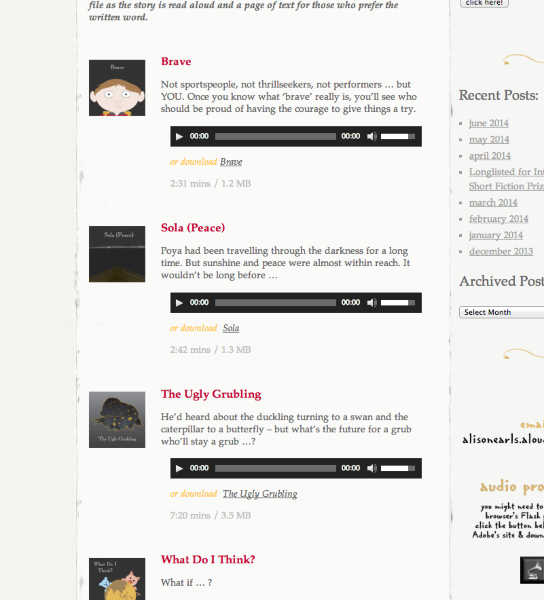
Currently, the spacing looks to be working correctly. Can you point me to a spot on your site where you’re still having trouble?
-
@jeremeylduvall – Thanks so much for checking it out. The page you looked at is actually the only one of the 4 audio heavy pages that doesn’t seem to have been affected. (I’ve actually tried copying the code from it and replacing the audio file and jpg code with others on the other pages but the gaps still remain!). So if you can look at “very short stories”, “short stories” and/or “longer stories”, you should see the problem. I’ve tried changing the margins around the pictures to 0 but the space before the player still exists. Any advice would be GREAT! Thanks.
-
@alisonearlsALOUD – It looks like this is happening because the audio shortcode is set to clear all elements, meaning it doesn’t like being aligned next to other elements. Therefore, it pushes itself down so that it doesn’t have any elements aligning left or right. The reason your “children’s stories” page looks a bit better is because you’ve placed the text above the audio shortcode, which takes up the gap. If you place the text above the shortcode in the other pages, you’ll get something like this:
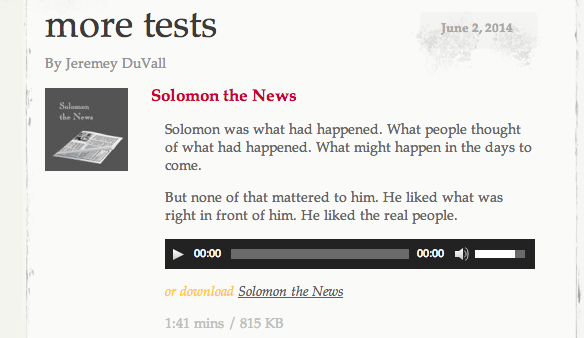
Can you give that a try and let me know if that achieves the look you’re going for?
-
@jeremeylduvall – Thanks for that. The problem is that there are many places that I don’t have enough text to fill that gap OR, as in the ‘very short stories’ test you did, I actually want the audio option to precede the full story in text. This has only just happened recently. Even when the new look audio player came into being, it wasn’t clearing the elements around it. Is there a way to set the audio shortcode so that it doesn’t clear all elements? Because there’s no way I can consistently fill those gaps before it when I’ve got different lengths of text/no text at all before it. If not, I think I’m stuck with gaps because I can’t contrive text content to fill them.
-
Having been away for a few weeks, today I checked with the code of my music playlist page (which I had to take offline because of the many problems) to see if WordPress now has a fully functional audio player again. The result? Nope. There’s been some tinkering, but still no adequate problem-solving. Two main problems stand out especially:
- Instead of showing a tiny player box with efficient “Previous” and “Next” buttons (as used to be the case when using playlists with the Flash player) this new player now dumps a massive list of 73 clickable songs smack in the middle of my page, breaking both the page continuity and the layout with endless boxy lines and an ugly noncompatible font. This simply destroys the overall page setup. If my playlist had 500 songs, would this overrun my page with a near-endless list of 500 titles? Apparently.
- The player still ignores the artist names and song titles as given in the original page audio shortcode. Yes, it now displays the MP3 filenames… but what use is that to whoever tries to see what song is playing? In my case, those filenames happen to be organized by artist, not by song title — so no show.
I feel totally cheated by WordPress. This is like having paid for a Netflix subscription, and then Netflix suddenly starts streaming all movies in black-and-white because their geeks want to experiment with data compression! Where I live, such a thing is called “wanprestatie” and in principle, customers can sue companies over it — when the company does not deliver what the customer may reasonably expect. Obviously I won’t sue WordPress or Automattic; but only because it’s not worth the hassle.
I had hoped for a return of full functionality, one way or another. The continuing of these problems and gross flaws is not just disappointing. It’s unacceptable. I cannot help wondering if the Automattic management people have ever even heard of CRM? Customer Relations Management? I can assure them, allowing experimenting coders to break functionality at the cost of everyday users is not the way to maintain a happy and loyal customer base.
This kind of HTML5 experimenting should have been done beforehand in a proper testing environment, not at our expense.
Well, I can do nothing now but wait another few weeks and see what WordPress comes up with next.
-
-
@alisonearlsALOUD – I replied through private email to the address on file for your account. Please keep all further correspondence regarding this issue there!
@henkvansetten – We definitely appreciate the feedback and have been attempting to bring back as many of the missing functionalities as possible.
Instead of showing a tiny player box with efficient “Previous” and “Next” buttons (as used to be the case when using playlists with the Flash player) this new player now dumps a massive list of 73 clickable songs smack in the middle of my page, breaking both the page continuity and the layout with endless boxy lines and an ugly noncompatible font. This simply destroys the overall page setup. If my playlist had 500 songs, would this overrun my page with a near-endless list of 500 titles? Apparently.
Correct. There isn’t a way to shrink the song list and use a next/previous button to switch between songs. Please note, the font and appearance of the player are fully customizable through CSS.
The player still ignores the artist names and song titles as given in the original page audio shortcode. Yes, it now displays the MP3 filenames… but what use is that to whoever tries to see what song is playing? In my case, those filenames happen to be organized by artist, not by song title — so no show.
In order to get the file name to display appropriately on your “The Music” page, you’ll need to edit the media item. For example, your mp3 for “mp_moon.mp3” can be changed to the song title by changing the title here:
https://stayontop.wordpress.com/wp-admin/post.php?post=3931&action=edit
That change will be reflected in the audio player.
The overall changes to the audio player were made to bring WordPress.com back in sync with the rest of the WordPress project. We currently have no plans to revert back to the previous audio player. If you would like additional functionality with regards to how your audio player looks and functions, there are two main options:
1. You could experiment with CSS customizations through WordPress.com. However, please keep in mind that functionality changes (adding a next/previous button) aren’t possible through CSS. However, you can change the width, colors, clear property, etc.
2. You have the option to moving to a self-hosted WordPress.org install. In that scenario, you would have complete control over how the audio player functions. If necessary, you could even look to extend the functionality with the variety of audio plugins available.


- The topic ‘Audio player changed appearance’ is closed to new replies.
 WordPress.com Forums