Authorship and Google **PAGES**
-
Note: Google plus PAGE. A page is created by your google+ ‘normal’ page
I can’t for the life of me make the google snippet testing tool work with my wordpress.com blog and my Google+ page (https://plus.google.com/+The5krunner/posts)
I have noted Timethief’s comments and others on this thread.
And I have added the X-fn author link to my about page on my blog.
I have connected my G+ profile as per this post .
However here may lie the problem. wordpress CANNOT LINK TO A G+ page only to the G+ account.
This is analogous to the same type of problem that there used to be with Facebook A facebook page can now be linked to and published to BUT ORIGINALLY IT COULD NOT.
I really have spent 10s of hours trying to resolve and research this.
also note: There was an issue with a G+ profile and page not accepting a number (as in the5krunner) but as you can see I have got google to agree to let me do that :-) on my g+ PAGE.
I would appreciate a link to someone who has made a G+ ***PAGE*** work and I will figure it out from there myself unless anyone can spot anything obvious with what I’ve done (but I have checked MANY combinations of settings).
The blog I need help with is: (visible only to logged in users)
-
We need to separate two different issues here:
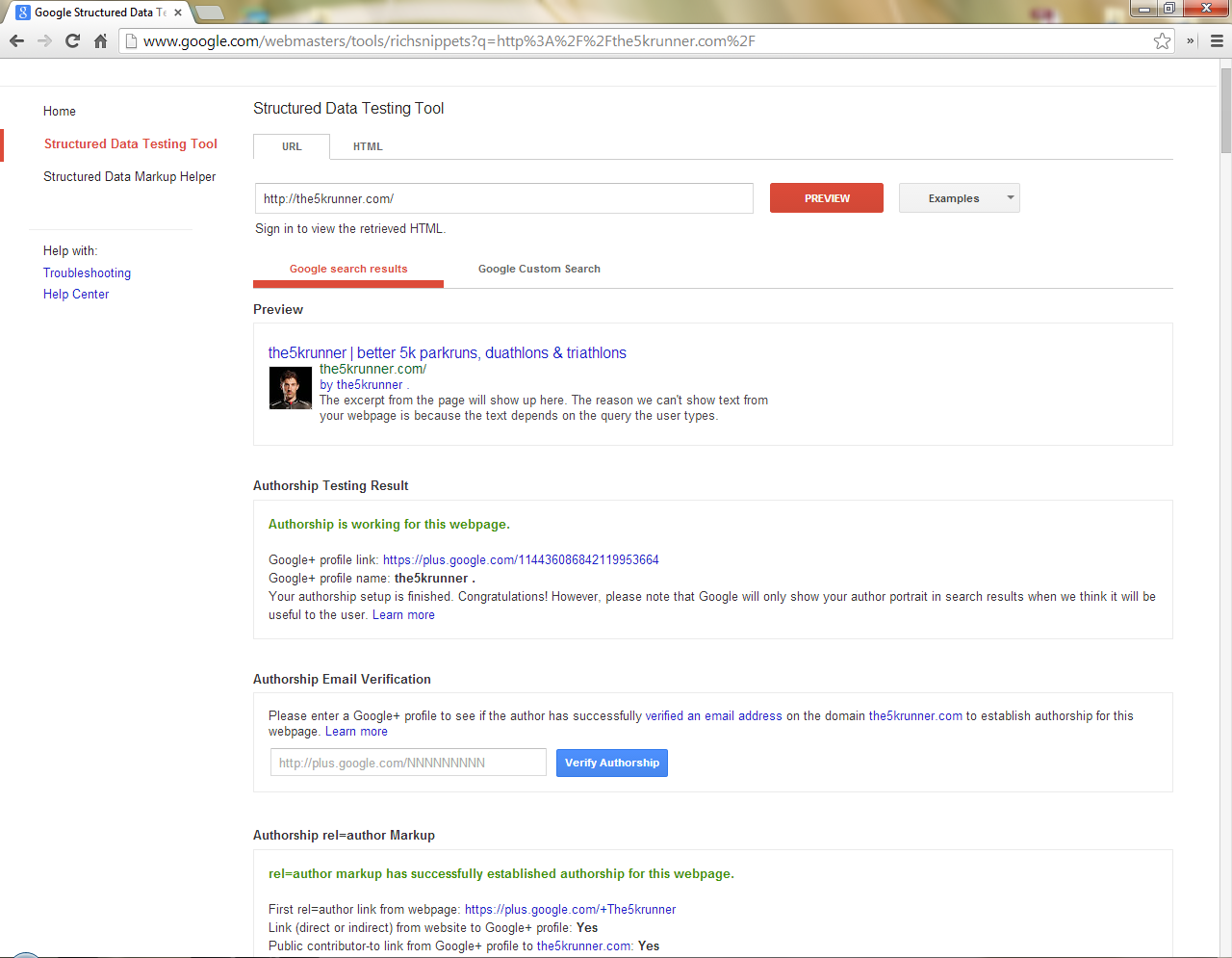
Authorship for your site Is working according to the Google Structured Data Testing Tool. Here is what I see (screenshot). This is a result of connecting your site to your Google+ Profile http://en.support.wordpress.com/google-plus-profile/
Publicizing to a Google+ Page: http://en.blog.wordpress.com/2013/12/11/publicize-google-pages/
I’m also going to point you here to connect up G+ in your sidebar: http://wpcommaven.wordpress.com/2013/09/28/google-plus-connecting-to-pages-and-profiles/ Make absolutely sure that you choose the icon option and copy/paste the resulting code into a text widget exactly as they give it.
If that is not working for you, please let us know.
PS I participated in that forum thread you linked to and there was a lot of confusion there.
-
hi justjennifer, I really appreciate your help thank you for your considered reply.
Commenting on your points as you make them1. the screenshot you provided did not go to the final step: you need to also put the author into the “authorship email verification”. you can use either the G+ number or the +The5krunner text for that on the end of the string. Both pass two of the constraints and fail the third. That is where the problem lies, I think. As I say, I can’t (for the life of me) resolve it after many hours of trying.
2. connect to g+ profile: If I connect to the G+ profile then I think this causes a further problem. +The5krunner is a PAGE not a simple profile. so it is NOT POSSIBLE to connect wordpress to this page…only to the profile that created the page. So I think if I try to do this then it causes problems
3. publicise G+ pages: that is working fine and I don’t think is relevant to the problem.
4. G+ badges in the sidebar: again I don’t think that is relevant. (It looks very nice on the wpcommaven page!!) but I already have the required minimal rel=author code in my right sidebar as I do for rel=publisher( the latter of which works fine)
-
Perhaps this will be more insightful: https://en.forums.wordpress.com/topic/posting-to-google-business-web-site
-
So I’m only interested in getting the AUTHORSHIP working. ***Not*** publicize.
ie its how to resolve the wordpress related errors causing the AUTHORSHIP EMAIL VERIFICATION to fail.
(I actually have pages created by 2 wordpress authors – one linked to the G+ PAGE and the other linked to the G+ normal profile…both have the same fail)
-
OK then, I’m fresh out of ideas how to help you. Perhaps another forum volunteer will be able to suggest something.
-
We have added support to Google+ in Publicize, but the rest of this hasn’t been integrated into WordPress.com directly.
The best I can come up with to assist you is this page:
https://plus.google.com/authorshipVerify you have an email address (such as (email visible only to moderators and staff)) on the same domain as your content. (Don’t have an email address on the same domain? Use this method to link your content to your Google+ profile)
If you have an email address associated with your G+ profile at (email visible only to moderators and staff), you may be able to link up your author profile, so it’s worth checking out.
Option 2, that allows you to do this without an email address on the same domain, requires adding HTML to your site. It’s unclear to me where that HTML would go, but my hunch is that it would go in the header.php file which you do not have access to modifying on WordPress.com.
If this isn’t helpful, I’m afraid I’m out of ideas as well, though perhaps someone with more experience with Google+ authorship may be able to assist you.
-
One important thing to note too is that Google+ sees authorship as a specific personal interaction. The rel=author tag that is added using Authorship is specifically for G+ Profiles. as Google+ see it.
With Google’s snippet tool, you don’t need each area to report back affirmatively. They provide a number of different ways to verify. The end result is https://cloudup.com/c61Zx37TUrF , which is also reflected in the example search result above.
Within your Google+ Page, you can link up your website there. When doing so, they’ll give you a prompt to confirm you own the site with a link to add to your site. It’ll look
<a href="http://plus.google.com/YOUR-PAGE-URL" rel="publisher">Google+</a>. You would need to add that anywhere on your homepage. You can use a custom menu (as long as adding the rel tag), a text widget, a link within the body of your home page, etc.Cheers!
-
thanks Kraftjb
1. yes I think this is it. Authorship CANNOT be for the PAGE just for the individual profile
2. The snippet testing tool (authorship email verification) says:
“Email verification has not established authorship for this webpage.”
and
“Automatically detected author name on webpage: Not Found”to me that is pretty clear that something is not working properly. Yet I have created a new G+ and wordpress user (aka: race leader) user and changed authorship. I’m pretty sure I’ve done the right things. Some of the searches I do where my result shows has other authors AUTHOR images being shown eg search for “sub 20 5k training plan”. Mine can be above or below them in the results and the image never appears. My URL that shows up has very good unique content and LOTS of comments.
so something really is wrong.
3. My understanding is that rel=PUBLISHER can be set to the G+PAGE – I have done that and it appears to be OK.
4. ***FOR OTHER READERS**** My understanding is that google might take the ORIGINAL AUTHOR when the post is first published. So changing the author to one that is not set up properly may not work. Just so you know. And yes I think I have tested my new RACE LEADER user with proper new posts as well.
5. Anyway back to my original question. Can anyone give me an example of correctly setup authorship for a G+ PAGE, where the rel=AUTHOR shows up correctly in searches…thank you!!
-
Howdy,
2. I’m not seeing the second error. In either case, it’s reporting that authorship is working ( https://cloudup.com/czmnCkRg6JE , as it was before in JustT’s screenshot).
4. Google caches results in their search engines, so if the post’s author has changed, that won’t immediately be reflected in Google’s results. They will eventually catch up. The data testing tool pulls fresh data.
5. This isn’t possible. Google+ uses rel=author as a tool to link content written by a person to their Google+ profile and rel=publisher as a tool to acknowledge the entity publishing the site (e.g. page). A few links on the subject:
https://productforums.google.com/forum/#!topic/google-plus-discuss/Q4ulZpDKdvo
http://www.advancessg.com/googles-relpublisher-tag-is-for-all-business-and-brand-websites-not-just-publishers/There isn’t a published-by-Google reference that I’ve found that describes it as clear as the contributor in the first link, though all references to rel=author in Google’s documentation only mention it in context of Google+ individual profiles.
The idea is people author content while businesses publish it.
Cheers!
-
2. you need to paste the g+ userid into the authorship email validation section of the page (ie a further check)
. this does not work for the/any author (as I say above)…in the sense that one of the 3 checks fail.4. Yes google does cache. I have taken that into account in my comments and it is not relevant to this issue.
5. yes. I haven’t found a google reference either. In the first link it is not so clear cut if you read WASAWEB’s comments closely (I actually vaguely think that I did get it working once but then messed around with it, that’s why I’m persevering)
thanks again


- The topic ‘Authorship and Google **PAGES**’ is closed to new replies.
 WordPress.com Forums