

Bachground & header movement
-
As I scroll down the home page of my website, the background moves too. How do I keep it static?
2. As I scroll I would want the header containing the logo & menu to be static on top & not move. How do I achieve that?
I am using the Creative Portfolio theme.
The blog I need help with is: (visible only to logged in users)
-
Hi, give the following a try and see how it works for you. I’ve limited this change to 1025px and wider screens/windows since the menu changes to the touch device menu at 1024px and narrower.
@media screen and (min-width: 1025px) { .site-header { position: fixed; z-index: 1; width: 100%; } #page { position: relative; } .fc-holder { margin-top: 93px; } } -
Hi,
It works perfectly but causes one problem.
It leaves the site header that contains the logo with a white block?
So the menu isn’t visible at the top as the page opens.
How do I correct that?
-
There’s a simpler way to change the background image position using the settings in Appearance > Customize.
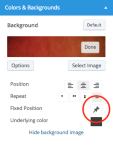
First, remove the CSS example from above. Then, go to Appearance > Customize > Colors & Backgrounds, click on the background bar at the top of that panel, and click the “Options” button that appears at the bottom left. One of the options there is named “Fixed Position.” Click the pin next to that to toggle the background image between being fixed or scrollable.
Here’s what the option looks like:
-
The background is fixed, it’s the header menu that I am referring to.
The CSS code above worked perfectly to make it static throughout the webpage. I scrolls as the page scrolls but its messing up the header as P get a white block as the site header & hence the menu items aren’t visible.
-
Aha, I confused background and header, sorry about that!
I see what you mean about the menu items being white text on a white background if you scroll down while on an individual post such as http://thepicturebar.com/2015/04/07/stanleyrocelyn-wedding-teaser/
One possible workaround could be to add a background color to the menu items. Here is an example that makes the background 25% black and sets a 10% border radius, you would want to add it inside your “min-width: 1025px” media query in the previous example.
.main-navigation > div > ul > li {
        background: rgba(0, 0, 0, 0.25);
        border-radius: 10%;
    }


- The topic ‘Bachground & header movement’ is closed to new replies.
 WordPress.com Forums