

Background Colors
-
I just chose the Oxygen theme and went to change the background color scheme. I have the old upgrade of custom design. When I first started playing around with background colors, the color of the main part of the site, where the content lives was white. As I played around with the colors, it changed the background and the content area to the same color. I can’t seem to make it go back to having the content area white with a background color. Why is this happening? I don’t even see a place where I could change the content color.
The blog I need help with is: (visible only to logged in users)
-
There are two different places to change your background color and they each work a bit differently.
The background color tool in WP admin (accessible from Appearance>Background in the WP admin menu) changes your whole background including the color behind your text.
The other background color tool is in the Customizer (accessible by clicking Customize in your My Sites Dropdown). The tool under “Colors and Backgrounds” here changes your background but leaves your content area color alone.
To get your content area color back to white, change your background color to white in the WP admin view.
Once you’ve done that you can play with background colors in the customizer without changing the background of the content area.
Let me know if any of that is confusing or if you need any help getting everything set up.
-
I can change the color back to white in the WP Admin Background area, however when I go back to Customize and change the colors there and then save the publish, it goes back to having the site background being all one color. Something is off with the coding or something else with my site that I can’t seem to control. for now I will go back to WP Admin background and change back to white, but not sure why my customize tools aren’t working properly. Thanks.
-
The other weird thing is that when I look at it in the customize area, it looks like it should. However once I hit save and publish and then look at the site outside of the customize area, i.e. view site, it looks like trash with the entire thing the same color.
-
When I visit your site now, I see a black background and a white content area. Here’s a screen shot
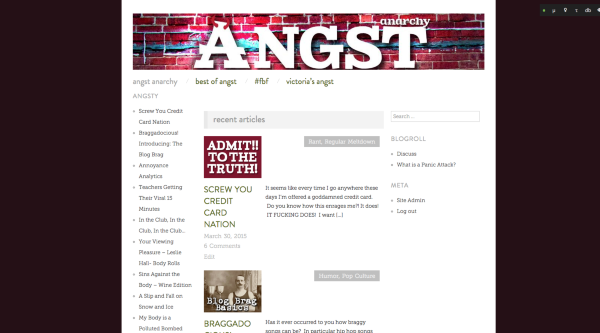
Are you seeing something different?
-
I realize that. It’s because I changed it back to white in the WP Admin background area after making a change in Customize. However, I don’t think I should have to do that after playing with the colors in Customize. I guess I can do that every time, I just didn’t think it was right that playing with the colors in Customize would make the site change to all one color, i.e. the background color chosen in Customize would change the background color choice made in WP Admin Background.
Does that make sense? The work around to fix it is going back to change the color in WP Admin Background after customizing, but I Don’t think it’s supposed to work that way. Whatever color I choose in WP Admin Background should STAY on, no matter what I do with Customize. But it doesn’t. When I change in Customize, it changes everything, including the background of the page. Maybe this is the way it is, but I didn’t think it usually worked this way. Maybe a problem with the theme. I’m not sure.
-
Whatever color I choose in WP Admin Background should STAY on, no matter what I do with Customize.
It actually works the other way. The customizer trumps the WP admin background color. If you set the background color to white like you have now and make all of your future color changes in the Customizer the site will work as expected.
The only time you should mess with the background color in WP admin is if you decide you want your content area to be a color other than white. In that case you would change the background in WP admin to the color you wanted for your content area and then use the customizer to set the color of the actual background.
Hopefully that will save you some frustration.


- The topic ‘Background Colors’ is closed to new replies.


 WordPress.com Forums