

Background Image on Atrium Theme
-
The background image for the Atrium theme isn’t working for us. It will not auto-conform to all screen sizes. We want the same image we have on our own site (http://www.enotes.com/homework-help). It either super stretches, or – when we optimize the image – it has grey bars on the side. Any help is appreciated!
The blog I need help with is: (visible only to logged in users)
-
If you’d like a full-screen image, have you tried uploading a larger original graphic so the stretching is less apparent?
-
Yes, it’s not exactly ‘stretching’ that seems to be the problem… when we upload a very large image it gets all blurry.
-
-
-
-
Ah! Yes. Here’s one of them https://enotes.files.wordpress.com/2015/02/classroom-blurred.jpg
-
Thanks! At 4428px wide, that image is actually much wider than I think would be optimal for using as a background, since only a portion of it will be displayed on all but the most gigantic screens, making it hard to tell what it’s an photo of, especially since the original image is out of focus. I tested this in a couple of different themes, but the result was always the same, which is what’s expected since the way background images work isn’t theme-specific.
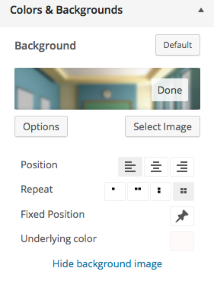
Could you try resizing the image to about half that width and see how it works for you? After uploading, you may need to click Options and adjust the settings to get the best effect:
-
-
-
Ah – sorry. I thought you were giving me access to a sandbox to play around with. I’ll try resizing the image to about half. The only problem is we tried all sorts of image sizes to no avail.
We were trying to emulate this site: http://www.enotes.com/homework-help Which we were obviously able to, but it’s not working for us properly. :(
-
@ sburtonenotes,
@ kathrynwp,Sorry to barge in, but I could help but notice that the 4428 wide image in question is blurred in the example from one website you provide as the model that you are trying to duplicate on another website.
We want the same image we have on our own site (http://www.enotes.com/homework-help).
In fact the image is named “classroom-blurred” on both websites.
Yes, it’s not exactly ‘stretching’ that seems to be the problem… when we upload a very large image it gets all blurry.
If this is true you’ll have to provide another example, because in the given example, “classroom blurred,” the image doesn’t get blurry after uploading, it’s a blurry image file you are starting with.
-
-
We want the image blurred. If you see my original post:
It either super stretches, or – when we optimize the image – it has grey bars on the side. Any help is appreciated!
-
We want the image blurred.
Of course. Sorry.
I ran a couple of tests. The customizer preview does seem to duplicate the stretching you refer to. I don’t know if the following is significant. The full image was uploaded to the media library (in preview), but om the image uploader in the customizer sidebar, while the full width of the image is replicated, only about the top 35% of the image is shown.
-
Another technique you could try to more finely control the way the background image is displayed, is by adding it via CSS, rather than through the Background panel in the Customizer. Here’s some sample CSS you can try:
body {
  background: url(//enotes.files.wordpress.com/2015/02/classroom-blurred.jpg) no-repeat center center fixed;
  -webkit-background-size: cover;
  -moz-background-size: cover;
  -o-background-size: cover;
  background-size: cover;
}
If you go this route, I would still recommend making the original smaller so that more of it is visible on smaller screens.
-
-
-
Can I ask another quick question while I have you? (let me know if I need to make this a new thread).
On the Create/Edit post page, there’s different formats (Standard, Gallery, Image, and Video). How do these differ? I am creating a post with lots of images and I selected Gallery and I don’t see a difference in the post creating or in preview. Thanks!
-
Post formats may be displayed a bit differently in different themes. In the Atrium demo I don’t see a huge difference between them, for example:
Video post format: https://atriumdemo.wordpress.com/2014/09/22/rachel-levit/
Image post format: https://atriumdemo.wordpress.com/2014/09/22/trifle-ceramics/
Standard post format: https://atriumdemo.wordpress.com/2014/09/22/rachel-levit/If you need further help with Atrium specifially, feel free to post in the Atrium forum, where the developers will be glad to help you directly:


- The topic ‘Background Image on Atrium Theme’ is closed to new replies.
 WordPress.com Forums
