

bad visualisation with new mac
-
Hi,
I chose Suburbia theme. This is how it looks on my other (older macs) http://tinyurl.com/suburbiabefore
AND IN THE PERSONALIZE SECTION OF MY DASHBOARDNo problems until I changed my laptop. Now I have a MacBookPro Retina, 15-inch, Late 2013, NVIDIA GeForce GT 750M 2048 MB, OSX 10.9.1
This is how it looks now
http://tinyurl.com/suburbiaafterI tried to change the screen resolution via Control Panel, but nothing changes.
I also tried to empty my cache and cancel cookies, but nothing changes.Ah… by the way: the problem appears in Chrome, Firefox and Safari.
Is there a solution?
The blog I need help with is: (visible only to logged in users)
-
update:
a good technician gave me a good suggestion: it’s probably some problem in your software, a corrupted prefecerence file, perhaps…
try opening a new user on the same machine.
If the problem persists the file in the general Library, if it disappears then the problem is in the User Library.So now: is there anybody who could suggest where I should look and what to do in order to repair or substitute this file?
thanks a lot
-
Hi there,
Unfortunately, I wasn’t able to reproduce this issue on any of my browsers (Google Chrome, Firefox and Safari). I also have a MacBook Pro with Retina display. I found that your site was visible on all my browsers as seen in the screenshot below:
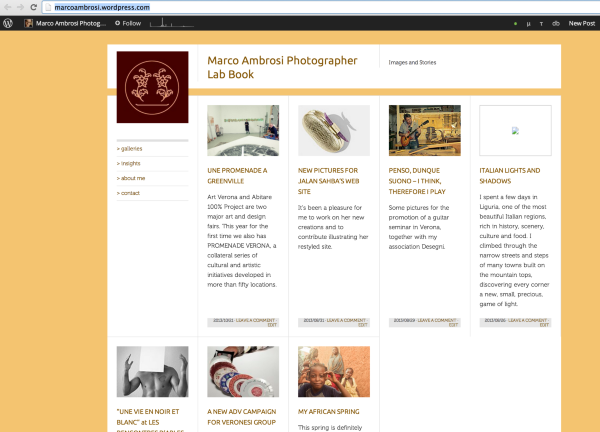
Can you please make sure that your browsers are all updated:
Also please make sure you have third-party cookies enabled. In addition, do you have JavaScript enabled? Please make sure they are both enabled.
If you still find that it is not working, can you try disabling all browser extensions or add-ons temporarily to see if it works? Then we may be able to pinpoint the reason.
Let me know how this works out!


- The topic ‘bad visualisation with new mac’ is closed to new replies.
 WordPress.com Forums