

Baskerville-2 Blog Excerpts
-
I see in the description that the theme supports blog excerpts. The first Baskerville did.
I don’t see the excerpts setting ANYWHERE in the new theme… and now I have full blog posts showing. Can anyone tell me where this is set in Baskerville2?
The blog I need help with is: (visible only to logged in users)
-
Here’s the theme description page link https://wordpress.com/theme/baskerville-2 Scroll down to this:
Content Options
Baskerville 2 supports all Content Options, including the ability to display your choice of full post content or excerpts on the blog and archives. -
It wasn’t there. It was missing.. that was the problem.
I figured it out though… because I opened the code…
UGHif you don’t install JetPack as a plugin into wordpress, it won’t show up.
Install Jetpack, and it all shows up.
-
If you are referring to a site you installed Jetpack plugin into then you are posting to the wrong support forum.
WordPress.COM and WordPress.ORG are completely separate and have different username accounts, logins, features, run different versions of some themes with the same names, and have separate support documentation and separate support forums. Read the differences here http://en.support.wordpress.com/com-vs-org/
Our support docs do not apply to
(1) local installs of wordpress.ORG software on your own server or
(2) wordpress.ORG software installs on paid hosting, and we do not provide support for them at wordpress.COM.
(3) sites linked to wordpress.COM accounts with the Jetpack plugin so they display on the My Sites wordpress.com account page.re: wordpress.org support
The wordpress.ORG support forum is at http://wordpress.org/support. The wordpress.ORG login link is here https://login.wordpress.org/ If you do not have an account yet then click Create an account https://login.wordpress.org/register/ and if you have lost an account password click Lost password? https://login.wordpress.org/lostpassword/
WordPress.org support docs are at https://codex.wordpress.org/Main_Page
See also https://apps.wordpress.org/support/ for app support.re: Jetpack support
Some Jetpack solutions are here http://jetpack.com/support/
Others are in the Jetpack support forum at WordPress.org
http://wordpress.org/support/plugin/jetpack
However, if help cannot be found at either one then they can file a Jetpack support ticket here > http://en.support.wordpress.com/contact/?jetpack=needs-service -
Ok.
In any case the issue was solved.
The problem was i had Baskerville 2, and the theme says it supports content options.
As you pointed out.
My concern and issue was that content options menu option, as shown in the demo, did not show up.
Not there.I read the code of the theme and figured it out on my own. For some reason i don’t understand, the menu for content options only shows up if you install the jetpack plugin.
No other support needed… problem solved. I just wish it was in the documentation that that theme asked for that plugin be present and i would have not had to post the question.
Anyway, this is the support forum that the Baskerville 2 theme page sent me to.
All set now.
Thanks for the assistance -
OK I’m stuck again.
So I’m not understanding that this theme is tied to wordpress.com, but I do in fact have a self hosted site.
The wordpress support forum for this theme points me here though.So here’s the issue now that I’m having. The theme has functionality tied to jetpack being enabled and linked to a wordpress.com account.
If I enable jetpack, and connect it to wordpress.com, all the “extras” for the theme show up.
But also when I do this, it breaks my facebook feed for some reason. As soon as I disconnect jetpack from my wordpress.com account… the facebook feed works, but all the extras for the theme go away, and the excerpts again no longer show up.I’ve hit a conundrum.
How do I use this theme, which clearly says it is usable in self-hosted sites.. via wordpress.org, when the them clearly only lets me connect to wordpress.com / jetpack?
or is jetpack connectible to wordpress.org? -
ok so i figured that out too… it did let me connect a self-hosted site to wordpress.com by setting up an account…. i followed the instructions…
that broke the fb feed again.went into jetpack settings, turned off some media settings for images… and it works fine now….. and all the extras are there.
-
Hi crbtestweb,
I’m glad you were able to get it sorted.
If you need further help with the self-hosted version of this theme, you can post in the WordPress.org general themes forum:
https://wordpress.org/support/forum/themes-and-templates
Tag your post with wpcom-theme in the tags area to be sure it will get attention:
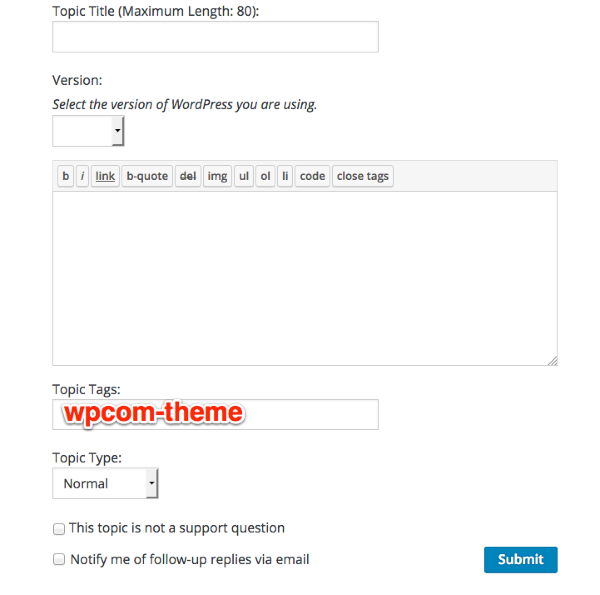
You’ll need a free WordPress.org account to post – if you don’t already have one, you can register here:
https://wordpress.org/support/register.php
Be sure to provide a link to your site when you post so folks can help you more easily.


- The topic ‘Baskerville-2 Blog Excerpts’ is closed to new replies.
 WordPress.com Forums