

Baskerville 2 – Blog post excerpts do not load properly sometimes
-
Sometimes the blog post excerpt page does not load properly. The tiling might be off and/or there is a lot of blank space that should not be there. Any idea why?
The blog I need help with is: (visible only to logged in users)
-
Hi bubbleteaboy,
Sometimes the blog post excerpt page does not load properly.
Do you mean this Reviews page listing all posts?
https://thatbubbleteablog.wordpress.com/reviews/
Would you be able to make a screenshot of the tiling issue and upload it to your Media Library? I can’t see any issues at the moment but the screenshot may provide a clue as to what is happening :)
Thanks!
-
Sure thing. I uploaded six pictures which are meant to be seen as three couples. First is when only two of them tile (the rest are underneath but there is a lot of blank space separating). second is when only one shows up (the rest still underneath) and then the third is when it works well (they fit to each other like a jigsaw). Thanks for replying!
I posted into my media, I hope that is right.
-
Good morning –
I’ve had a look at the images added to your media library. But, when I go and look for myself at https://thatbubbleteablog.wordpress.com/reviews/ I don’t see any issues.
Can you tell me which browser you’re using? And, have you noticed the issue in other browsers before?
Do you have any browser extensions enabled?
-
Good morning!
I was using Firefox with an AdBlocker. I turned it off and the issue happened less. I also found viewing it a visitor to enable the ads to load also reduced the occurrence. I thought this fixed the problem but there is still a fringe case (maybe about 10% of the time) where the tiles do jigsaw together but there is a large blank space between the header and the tiles. It seems to happen when the tiles load slowly/struggle to load.
Do I have to compress the pictures I set as the ‘featured image’ so that they load fast or is this done automatically?
Thanks.
-
I’ve uploaded two pictures of the fringe case onto my media library which was using IE 11. Google Chrome seems to be the best (I have not managed to get it to play up on Chrome).
-
Hi there,
The problem with something like AdBlocker is that it’s a bit of a blunt tool – it does not block ads themselves, but it blocks the type of code that are used to display ads. A theme like Baskerville uses that same type of code to dynamically adjust the layout, which means AdBlocker can block the theme’s code from loading as well.
The good news is, it won’t affect your site visitors, as you saw yourself, unless they are also using ad-blocking in their browser. Bad news is if they are, there’s not really anything we can do to prevent your site being messed up for them as well. However, you can set an exception in Ad Blocker for specific sites, so can set it not to block stuff on your site, and things should display correctly for you.
As for the white space issue you still see sometimes even with AdBlocker disabled, that’s a bug that we’re aware of already, and it’s being worked on. I’m not able to give you an estimate on when it will be fixed, though.
-
Ah, that does explain it. I was wondering why even with AdBlock disabled it still went wrong, but if it is a known bug and being worked on, that’s really good to hear! I can consider this issue resolved then?
-
That’s correct. This case has been added to the report in this thread: https://github.com/Automattic/themes/issues/208
You can follow along if you like.
-
-
Hi @bubbleteaboy — thank you for this report!
I believe we’ve found the cause of the occasional layout issues you were seeing, and have deployed a fix.
I’ve tested your site in a few different browsers, and things are looking good.
However, we’ve found this issue presents itself inconsistently, so it’s possible we missed a specific case where it can be replicated. If you do continue to experience this problem after clearing your browser cache, please don’t hesitate to let us know!
Just let me know if you have any questions at all about the above – thanks!
-
Thanks so much! I haven’t seen it recently too, having swapped away from ‘infinite scroll’ due to the addition of a footer bar. But I really appreciate you and the team working hard on fixing the issues (I have come across another one but will make a separate thread for it).
-
Fabulous, thanks for the update, @bubbleteaboy. We’ll leave this thread open for the moment in case you run into this issue again. If you do, just add another comment and upload a screenshot as well. Cheers!
-
Also having huge amount of white space between header and text using the Baskerville 2 theme. Not sure of options. I read that the issue was resolved, but it is still showing up on my site. I just opened this site yesterday and I’ve been working on it today. Let me know if there is something I can do. Thanks!
-
-
@lowcarb4ever23, that is not the same issue. The issue reported in this thread was regarding the posts page that lists thumbnails and excerpts of all published posts on a site in a grid format.
The page you’re linking to is a static home page, and the white areas you see there are the regular spacing between post/page titles and content for this theme. You’ll see similar spacing if you open any page or post on the demo site for this theme as well, for example, https://baskerville2demo.wordpress.com/readability-2/
As you have the Premium Plan on that site you can override this using custom CSS. Go to My Site ->Customize and click on CSS. Then add the following on a new line in the editor box on the left:
/* Reduce space between post/page title and content */
.single .post-content {
	padding-top: 1%;
}

.post-header {
	padding-bottom: 1%;
}
I also notice some unnecessary code on the specific page you linked to here:
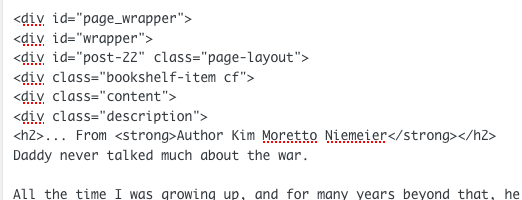
If you copied that page’s content in from somewhere else, that would explain where that code is coming from, as that code is not something that was added on our end.
That code could also be adding additional space at the top of your post content, so please edit the page in the HTML view of the editor and remove all the lines starting with div at the top, and /div at the bottom.
-
My apologies. The other two threads I had found the issue on had closed out and I couldn’t ask and took a chance here. … and THAT WORKED!!! (CSS Code) Thank you very much!
-


- The topic ‘Baskerville 2 – Blog post excerpts do not load properly sometimes’ is closed to new replies.
 WordPress.com Forums