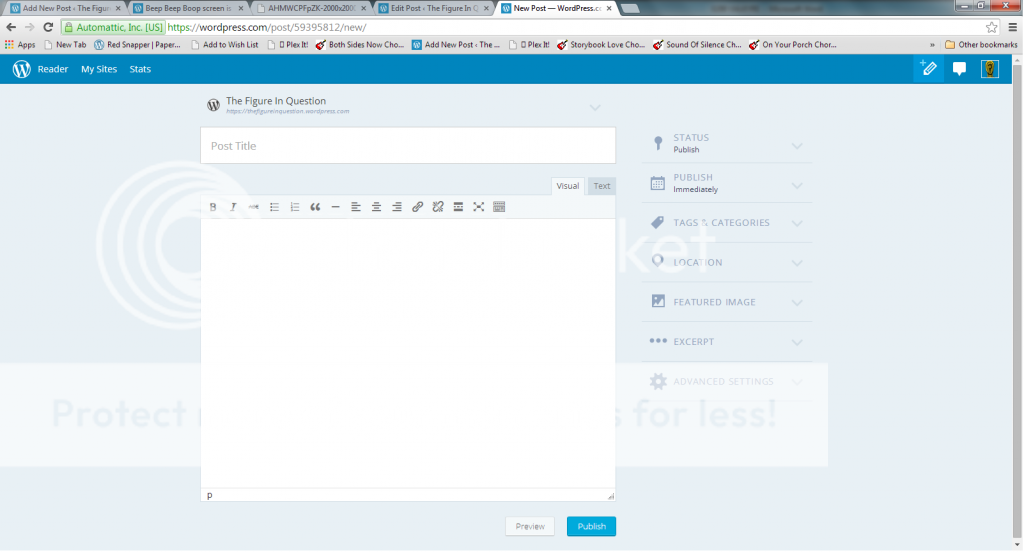
Beep Beep Boop screen is a joke. Is this a glitch?
-
-
@longshotsblues
If you read what’s at the links I provided above at https://en.forums.wordpress.com/topic/beep-beep-boop-screen-is-a-joke-is-this-a-glitch/page/8?replies=222#post-1994587 then you have an understanding of what’s going on. The new WordPress versions are up and running here at WordPress.COM about a month before they become available to WordPress.ORG users. -
I don’t like the new interface. I have only used it once.
1- I don’t know if something is saved, or published.
2- You cannot preview the post in a separate window. I like to have both the edit page, and the preview, on my screen when I edit
3- I did not see the shortlink. This is handy for twitter.
4- Putting the various options in a sidebar, and drastically reducing the size of the edit window, is a bad idea.
5- This morning, I was in a hurry to get to work. I had a post prepared, and just enough time to get it posted. This was a terrrible time to deal with a new interface. -
With due respect, I did read your links. This just started in the middle of last night here @.com while I was writing, posting and editing a new blog. I provided a link that WP.org from 3 weeks ago had users complaining about what we are now just experiencing and complaining about as well.
It’s apparent that this is not true that .com has new versions before .org as you can also read from my link. There are others, just have to google the problem.
-
Does not save your work if you open up settings tab on the right.
Not sure what this means. If you open up Settings you can’t save your post? I wasn’t able to reproduce this, can you please explain?
I was trying to use it for a post. I added some pictures and found the resize problem. Saved the post. Then I added more text and images, saw the blue “Settings” icon on the title bar and clicked on it to see if I could change it so it would remember the picture size. But these Settings were my profile settings, not related to the editor.
Then I couldn’t find a way back (!) as it covered the Boop Editor. I went back on the browser using the back button, but when I got back to the Boop Editor page it had nothing in it. Eventually, when I found the draft and edited it using the Regular Editor, all the changes after that save point were missing.
I spent enough time doing the edits and settings look that some autosave should have kicked in, but apparently it didn’t.
-
Not sure it has been mentioned but this beep poop April’s Fools joke of an editor removed my post from being “Sticky” when I actually did use it to make a quick update. This made me quite angry when I discovered it a few hours later.
-
@planetdreamdiaries, thanks for the feedback. I tried to take this piece by piece in my reply below to keep it in order.
Edit is not longer found on the same page as add
That’s a good point. With the traditional editor did you find yourself simultaneously editing existing posts and writing new posts a lot? We’ve focused a lot so far on the new post writing experience so I’d be curious to hear what your earlier workflow looked like here.
We need new windows opening as much as we need to all rethink myspace as an A-1 blogging site
I hear ya. We’ve got this issue logged internally and the dev team is taking a look at what we can do to blog like it’s <del>1999</del> 2014.
Can you imagine the time you have forced upon your users to go through one long string of code just to find the one edit they’re trying to make?
That sounds like a bug. Would you mind sending the HTML content you’re working with to help@wordpress.com and mention this thread? It’d be ideal if you could send what you’re working on as a text file or PDF of text. Alternately if you wanted to tell me the title of a post with some HTML content that’s giving the new editor fits that would help me dig in to the details.
I cannot say it anymore clear than I have – make a change/edit, click update and my changes aren’t sticking – they only stay put via the old editor.
Losing updates sucks, I’m sorry. This threads gotten pretty busy so my apologies if you’ve already posted this somewhere and I missed it, but could you post details of what browser and operating system you’re working with? We can then work internally to figure out what’s up with it.
They are NOT, as they were before, listed at the top of the category list any longer – you have to sit there and scroll through your entire list of categories to find the ones you’ve used for that post.
That’s great feedback, thank you. Do you find that you edit a category list quite a bit after publishing something? If so I totally understand how much of a pain it’d be to scroll up and down the page over and over to do something which used to be easy.
The time is NOT accurately updating.
Another bug we’ve got tracked internally and are working on. This also appears to be impacting scheduled posts.
It’s too small – it’s cramped together – it’s terrible on the eyes.
Can you tell me a bit about what feels too small? Is it the font size, editor width, overall window dimensions, something different?
It’s too difficult to get back to your main add screen
We’re going to make this transition smoother so it feels less like switching between totally unrelated tools.
Where is the spell check? How can you have a text/writing editor without a spell check?
Got it. Will pass along the importance of spell check for you. A lot of browsers come with spell check built-in at this point so it’s helpful to know that you’re still relying on the one built-in to WP.com.
Insert media? Where did it go? How do we insert media while in edit mode?
The same “Add media” button that’s there for new posts should be there on editing, too. I just gave this a test on a couple demo sites and it loaded normally right below the title field. I snapped a screenshot of this at:

Is that not loading for you? If so, could you post a screenshot of what you do see on the editor for existing posts?
Thanks again for all the feedback. I know it’s not an ideal experience right now and I know it feels like a huge change. We’re going to continue working to make it better.
-
@skyvisionsolutions Can you let me know the title of the post which lost the sticky setting on it? Thanks!
-
When you set your featured image it then takes you to your computer so you are literally uploading the photo again, so you end up with two copies of it. I know you want us to pay for this, but that is a bit much making us use space unnecessarily.
Also, you asked about the size and eyesight, the whole thing is too small, you have to zoom your page out so you can see it properly. I have a very large monitor and it is tiny on mine, then I zoom in and it screws up lots of other things.
There is no word count, if you want to blog seriously you need that word count. You need it for SEO purposes.
-
My back up plan to edit old posts without scrolling through pages looking for them is. Find the article by searching your blog. Cope a sentence, or part of a sentence, from the article you want to edit (make sure it is not any codes in the part you copy).
Go to Dashboard, post —> All posts.
Paste the copied text in the box that says “Search posts”.
Then under the article, click the edit button (far left).
Not optimal, but doable until further notice.
-
@susanbourne In response to your questions:
I so agree… and I wonder why WP Happiness Engineers don’t see this?
We do see the issues. We’re working in this thread to gather, collect, and pass along feedback. This only launched a short time ago; some improvements will be immediate, some will take a little longer.
Is WP pruning bloggers as if we are weeds to be pulled or uprooted?
That’s not our intention in any way. We’re simply trying to build a more refined and modern post editor for existing users as well as those new to WordPress.com. The balance is tough to strike sometimes, and it’s something we’ll keep working to improve.
Will WP soon re-offer all the old sensible, workable functions for a fee?
Absolutely zero plans to do that.
Just what is up with WP that it keeps ignoring the voices of its users?
As I mentioned above, we hear you. We have internal threads tracking the bugs, suggested improvements, and workflow disruptions this has caused.
We’re also trying to keep in mind that for every bug that arises and is posted here there are numerous posts which are published without any issues. We’re trying to listen to both sides here.
-
Hi @leannewhatever,
When you set your featured image it then takes you to your computer so you are literally uploading the photo again, so you end up with two copies of it.
Great point. I’ll pass this along internally.
-
On “Sticky” post, I had re-enabled it as “sticky”, but for your purposes, I added a period at end of post and updated with beep poop editor. The post is now no longer “sticky” again. Link at: http://wp.me/p3nav9-2bp.
-
-
Couldnt’ you just get the normal old-style (without beepbeepboop) edit function back? At least as an option?
also many paying customers would be glad about i bet…
shouldn’t be that much to to, because the wp-engine worked wunderful until yesterday….
-
Couldnt’ you just get the normal old-style (without beepbeepboop) edit function back? At least as an option?
It’s there as an option. As others have mentioned above if you go to your blog’s Dashboard and navigate to Posts > Add New it will load the traditional editor.
-
@andrewspittle
This is what I see when I go into the editor:
linkthe “add media” button is missing, as is the second row of format options
-
It’s there as an option. As others have mentioned above if you go to your blog’s Dashboard and navigate to Posts > Add New it will load the traditional editor.
yes, i know that since before i even came to ask first time for support.
my problem is as described here: https://en.forums.wordpress.com/topic/changes-in-wp?replies=1#return
“Dear WP
Since today, i’ve got a problem with editing allready posted articles. If i click (with pilcrow theme) on the weblog-site on ‘edit article’ i cannot get directly into the same place as if i go to the dashboard –> articles to edit it there. Instead i get a strange window telling me “beep beep boop” in a totally different interface for editing posts. I really don’t like that interface and would ask u, if it’s possible to get back the old version, so i can get directly in the same editing interface as when i do it from dashboard.
Thank you. “
So the point is: Me and many other users (also paying ones) – look history here https://en.forums.wordpress.com/topic/beep-beep-boop-screen-is-a-joke-is-this-a-glitch/page/2?replies=54 – would be very glad to have the old, normal, one-click-edit-mode back.
-
Disgusting it´s the word that fits to all new changes on WordPress.
The server went down, it´s impossible to say to my visitors that I liked their comments and now I saw that the post layout turn something that was easy and simple in a Disgusting experience.
I really rate this change and would like to request that for my blogs the prior structure, layout and tools come back.
-
@springwolf-
1. Modern PCs typically have WIDE screens, 1024 or more wide; yet you’re cramming everything together and using 1/4th of the screen for an edit box. Some one actually thought this was a good idea? Are you kidding me!
Thanks for the feedback! So, I’m assuming being able to increase/decrease the post editor section would be desired? Let me know. I’ll relay this to our developers.
2. Your new interface forces me to click more buttons to access options I could simply move my mouse to and select. Thus once again creating more work for me when I posting a new article. Seriously? Why use drop downs for things people want access to right now; not 5seconds from now!
Ah, I see. So the dropdowns are creating more clicks when before you could have just went straight to the module? Am I correct?
3. I have templates set up and saved as drafts to …once again…same me time. The “copy post” option is no where to be found! Again making more work for me, or forcing me to click more buttons to accomplish something I was able to do with 1 click!
So yes, the copy post function has been removed from the new Editor. However, I understand this being a huge disservice for users who relied on this. We’re always open to bringing back features that our users feel is pertinent. So I’ll keep this noted and relay this back to the developers.
4. And because of all these new “features”; we’re forced to wait for some cartoonish idiotic “Beep Bop Boop”? WTH Are you in kindergarten?
We are aware of this and has been mentioned multiple times as seen in this thread. Thanks for your patience. I’ll try to keep this thread updated as quickly as I can.


- The topic ‘Beep Beep Boop screen is a joke. Is this a glitch?’ is closed to new replies.
 WordPress.com Forums