Bibliography
-
My bibliography page no longer shows the link image. Is this because I just went to a paid site? How to fix it?
The blog I need help with is: (visible only to logged in users)
-
Hi there!
I checked the bibliography page on your site and noticed you’ve inserted links. No images appear to have been inserted on that page. So I’m not sure what you meant by link images. Can you clarify what you were expecting to see?
The page appears to be working as expected based on how it’s set up. Once we know how you wanted it to work, we can help further.
Thanks!
-
in my last book review Dead of Winter on my bibliography page i wasn’t able to add the link to that page. The link image usually just pops up. But this time it didn’t appear so my review in my bibliography is not there. Hope this makes sense.
-
Hi there, @neesrecordaolcom!
Thanks for reaching out.
It sounds like you want to add a link to this post to your Bibliography page. Is that right?
If so, here is a video to show you how to do so:
I hope that helps! If you still need help, please let us know. The more we know about the issue you are having, the better we can assist you here.
-
Thanks for getting back to me so quickly. I figured out the problem is that my posts are no longer in Classic which is where I find the link. Can you fix that for me?
-
Hi there,
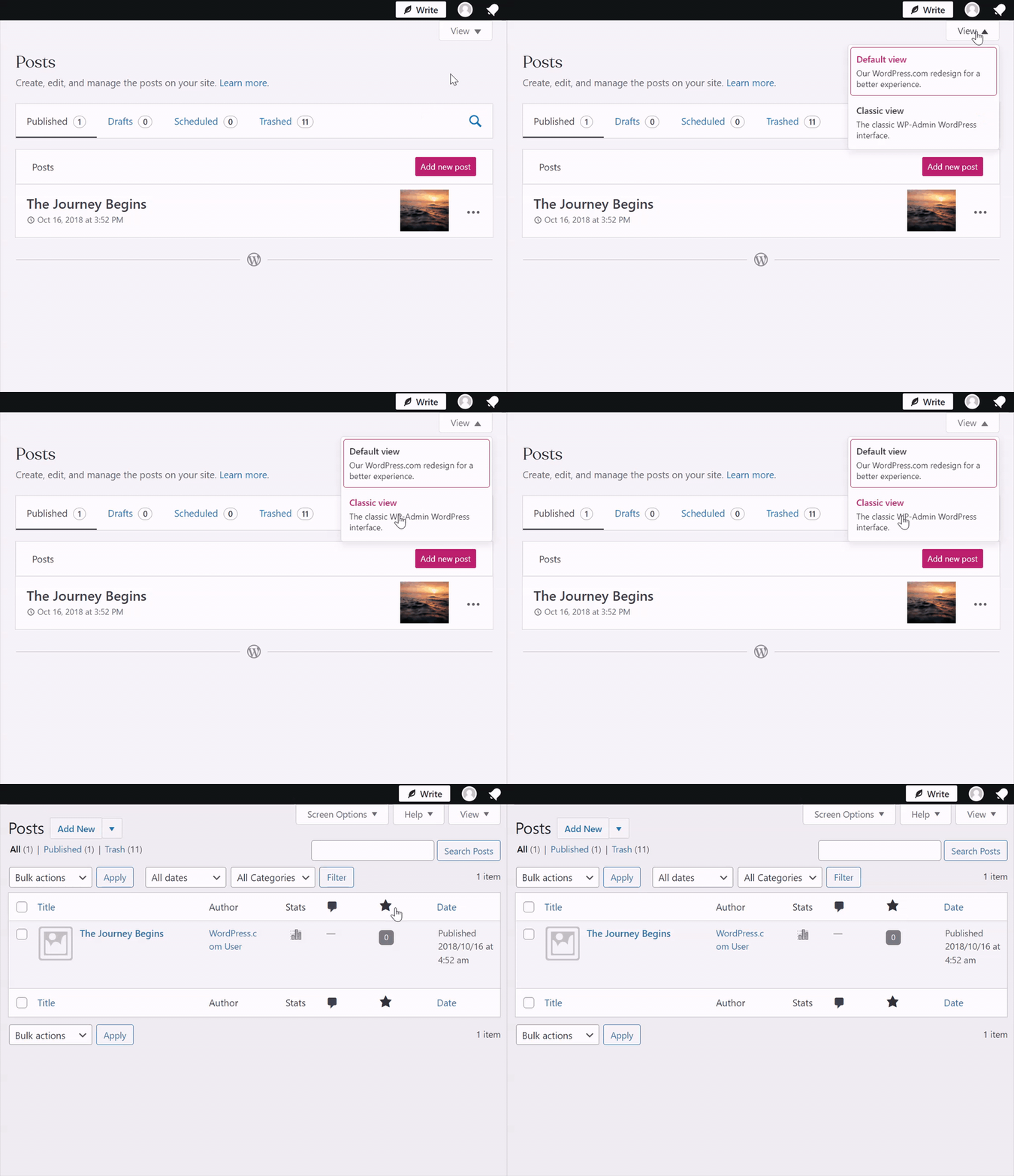
When viewing the posts page, you can switch to the classic view by clicking the “view tab” in the top right-hand corner.
Example:
https://en-support.files.wordpress.com/2022/03/view-tab.gif?w=930Alternatively, you can click the three dots next to the post title and copy the link.

Please feel free to reply to this message if you have any other questions and have a great day!
-
Hi Jeff,
Can I just stick with you? Too many people are confusing for me. I am a senior so bear with me. I never had this problem until the other day when I bought a paid WordPress site. Could that be the problem? I tried the above and I couldn’t make Classic stick.
When I am making a post, writing a book review, I still can easily get to classic my hitting +
But I still can’t get the link to my books on the bibliography page. It was always so simple. I’m not sure what happened.
Hope you can understand this and fix the problem for me.
Thx,
Martie
-
Hi Martie :)
Can I just stick with you?
We are a remote team which means we can cover our customers 24/7. That said, not all of us can be online 24/7. That is to be expected when you staff your support service with humans, and not bots. This allows you to get your reply quicker than Jeff’s next shift (also helps ensure no interruptions in service when we’re sick, on holiday and so on…). But, on your end, it should work as if we are one person, so if you are welcome to share feedback if something doesn’t seem right.
But I still can’t get the link to my books on the bibliography page. It was always so simple. I’m not sure what happened.
I don’t think this is related to the site’s upgrade but I would like to know how you used to do that before to help you find it. Jeff showed the above one way, I understand that you are used to something different, could you please share more details?
-
1 – Got it no problem.
2 – I can’t because it is no longer there.
Before this issue started about three days ago: I used to hit edit on my bibliography page. Then move to where I wanted to link the book. Then there would be something like a circle. Once taped it would show me what review I wanted to link on that page. And once tapped the review link would be there. Hopefully, this makes sense and you can follow me.
3 – I tried to do what Jeff showed me but hitting Classic in view did not turn the page to Classic.
4 – Is there a way to get rid of blocks on my end?
Thx,
Martie
-
In addition to my above comment: Or if my bibliography page did turn to classic. the review link doesn’t appear.
-
I know it can be frustrating when all you want is for things to work as they did a few days ago. I appreciate your patience as we work to get this solved, one piece at a time.
The blocks will enhance your experience with the editor in time as you learn. They are more robust and customizable. We have some pages to help you along and there’s a good video at the bottom of this one:
 Blocks are the components for adding content in the WordPress block editor. There are many different block types available for you to use. This page has a list of all the blocks that are available. List of Available Blocks We are adding new blocks all the time. So this list keeps growing! Ad BlockArchives BlockAudio BlockBlog Posts BlockBusiness Hours BlockButtons BlockCalendar BlockCalend
Which part of the video that @jmills39 shared does not work? Please be as specific as possible.
Next we will tackle the follow up questions:
But I still can’t get the link to my books on the bibliography page. It was always so simple. I’m not sure what happened.
Take a look at the screen shot below. That link in blue text pops up when I click on the title. Is this what your after?

-
1 I am not at all interested in blocks. Is there a way to delete them from my site?
2. I am not confused with Jeff’s video. I went to view and clicked classic but nothing changed.
3. YES.
I appreciate everyone’s help but I wonder if a supervisor can do more? Not judging, just asking. As u said, this is very frustrating since until a few days ago it worked fine.
Thanks,
Martie
-
I have set both your pages listing (pages > all pages and posts > all posts) to use the classic view, which allows you to use the classic editor for editing your pages and posts.
To find the link to edit pages and posts with the classic editor, hover over the post or page title in the pages and posts listings under all pages or all posts, and below the title, you will see a link to the classic editor. Clicking that will open that page or post in the classic editor. Video: https://d.pr/v/wrYir6
What I would recommend, if you are starting a new page or post, is to go to Pages > All pages, or Posts > All posts, and near the top left, click the down arrow on the right of the Add New button, and you have the choice of starting a new one with the classic editor. Screenshot: https://d.pr/i/HFXqAhk
-


- The topic ‘Bibliography’ is closed to new replies.
 WordPress.com Forums