

blissful template removing widgets on posts page
-
Blissful Template –
How do I remove the side bar widgets – search, archive and meta from ‘posts’ main page?
Also how do I remove the main heading on the posts page – currently says ‘category archives…’
thanksThe blog I need help with is: (visible only to logged in users)
-
Hi there!
Are you referring to removing the Archives, Search, etc from pages like this?
http://melbourneweddingphotos.net.au/category/weddings-2/
If so, you can do that by just dropping an empty Text Widget into your sidebar on your Widgets page here:
https://melbourneweddingphotos.wordpress.com/wp-admin/widgets.php
It looks like you currently have a blank one in place. In order to have this work correctly, just remove the “Visibility” section shown here:
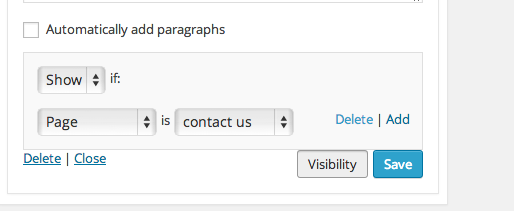
Just click “Delete”.
Regarding removing the page title, you could do that through the following CSS:
h1.page-title {
	display: none;
}
However, in order to save the CSS to your site, you would need to purchase the Custom Design upgrade shown here:
http://en.support.wordpress.com/custom-design/
This allows you to change fonts and colors as well as upload custom CSS.
Let me know if you have any additional questions!


- The topic ‘blissful template removing widgets on posts page’ is closed to new replies.


 WordPress.com Forums