

Blix theme – placement of sidebar
-
Hi,
I currently have the blix theme, and really like it, but I would like to change the sidebar to appear on the left, instead of the right. Any way I can do this?The blog I need help with is: (visible only to logged in users)
-
I would like to change the sidebar to appear on the left, instead of the right. Any way I can do this?
Yes, but it will require and annually renewable upgrade and CSS editing. See here for details on purchasing the annually renewable custom and CSS editing:
Custom design – Frequently Asked Questions
http://en.support.wordpress.com/custom-design/#frequently-asked-questions
http://en.support.wordpress.com/custom-design/
http://en.support.wordpress.com/custom-design/editing-css/
http://en.support.wordpress.com/custom-design/custom-fonts/If you purchase the upgrade please use this link https://en.forums.wordpress.com/forum/css-customization#postform so you can copy and paste your text into a thread that will appear in the CSS Forum where you will get the help you need.
That’s a very old retired theme and themes are retired when they no longer support all WordPress features. The recommendation is to change themes. Here are 39 Two Columns + Left Sidebar WordPress free themes with left hand sidebars http://theme.wordpress.com/themes/features/two-columns+left-sidebar/?sort=free
Themes are just “skins”. You can quickly and easily change themes on any WordPress.COM hosted blog to another one found here http://wordpress.com/themes/ and no data will be lost or negatively affected by the change. The only time you may have to do some work is if you are changing to a dramatically different theme and have done any CSS editing.
Provided you are logged in as Admin under the same username account that registered the blog go to Dashboard > Appearance > Themes, Browse themes until you find one you like and click “activate” or type in the name of the theme you want to use when it appears.
After you change your theme all you need to do is go here Dashboard > Appearance > Widgets > Inactive Widgets and re-install them where you want them to appear. The widget contents and settings will be the same as they were prior to changing themes.
-
Thanks for the info. I chose a new theme, CONFIT.
I tried to upload a new background picture, and used the upload feature in the custom design for themes (a pdf as recommended), but doesn’t appear to be replacing the default photo. Do I have to be a premium subscriber to change the background?Thanks!
Catherine
-
Hi there,
This is the Confit detailed theme description page link http://theme.wordpress.com/themes/confit/If you are expecting a background to change beneath the text in your posts or pages that is not how the theme is designed to function. See here https://confitdemo.wordpress.com/
-
used the upload feature in the custom design for themes (a pdf as recommended)
I tagged this thread for a Themes Staff follow-up. They will be able to assist you. Please subscribe to it so you are notified when they respond. To subscribe look in the sidebar of this thread, find the subscribe to topics link and click it.
-
Hi Catherine – could you provide a link to the site running Confit so I can take a look? http://musicopl.wordpress.com/ seems to be running Twenty Ten.
Do I have to be a premium subscriber to change the background?
No, you shouldn’t. Changing the background image is a free option in most themes. If I can see your site directly that will be helpful, so I’ll look forward to a link. Thanks!
-
Hello Kathrynwp,I changed the theme, since according to one reply I got (see above) changing the background picture is not the way Confit is designed. Thanks….
-
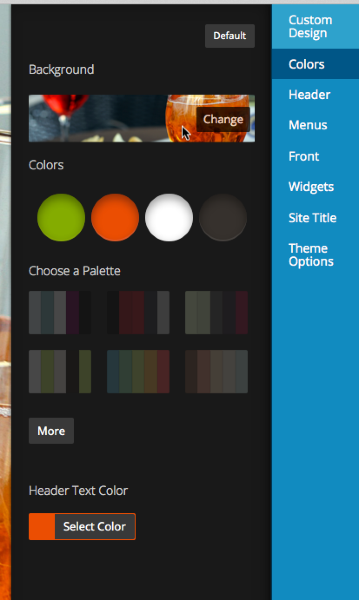
If you decide to change it back to Confit I’d be glad to help you troubleshoot. You should indeed be able to replace the default background image of the food in Confit, under Appearance > Customize > Colors. Just click the small image below “Background” as you see here in the screenshot, and select another image. When you’re done, be sure to save your changes.
-
Hi,
I’ve decided to go with the Twenty Ten theme, since it has a stock music related banner, and I’ll work on customizing that after I get the look/feel and content set.I have one general question that I’m hoping someone can help me with. I have the menu all set across the bottom of the banner, but in some cases there are submenus (pages) that appear when the menus drop down. Is there anyway to “hide” those submenus so they are only viewable/accessible once you are on the parent page?
Thanks!
Catherine


- The topic ‘Blix theme – placement of sidebar’ is closed to new replies.
 WordPress.com Forums