

Block editor and zip files
-
Just noting I uploaded a zip with several pictures in it (with various extensions, spaces in the file names, etc) and while it took a minute to upload, it’s working fine.
-
The post is in my drafts, @supernovia
I have saved it and only the text appears. There are no files in the two file blocks.It is here (via the WP-admin), the title is “Nuevo test”
https://trasnochada.wordpress.com/wp-admin/edit.php?post_status=draft&post_type=postor here (via the Block editor):
https://trasnochada.wordpress.com/wp-admin/post.php?post=5076&action=edit -
If you upload a smaller zip file do you have luck? My internet’s a bit wonky today and I couldn’t upload all 108MB that you have posted there.
Or, if you add via the media library does it make a difference?
-
If you upload a smaller zip file do you have luck?
Nope.
I tried with two zip files. One of 152 MB (it contains audio files, mp3 format), and the other of only 3 MB (it contains image files). -
Thanks for uploading the files.
The 3MB one uploads without any trouble in the block editor, both in WP-Admin and Calypso for me. My upload speed is not very fast so the audio one is still busy, but it’s not showing me any security warnings like you’ve been seeing.
I also tried with a non-staff test account to make sure any special permissions my account might have is not affecting things, and there the file is uploading without any issues as well.
So it appears the issue is not with the files or with the editor, but with your specific site or account, somehow.
Just to confirm, you’re unable to upload directly to the media library as well? Or is the problem exclusively with the block editor?
-
Can we try creating a new post on your site using the block editor and uploading the file from our end? That might help rule out whether the problem is your site or your account.
-
Just to confirm, you’re unable to upload directly to the media library as well? Or is the problem exclusively with the block editor?
The problem is exclusively with the block editor.
I just uploaded the two zip files to my media library (the 3MB and the 152 MB) via WP-Admin-> Media Library-> Add new.The zip files are in my media library right now.
Can we try creating a new post on your site using the block editor and uploading the file from our end?
Of course, @kokkieh Go ahead. 👍
-
Hi galois,
I was able to upload that file by using the File block. I did that by directly logging in to your WordPress.com account.
So, I believe that this is something on your end. Have you tried a different browser or even another computer?
-
Have you tried a different browser or even another computer?
Yes. Same problem with Opera (last version) & Maxthon (last version).
I just created another draft and the same thing happens.
The new draft is here:
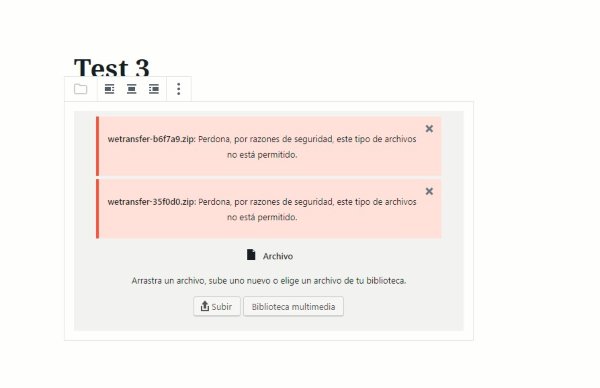
https://trasnochada.wordpress.com/wp-admin/post.php?post=5092&action=editThe two warnings are these:
-
@galois I tested your account and even tried a small upload (you can delete that). I was not able to duplicate this error.
I’m guessing the other browsers you tested were ones you don’t typically use anyway, but just in case, would you be willing to try clearing offline data? Or, can you test with another computer?
-
This afternoon I will try using other browsers (G Chrome, Vivaldi, Firefox or M Edge). I usually use Maxthon and Opera.
Another computer I do not have … :(Thanks a lot, @supernovia
-
Ok. It’s happening regardless of which browser you use.
What operating system are you using, curiously?
And can you clarify whether you’re able to insert the zips that are already in the media library via the block editor?
-
Sorry for the delay. :(
What operating system are you using, curiously?
Windows 10 Home, 1809 version.
And can you clarify whether you’re able to insert the zips that are already in the media library via the block editor?
Yes!
-
-
Tomorrow I will do several tests with Chrome and Firefox. And again, thank you very much for your help, @supernovia :)
-
I got the same result with Chrome and Firefox.
a) If I upload the zip (from any folder on my computer) the error message appears. b) If I choose it from my media library (some of which you uploaded, for example), everything works correctly. -
I’m stumped. But I can think of one more thing to try: if you download a zip I uploaded, can you upload that?
-
if you download a zip I uploaded, can you upload that?
I downloaded the zip to a folder and to my desktop (the Windows desktop).
And I can not upload it: the same error message appears again, and again, and again…I give up, @supernovia :(
-
I wish we could duplicate this; it’d go a long way toward solving it.
Is there any chance you can try another computer, or even a mobile browser? I just tested from mine and still uploaded without trouble.


- The topic ‘Block editor and zip files’ is closed to new replies.
 WordPress.com Forums