

Blog content is displaying in the wrong category
-
I created three main categories for my blog: Writer, Baker, and Happy Homemaker. When I created a recipe post and placed it under the baker category, the post showed up on the baker category and also on the happy homemaker category. I cant see any reason why it’s showing up on two categories.
Im having a similar problem with my pages. The “contact” page I created is being lumped in with my “about” page. Why is this happening? My site is bringingbackjupiter.wordpress.com
The blog I need help with is: (visible only to logged in users)
-
Hi there. Your menu item Happy Homemaker is also linking to the Baker category instead of its own. Possibly this is because there was no post in the Happy Homemaker category when you made the menu (I see there’s a post there now titled Test). Go to Appearance ->Menus where you created those pages and delete the Happy Homemaker one. Then add it again from the Categories option and save your menu. Don’t delete that test post until you’re done doing this.
I have no idea why your contact page is appearing on your home page along with the About. This isn’t supposed to happen at all as you can’t assign two pages as your home page. I’m tagging this for staff to follow up. Please subscribe to the thread so you are notified when they respond and be patient while waiting.
-
As @kokkieh stated, your Baker and Happy Homemaker menu items are linking to the same Category Page:
https://bringingbackjupiter.wordpress.com/category/baker/
Try removing the current Happy Homemaker menu item and adding back the correct Category Page:
https://bringingbackjupiter.wordpress.com/wp-admin/nav-menus.php
More information on Custom Menus can be found here:
In regard to your Contact and About pages, please set your site’s Front page and Posts page to different pages:
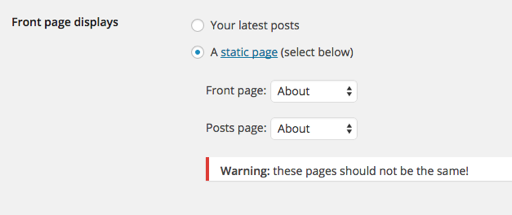
More information on this feature can be found here:
If you have additional questions, please let us know.


- The topic ‘Blog content is displaying in the wrong category’ is closed to new replies.


 WordPress.com Forums