

Blog Issues
-
Firstly: My initial page is my blog page and that shows correctly. However, when you click on ‘blog’ on the menu bar it shows a much older post, not my most recent post. How can I get my most recent post to show up on my blog page? Also the date the post was issued shows up on my initial page, but it doesn’t show up anywhere when I click on ‘blog’ on the menu bar. How can I get the date the post was issued to show up on my blog page? many thanks.
http://www.theomroom.comThe blog I need help with is: (visible only to logged in users)
-
Hi there!
Firstly: My initial page is my blog page and that shows correctly. However, when you click on ‘blog’ on the menu bar it shows a much older post, not my most recent post. How can I get my most recent post to show up on my blog page?
It looks like your ‘Blog’ menu item links to a specific Post and not your to most recent posts. You can fix this by going to Settings > Reading and selecting ‘Blog’ from the dropdown menu next to ‘Posts page:’
Also the date the post was issued shows up on my initial page, but it doesn’t show up anywhere when I click on ‘blog’ on the menu bar. How can I get the date the post was issued to show up on my blog page?
The theme you’ve chosen doesn’t display the date that the post was published on Single Posts. On my test site you can see how the blog looks with dates displayed:
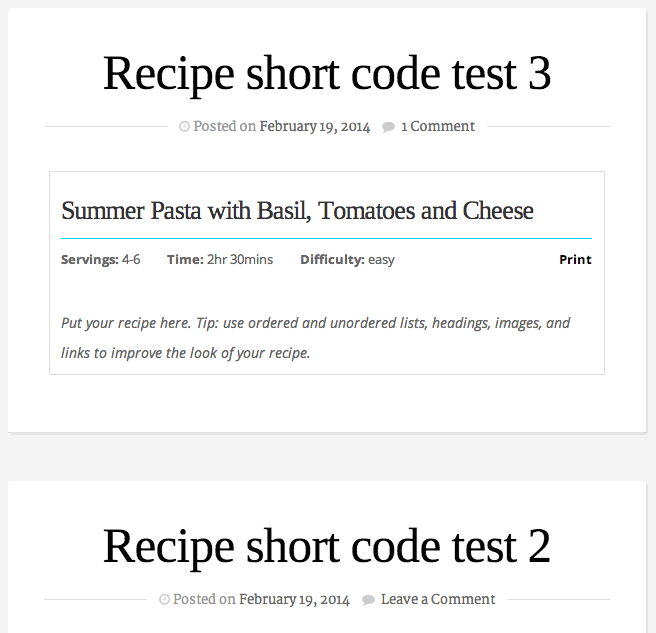
You’ll see this on your ‘Blog’ page once you make the change I outlined above.
Let me know if I can help with anything else!
-
-


- The topic ‘Blog Issues’ is closed to new replies.
 WordPress.com Forums