

Blog page
-
Hi There,
When I look at my site and navigate to the blog page it shows only part of the blog and there is no way to click to expand the entire post. The only way I can do that is by clicking on the date listed below it. I’m concerned that people won’t know to do that, how do I make it so it’s easily able to expand or just simply shows the entire post on that page?
WP.com: Yes
Correct account: YesThe blog I need help with is: (visible only to logged in users)
-
Hi There,
Your Blog page shows all your blogs and currently, there is only one blog that is showing a part of it ie 55 words as an excerpt for that.
You can try adding the More block, this will help you to add a read more tag and truncate your blog entries so that some part of your post gets displayed and after the user click the link like read more (any other name) it will continue to show the full post.
In order to add a More Block, click on the Inserter icon. Search for the More Block and click on it to add it to the post. When you do this, a link will be placed directly after your excerpt, pointing the reader to the full post. You can put this link anywhere in a post, and customize it to say whatever you want.
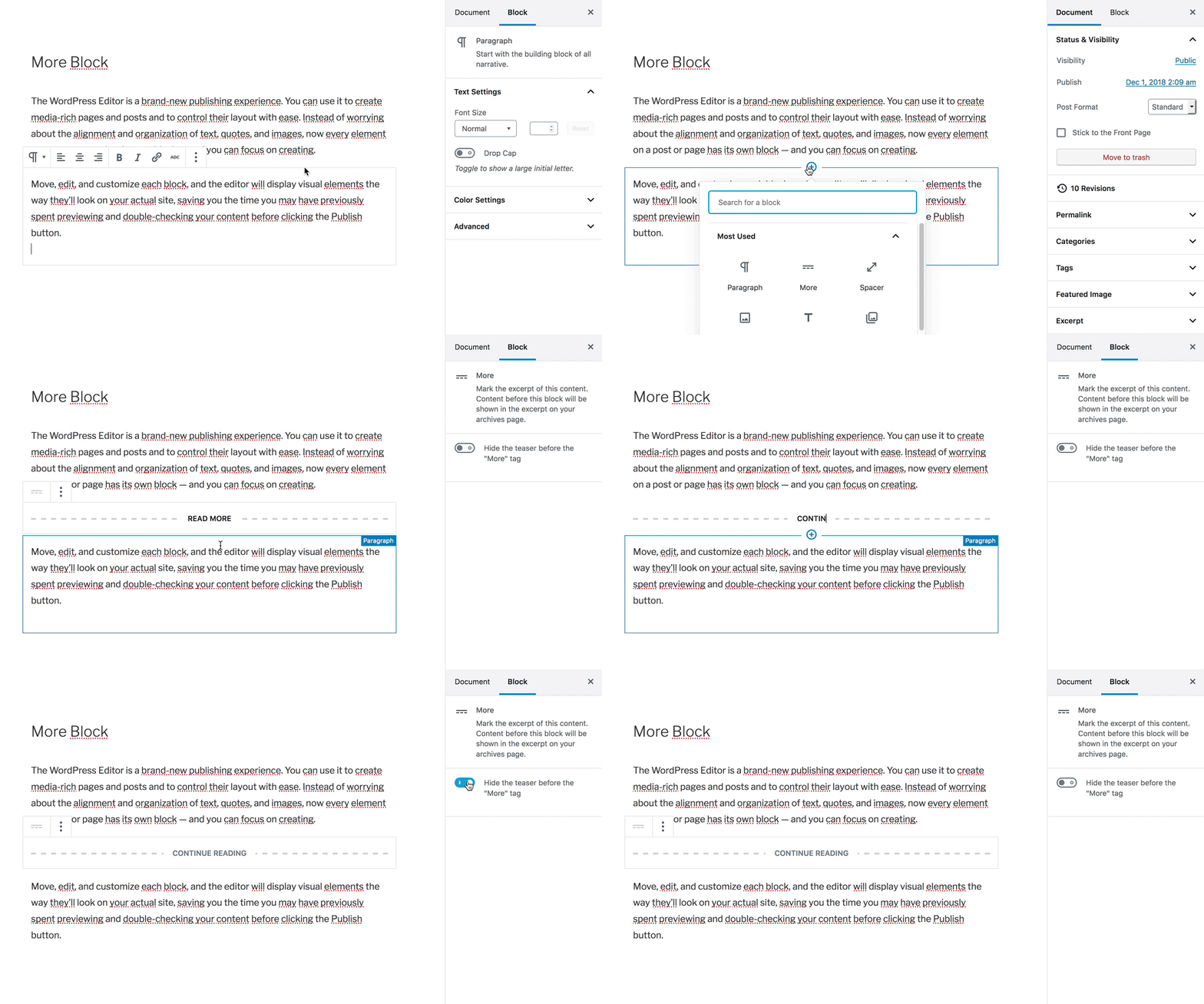
https://wordpress.com/support/wordpress-editor/blocks/more-block/#adding-the-more-block
Hope this helps!
-
Hi there,
The Russell theme you’re using only show post excerpts by default, and the theme doesn’t have a setting to change this.
The More block as suggested above might let you control where this excerpt cuts off, and should add a Continue Reading link your visitors can click to view the full post.
If you prefer to have the full post visible, then the only way to do that in this theme is to use the Latest Posts block on a static page instead. In other words, create a new page, add the block, and configure the block settings to display full posts. Then add that page to the “Blog” label in your site menu:
https://wordpress.com/support/wordpress-editor/blocks/latest-posts-block/
Let us know if you have any questions about this.


- The topic ‘Blog page’ is closed to new replies.
 WordPress.com Forums