

Blog password protection
-
I somehow put a password protection on my last blog. How do I take it off? I want it to be open to the public.
The blog I need help with is: (visible only to logged in users)
-
Hi there!
You can do this by editing that Password Protected post and going to the Publish module. Next to Visibility, click on Edit. Select Public and click ok. Finally, click on Update and you should be set!
Cheers!
-
-
Go here:
https://familyhopeblog.wordpress.com/wp-admin/post.php?post=59&action=edit
And then you will see the box on the right that looks like this:
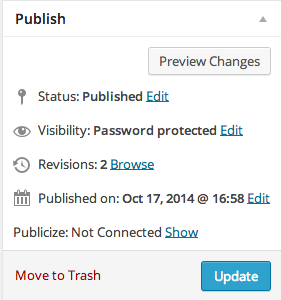
Click on Edit next to Visibility: Password Protected.


- The topic ‘Blog password protection’ is closed to new replies.
 WordPress.com Forums