

Blog post as menu item?
-
Is there a way I can add the blog posts as a menu item in this theme? If so, I’m not able to figure this out…
Thank you!The blog I need help with is: (visible only to logged in users)
-
Hi there,
Yep, this can be done. First, head over to My Site > Menus. This will take you to the Menus section within the Customizer.
When you get there, click on any menu you want to modify.
Next, click the Add Items button to choose from the available types of menu items on the right. In your case, you’ll want to click on Posts. It will open to reveal any blog posts you currently have on your site.
Click the post you want, and it will be moved into your menu on the left. If you drag it beneath another item and slightly to the right, it will create a dropdown from the item above it.
If you’re looking to add multiple posts in the same category, you can add a category instead of a single post. This way, when visitors click the category, they’ll see all posts within that category.
When you’re done making changes, click the blue Save & Publish button at the top left.
-
Hi there,
I have a similar enquiry.
I would like to have a menu item “Blog Posts”, which links to all my blog posts, starting from latest posts.
With your solution, I would need to keep linking new blog posts under the menu item. Also, I can’t seem to be able to click to “add items” to the menu. Any advice would be greatly appreciated, thank you.
Blog: bittersweetdiagnosis.com.
Theme: Dara -
Hi Ashley – David’s suggestion is only suitable if you wanted to add individual blog posts to a menu.
I took a look at your front-page settings and I see a couple of problems — you’ll want to fix this up first before doing anything with your menu.
There are two ways you can set up your front page.
1 – You can have your front page display your latest blog posts, with the newest first, i.e. reverse chronological order. With this method, every time you add a new blog post, it will automatically be displayed at the top of your front page. To choose this method, go into your Customizer‘s Static Front Page panel and next to “Front page displays” choose “Your latest posts”:
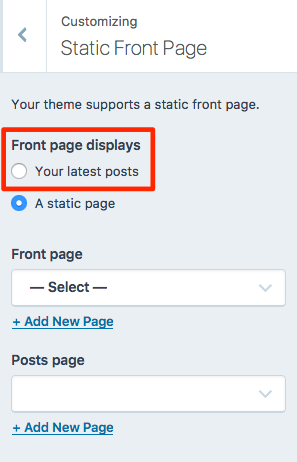
2 – On the other hand, if you don’t want the blog to be displayed on your front page, you can set up a separate page on which it’s displayed, and choose a different page for the front page. A guide for that method is here: https://en.support.wordpress.com/pages/front-page/
Right now, you’ve selected option 2 in the Customizer, but you haven’t yet selected which page should be your front page and which page should be your blog page, so things are a little mixed up at the moment. :)
Once you decide where you want your blog to live, you can add a link to that page in your menu as a Custom Link or as a Page link. I can help you with that more if you like, once you’ve decided which route to go.
-
tundratalkblog – are you all set or do you still need help? Looks like you’re displaying your latest blog posts on the homepage, and you have a Home link in your menu that links there. If you need further help, just let me know.


- The topic ‘Blog post as menu item?’ is closed to new replies.
 WordPress.com Forums