

Blog Post om Main Page
-
Hello,
My Blog posts on my main page of the website only show a portion. It then has a button that contains continue reading.
So my question is, how do I show the whole post and not just a portion of it?
The blog I need help with is: (visible only to logged in users)
-
Hi markbisbee,
When you created the post, you must have inserted the read more tag. Removing the read more tag will result in showing full posts on your main page.
Hope this helps.
Thank you.
-
That is how your theme is designed to function. See https://wordpress.com/theme/lovecraft In fact most new themes do not display full posts on the front page or main page for posts as many people use mobiles and tablets.
re: switching themes
Note that switching themes https://en.support.wordpress.com/themes/#switch-themes can be easily done, provided you are logged in as Admin under the same username account that registered the site. Themes are just “skins” on WordPress.COM hosted blogs. You can quickly and easily change themes on any WordPress.COM hosted blog to another one found here http://wordpress.com/themes/ and no data will be lost or negatively affected by the change. The only time you may have to do a lot of work is if you are changing to a dramatically different theme with different features and/or if you have done any CSS editing.Provided you are logged in as Admin under the same username account that registered the blog go to Dashboard > Appearance > Themes, Browse themes until you find one you like and click the “activate” or the “preview” link, or type in the name of the theme you want to use when it appears.
The theme customizer https://en.support.wordpress.com/customizer/ provides a preview function for exactly that purpose ie. so you can view what a theme will appear like prior to changing one.
-
Just to clarify, neither of these is quite accurate, though they are good guesses.
That is how your theme is designed to function
When you created the post, you must have inserted the read more tag.
You have your Content Options set to display a post excerpt. Open your Customizer‘s Content Options panel and select “Full post” instead. Save your changes and you should be all set. Let me know how it goes.
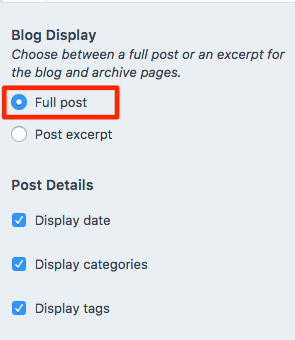
In fact most new themes do not display full posts on the front page or main page for posts as many people use mobiles and tablets.
Most new themes display the full post and leave it up to the site owner whether they want to keep that by default or display excerpts, via Content Options.
-
-


- The topic ‘Blog Post om Main Page’ is closed to new replies.
 WordPress.com Forums