

Blog verse Website
-
why am I being given setup options for a blog when I signed up to create a website?
The blog I need help with is: (visible only to logged in users)
-
Hi there,
Please note that the words site and blog are used interchangeably here on WordPress.com. There isn’t a separate sign up or theme for a site as opposed to a blog. They’d be exactly the same.
I’m assuming the differences you want between a blog and site would be that you’d want a custom menu and static pages like a Home page, Contact Page, etc. And then you may want a separate page for all your posts (blog type posts).
In order to do this you can create a “Home Page” by going to Pages > Add new in your Dashboard. This is a static page that would be the page your readers view the minute they visit your site. After you published that, create another page titled “Blog”, “Posts” or whatever you want if you want a separate page with all your posts. Leave this page empty, but publish it.
Then go to Settings > Reading in your Dashboard. At the top where it says Front Page displays: select a static page and set the the Home page you just created as your Front Page, and the Blog or Posts page as your Posts page. If you don’t want a Posts page, you can leave that blank.
Finally, if you want to create a Custom Menu you can by going to Appearance > Menus in your Dashboard. Please view the link for further instructions.
Let me know if you have any questions with this!
-
Yes, I want various tabs that viewers can click through with really none of the blog components. I added new pages for each of the tabs with the information I would like, and now can’t seem to find any of them. Is there some sort of tutorial available for how to use this program? I just purchased the $99 plan but am unsure what I am paying for other than a giant headache.
-
I added new pages for each of the tabs with the information I would like, and now can’t seem to find any of them
If you take a look at the Custom menu link I sent you above, it will teach you how to show your pages in the menu so it is viewable on your site. Here it is:
Also, if you don’t want a Blog/Posts page at all, do what I asked above up to here:
In order to do this you can create a “Home Page” by going to Pages > Add new in your Dashboard. This is a static page that would be the page your readers view the minute they visit your site.
Then, do not create the Blog, Posts page.
Then go to Settings > Reading in your Dashboard. At the top where it says Front Page displays: select a static page and set the the Home page you just created as your Front Page, and the Blog or Posts page as your Posts page. If you don’t want a Posts page, you can leave that blank.
As mentioned above, if you don’t want a Posts page, leave the Posts page section blank.
If you want a full tutorial on WordPress.com for new user, take a look at this:
As for WordPress.com Premium take a look at the guide for what comes with this upgrade. You can register a domain name, so instead of finding your site at chelseysplace.wordpress.com, you can find it at a domain of your choosing (determined by availability). The last I checked this domain is available:
chelseysplace.com
You can register (without paying with Premium) by going to Store > My Domains in your Dashboard. If you want that domain, enter chelseysplace.com (please leave out the www.). You can read more about this here:
In addition to a domain, you have the Custom Design upgrade, No Ads, 10GB of extra space and VideoPress.
Feel free to reach out if you have any questions!
-
Great, things are rolling! I am having a hard time removing the “reply” option from the bottom of each page. Also, there is some three-lined thing at the top of the page with menu options I would like to get rid of. I’m not sure what it’s called.
-
I am having a hard time removing the “reply” option from the bottom of each page.
If you want to disable comments on all pages, please go to Pages > All pages in your Dashboard. Then select all pages by checking the box left of “Title”. Then, go to the drop down menu labeled “Bulk Actions” and select “Edit”. Click on “Apply”, and you will see another dropdown menu next to “Comments”. Select “Do Not Allow”, and click “Update”.
This should disable Comments on all the pages you checked off.
Also, there is some three-lined thing at the top of the page with menu options I would like to get rid of. I’m not sure what it’s called.
If you click on that, it will provide you access to the widgets you added so I would be wary of removing that. However, if you still want to remove it, we can if we edit CSS. I can provide you the code to remove it – just let me know!
-
Thank you, that worked! My last question is about the featured image being cut off, in the about me section if you are viewing my page. How can I fix that?
-
Hi there,
That will actually be determined by your display size. For example, when my browser height size is small, it will look like this:
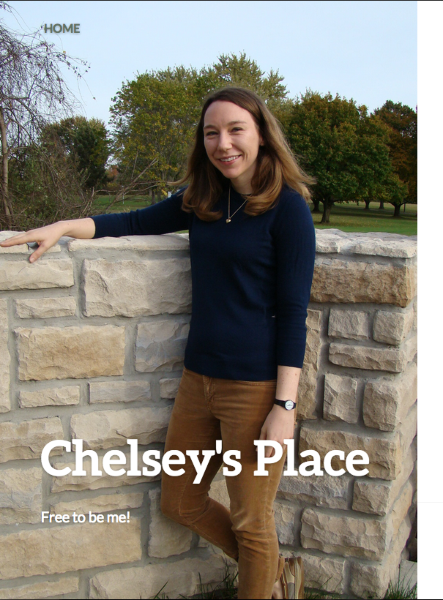
But, when I increase the browser size, I get the full picture:
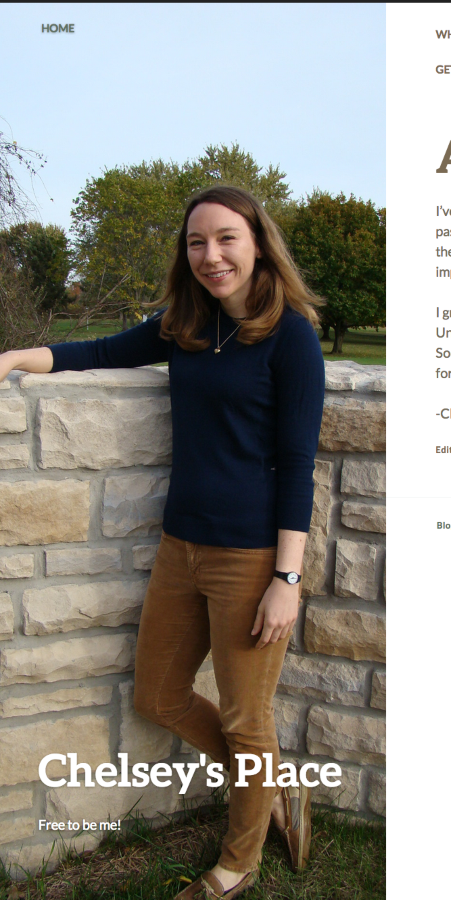
Cheers!


- The topic ‘Blog verse Website’ is closed to new replies.
 WordPress.com Forums