

Blurred header image
-
I have a clear image to use as a header, however once it’s uploaded it shows up slightly blurred, can anyone tell me how to fix it? Thanks
The blog I need help with is: (visible only to logged in users)
-
Hi @fryfiles,
I had a look at your site, and the image seems to be appearing clear. I also notice you have followed the specifications guidelines for the images as well. Here is the screenshot of how it looks on my screen:
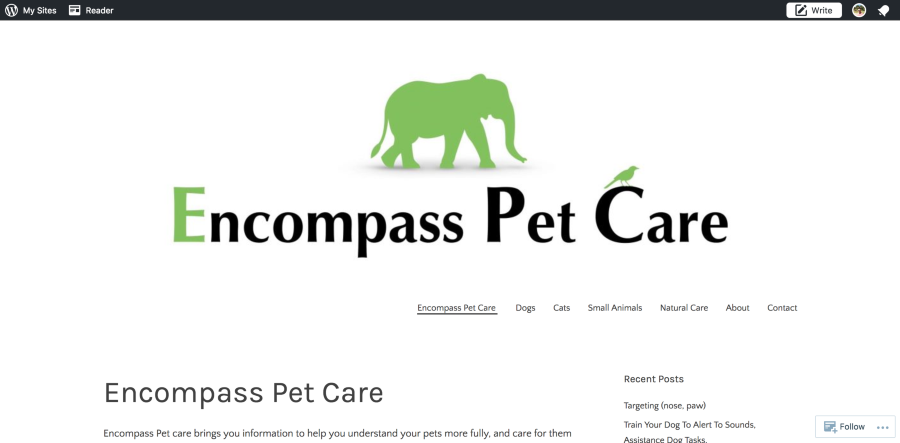
Are you still facing an issue an issue with it? You could share a share a screenshot of how it appears. Also, if you could share a screenshot after opening this support details link, on your browser –– which will give us further information about the environment where the image appears blurred.
Let me know how it goes, would be happy to assist you further.
Thanks!
-
Hi @pavanraheja, thanks for your message. It is only a small blurring but enough to bug me, heres a side by side of the website vs the original, hopefully it illustrates the problem better, the bird is probably the easiest part to see it on, http://tinypic.com/r/r1zukj/9 & http://tinypic.com/r/2ebh7ah/9.
Here’s the support details info: http://tinypic.com/r/2qvut4z/9
Thanks again -
Hi again,
Thank you for the details and screenshots. I noticed that the image issue is on the IPAD screen. The theme adjusts the images to appear as per the device. You would require to adjust the size using custom css to adjust that. Or probably it’s a theme reason.
I am tagging the staff to have a closer look and help you with it further. Someone should update you soon.
Thank you for your patience!
-
Hi again,
To be able to staff the tag please add “modlook” in the sidebar tags section to get their attention. You can learn more about it here:
Thanks!
-
-
Hey there,
What are the dimensions of the header image on your computer? Did you scale or crop the image locally or after you uploaded it to the media library?
The Custom header is 1088 × 300 pixels at its largest, so if your local file is not those same dimensions, the upload is automatically skewing it for you to fit the header area perfectly.
Also, did you upload the image to the media library first or did you upload it straight to the header image area within the customizer? If the latter, i wanted to see if you can try this:
1) Create a file locally that’s exactly 1088 x 300, containing your book covers, that is nice and clear.
2) Upload that file only into the Media Library, not the custom header area, here:
https://encompasspetcare.wordpress.com/wp-admin/media-new.php
And let me know if that clears up the image.
Thanks!
-
Hi staff-doublebassd thanks for your message, the image is the exact dimentions needed and I have tried uploading through the media library as you suggested but it looks the same unfortunately
-
I see that the image is a JPEG. Have you tried saving the image as a GIF? GIFs often work better for illustrations with type. Let me know if you can save the file as a GIF with the highest possible quality and see if that makes a difference.
Thanks!


- The topic ‘Blurred header image’ is closed to new replies.
 WordPress.com Forums