

Blurry thumbnail images on front page Alto Focus theme
-
hello :)
I am trying to get the knack of the Alto Focus theme, which I love, but I just can’t figure out how to make the thumbnail images on the front page crisp and sharp. The photos are crisp in the individual posts, but look flurry on the front page after they are resized. I tried different sizes of featured images in hope to find difference, but alas. Any ideas how to fix this? Thanks much!The blog I need help with is: (visible only to logged in users)
-
edit: so I just checked the blog on a different browser, on Explorer the images look just the I way they should be – sharp… but on Google Chrome they are totally destroyed :/ I have no idea why that is…
-
Hmm – I’m not sure why your images were looking blurry in AltoFocus in Chrome unless they were super small, but I see your site is now running Libre 2. Are you all set now or did youw ant to give AltoFocus another try?
-
thank you so much for your reply! :) I love the AltoFocus theme best of all because the front page (with the thumbnails) is beautiful :) but gave it up because I couldn’t figure it out (blush). I tried different sizes of images (640 px/ 600 px and 1024 px along the long side for horizontal images), but the results are the same. The thumbnails are blurry in Google Chrome and ok in Mozilla/ IE… sigh… Are there any directions about what is the best size to post images in AltoFocus? I would love to give it another try. I can switch to it again so you can check it out? and thank you once again for your time :)
-
I previewed your site with AltoFocus but still couldn’t see any blurriness in Chrome, so if you don’t mind switching back temporarily, I would be glad to take another look.
In terms of size, the recommended width of the featured images in AltoFocus is 1200px. (Specs are at the bottom of https://wordpress.com/theme/altofocus )
Could you also give me a little more info about your setup: what type of machine are you using? What OS? What’s the browser window size?
-
I just switched back to AltoFocus :) And again full-size look ok, but thumbs are fuzzy in Google Chrome, gosh… :X
I’ll try with 1200 px for horizontal images now.
I’m using Windows 10 on an Acer laptop, and the browser window size is 1366×635 (I think)
really, I am so grateful for you time :)))) -
I had a look at your site both on a Mac and PC running Chrome, but I’ve been unable to see any blurriness.
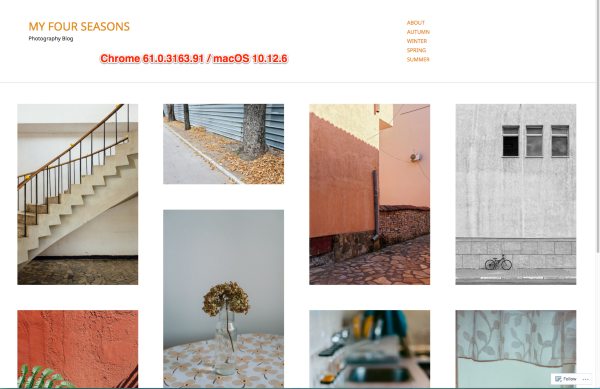
Could you try turning off all extensions in Chrome to see if something might be interfering?
https://support.google.com/chrome_webstore/answer/2664769?hl=en&rd=2
Look for the section called “Turn extensions on or off.”
Let me know how it goes.
-
thank you so much for taking a look… the fact that you see them clearly means the problem must be in the settings of my Google Chrome. Which is good news, in a way :) I tried to turn off extensions, nothing changed… and I tried to upload bigger-size images, nothing’s changed… I copied side by side how the same image looks on Chrome and Mozilla: https://cloudup.com/cqqMujb2NRD (hope the link works and shows what a great difference in sharpness there is on my computer, right? )…
I think I’ll call it quits for now… sigh… maybe will try to reset Chrome at some point or just only look at other browsers lol :)) anyways, once again I really appreciate all the time and effort, thank you kindly once again so much :)) -
You could definitely try reinstalling Chrome and see if that makes a difference.
anyways, once again I really appreciate all the time and effort, thank you kindly once again so much :))
You’re very welcome!


- The topic ‘Blurry thumbnail images on front page Alto Focus theme’ is closed to new replies.
 WordPress.com Forums