

Boardwalk theme featured image title issues
-
I’m having issues with controlling the display of my featured images on this Boardwalk themed blog: HomelesslyinLove.com.
First, the featured images get cropped awkwardly in the blog posts even when they are the right dimensions 2,000-1,500.
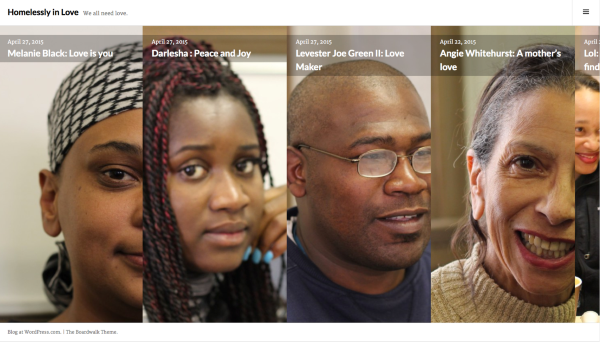
Second, they get cropped on the sides on the front page slideshow, and I’d like to know if there would be any way to control what part of the image is displayed on there.
Finally, after I tried fiddling with the site to figure out these two issues, the title changed places on each post. It was before inserted in the featured image in white font. Now, it’s posted below the image. Is there any way to go back to the previous settings for that?
Any help would be greatly appreciated. Thank you!
The blog I need help with is: (visible only to logged in users)
-
Hi arianemo – let me try to help with your issues:
Finally, after I tried fiddling with the site to figure out these two issues, the title changed places on each post. It was before inserted in the featured image in white font. Now, it’s posted below the image. Is there any way to go back to the previous settings for that?
Could you please link me to a page or post where you’re seeing the titles inserted below the image, so I can have a look?
I’m seeing the titles at the top of your images on the homepage:
-
First, the featured images get cropped awkwardly in the blog posts even when they are the right dimensions 2,000-1,500.
Second, they get cropped on the sides on the front page slideshow, and I’d like to know if there would be any way to control what part of the image is displayed on there.
There isn’t a way to control where the image is cropped on either the homepage or single posts. You might want to try using photos that are less close-up on people’s faces so they are more flexible in terms of the cropping that occurs automatically in this theme.


- The topic ‘Boardwalk theme featured image title issues’ is closed to new replies.
 WordPress.com Forums