

Bug in Twenty Fourteen Theme: Grid background color
-
Whenever I customize any color in the Twenty Fourteen Theme (e.g. accent 1 from green to blue), the background color of the featured content grid changes. It was black, and now it’s light grey. This doesn’t seem logical when all the text in the featured content grid is white by default.
I have tried and tried to change the grid background color back to black using custom CSS. I can’t find anything that works. Whatever background color I specify shows up as a barely detectable tinting of the grid image when you mouse over it, but has zero effect otherwise.
You won’t see the problem on my blog right now because I’ve switched back to the default colors, but the bug is very easily reproduced.
-
-
Hi there, have you tried using the blue featured palette suggested here:
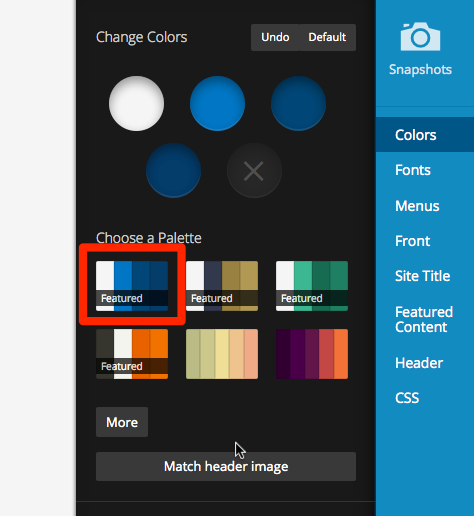
If you use that palette, the text in the featured grid will be black, instead of white.
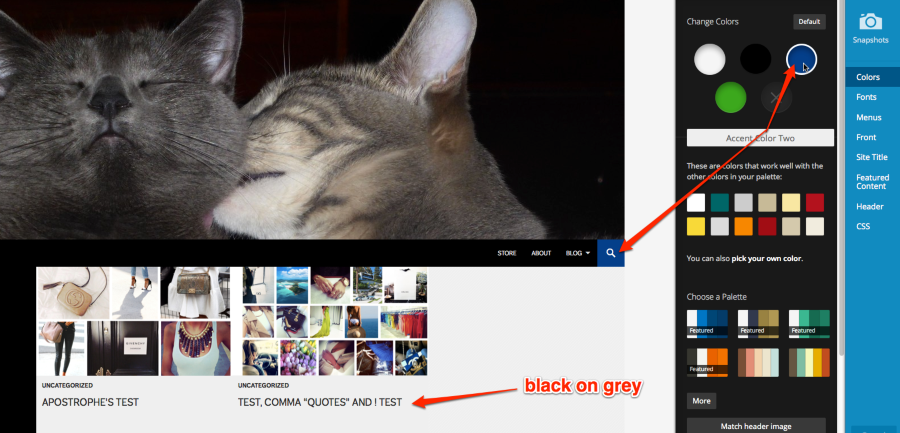
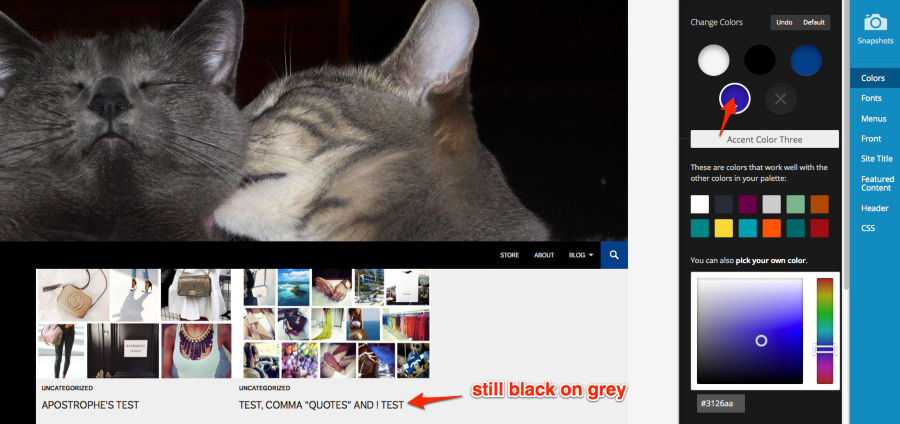
I also tried manually changing both of the green accent colours to blue, and the text on the featured grid automatically changed to black in these two cases as well. For example:
Accent Colour Two – Blue
Accent Colour Three – Blue
Let me know how it goes.
If you’re still experiencing the same issue, could you please take a screenshot of your custom colour palette that’s causing issues so I can do some more testing?
Here’s a guide on how to make a screenshot, if you’re not sure: http://en.support.wordpress.com/make-a-screenshot/
You can upload the screenshot – in a graphic format like JPG, PNG, or PDF – in your Media Library so I can see it. Thanks.
-
Yes, I’ve tried that palette, and it changes the background colour of the navigation bar to blue. That’s not what I want.
Let me clarify the misunderstanding. I like the default black background and white text for the left sidebar and grid. I don’t like the green accents (hyperlinks, search icon, hover menu color).
But when I change the accent color to blue, the grid colour scheme automatically changes to light grey background and black text. It doesn’t look right at all next to the left sidebar, which retains the default black background and white text. I don’t think this automatic change makes sense, but it’s supposed to be a feature and not a bug, that’s fine. Could you advise me on how to customize my CSS to override this? I haven’t been able to do that (see original report for the unexpected results).
I think this is why you will find that there are so few blogs using the Twenty Fourteen Theme with customised colours. It makes the grid look really unprofessional.
-
You can try this CSS to modify most of the instances of green:
.search-toggle,
.search-toggle:hover,
.search-toggle.active,
.search-box,
.hentry .mejs-controls .mejs-time-rail .mejs-time-current,
.slider-direction-nav a:hover,
.primary-navigation ul ul,
.primary-navigation li:hover > a,
.primary-navigation li.focus > a,
#infinite-handle span,
.secondary-navigation ul ul,
.secondary-navigation li:hover > a,
.secondary-navigation li.focus > a,
button,
.contributor-posts-link,
input[type="button"],
input[type="reset"],
input[type="submit"],
.primary-sidebar .widget button,
.primary-sidebar .widget input[type="button"],
.primary-sidebar .widget input[type="reset"],
.primary-sidebar .widget input[type="submit"],
.primary-sidebar .widget_calendar tbody a,
.footer-sidebar .widget button,
.footer-sidebar .widget input[type="button"],
.footer-sidebar .widget input[type="reset"],
.footer-sidebar .widget input[type="submit"],
.footer-sidebar .widget_calendar tbody a,
.content-sidebar .widget button,
.content-sidebar .widget input[type="button"],
.content-sidebar .widget input[type="reset"],
.content-sidebar .widget input[type="submit"],
.content-sidebar .widget_calendar tbody a {
    background-color: #xxxxxx;
}

.content-sidebar .widget a {
color: #xxxxxx !important;
}
If you still see any green, you can use a browser inspector to find the element’s class or ID and add that to your custom CSS as well. Here are some helpful posts that will help you customize your site with CSS:
Here is the theme’s CSS for you to look at:
http://s2.wp.com/_static/??/wp-content/themes/pub/twentyfourteen/style.cssLet me know how it goes.
-
Thank you so much! The first block of code worked fine. I had to remove the trailing comma from the second block before it would work (how strange). And I added some more code. This is what I have now, changing all green to blue (as far as I can tell) except for the link hover colours.
.search-toggle, .search-toggle:hover, .search-toggle.active, .search-box, .hentry .mejs-controls .mejs-time-rail .mejs-time-current, .slider-direction-nav a:hover, .primary-navigation ul ul, .primary-navigation li:hover > a, .primary-navigation li.focus > a, #infinite-handle span, .secondary-navigation ul ul, .secondary-navigation li:hover > a, .secondary-navigation li.focus > a, button, .contributor-posts-link, input[type="button"], input[type="reset"], input[type="submit"], .primary-sidebar .widget button, .primary-sidebar .widget input[type="button"], .primary-sidebar .widget input[type="reset"], .primary-sidebar .widget input[type="submit"], .primary-sidebar .widget_calendar tbody a, .footer-sidebar .widget button, .footer-sidebar .widget input[type="button"], .footer-sidebar .widget input[type="reset"], .footer-sidebar .widget input[type="submit"], .footer-sidebar .widget_calendar tbody a, .content-sidebar .widget button, .content-sidebar .widget input[type="button"], .content-sidebar .widget input[type="reset"], .content-sidebar .widget input[type="submit"], .content-sidebar .widget_calendar tbody a { background-color: #01b; } ::selection { background-color: #01b; } ::moz-selection { background-color: #01b; } a { color: #01b; } .content-sidebar .widget a { color: #01b !important; /* !important needed or it's just black */ } .primary-navigation ul ul a:hover, .primary-navigation ul ul li.focus > a { background-color: #000; } -
Addendum: I had to delete the following code.
.content-sidebar .widget a {
color: #01b !important; /* !important needed or it's just black */
}
It worked fine in the customize CSS preview, but on the real website it really did change all the widget links, with the unfortunate result that the calendar had blue text on blue background. I haven’t yet figured out a way to get the links in a text widget to be blue, while leaving the other links undisturbed. But fortunately, I don’t need that yet.
This is not the only time when the preview has been inaccurate. I have CSS specifying that the the blog tagline should not be bold, and the preview obeys that, but the real website ignores it. But that’s a separate problem, and not an important one for me right now, so I’m leaving the “resolved” status.
-
I had to remove the trailing comma from the second block before it would work (how strange).
That was a typo on my part, sorry about that. Glad you figured out how to fix it. :-) I’ll correct it above in case anyone stumbles across this thread in the future.
I haven’t yet figured out a way to get the links in a text widget to be blue, while leaving the other links undisturbed. But fortunately, I don’t need that yet.
If you do eventually need help with any remaining issues, feel free to post in the CSS customization forum:
https://en.forums.wordpress.com/forum/css-customizationGlad you’ve got things mostly working the way you want. Good luck with the rest!


- The topic ‘Bug in Twenty Fourteen Theme: Grid background color’ is closed to new replies.
 WordPress.com Forums