

Business page
-
WordPress automatically connects to my personal google plus and I would like to connect it to my business plus page.
Thank You
The blog I need help with is: (visible only to logged in users)
-
Hi there!
You can disconnect your current Google+ account through Settings > Sharing. Then you should make sure that your browser is logged into the Google account that you want to add. Then return to Settings > Sharing and click on ‘Connect.’ This will connect you to the account you’re currently logged into.
If you’re logged into more than one Google account, when you go back to Settings > Sharing and click on the ‘Connect’ button next to Google+, you’ll see the choice of which account to connect to.
Let me know if I can help further!
-
Shawna, thanks for your reply.
Let me use a more precise description.
My google plus personal page (dr brent binder) and business page (pain relief chiropractic) are affiliated with the same google account.
The settings>sharing option has allowed me to post to both accounts simultaneously. This is working fine.
The issue is underneath the “sharing” section (all the social media sites) in the “connect to google +” section.
This section only connects to my personal page, so that at the end of all my blog posts, it links back there instead of my business page.
Thank You!
-
Hi there!
I understand now. If your Google+ Page is managed by your Google account, you should have the option to connect to the page instead of your personal profile.
Here’s what I see when I first click on ‘Connect’
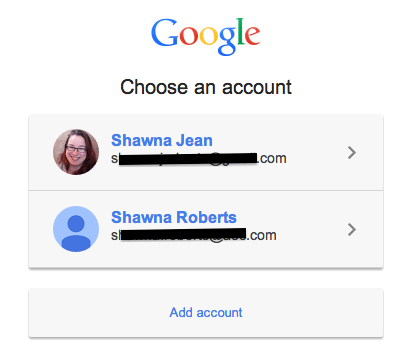
When I choose the account that manages a page, I get directed here:
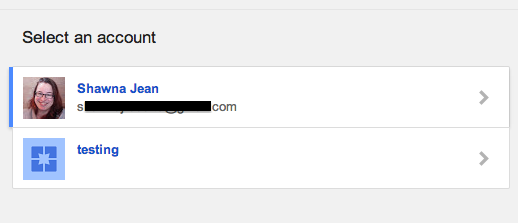
At that point, I can choose to connect to my Google+ account or the Page that I created titled ‘testing.’
What happens when you select your account from the first page? Do you see the second page? Can you confirm that your Google account is an administrator of your Page?
-
Actually I figured it out!
What I had to do was register for the separate domain name and create a separate log-in and password for my google plus business page.
Then, wordpress allowed me to choose which page i would connect too.
Thanks for all your help.
-
Great! I’m so glad it’s working for you now!
Let me know if I can help with anything else!


- The topic ‘Business page’ is closed to new replies.
 WordPress.com Forums