

Can I control the order of posts in a widget?
-
I am using the Zuki theme widget ‘Small Recent Posts’. I have 6 posts there – 3 are displayed across the page and another 3 under those. Is it possible to control which posts appear in which order? I would like to put them in a different order from what they are now.
The blog I need help with is: (visible only to logged in users)
-
Hey Laura,
That slider will display recent posts depending on their publish dates. The only way to impact the order of the slides is to change the dates on the posts themselves.
If you’d like to do this, you can open a post, like this one:
https://wordpress.com/post/79269150/323/?optin
Where you see the Publish settings you can make the date adjustment, as seen here:
https://cloudup.com/cG6aoXPEdNyClick “Scheduled” and then make the change you desire. Make sure you click to Update the change for the post.
I hope this helps! If you have any other concerns, drop me a note. Thanks much!
-
Thanks Robyn. I do have another question – about the appearance of the featured images in the post. For the posts in the category ‘Ingredients’, all the featured images are just chopped off. I assumed that the image would resize automatically down to a thumbnail size. Is there anything I can do?
-
Hello Laura!
I am not seeing images that are cut-off in your posts.
Here’s my view:
https://cloudup.com/cKADoih3Oaj
Of course, it’s possible I might not be looking at the same area that you are! Let me know where the cut-off images are that you are viewing.
This may help — Zuki gives the following sizing breakdown:
Quick Specs (all measurements in pixels):
- The default Post width is 640
- The default featured post image width is 840.
- Featured post images in the Featured Content Slider should be 1200×800.
Let me know how I can help further, Laura! Thanks :)
-
I’ve done a quick screenshot of what I mean – see attached. Same images but mine are chopped off and yours aren’t!
From: WordPress.com Support Forums [mailto:(email visible only to moderators and staff)] Sent: 10 February 2015 21:16To: (email visible only to moderators and staff): [WordPress.com Forums] Can I control the order of posts in a widget?
thatrobyn replied to a forum topic that you subscribe to
in response to the topic “Can I control the order of posts in a widget?”:
Hello Laura!
I am not seeing images that are cut-off in your posts.
Here’s my view:
https://cloudup.com/cKADoih3Oaj
Of course, it’s possible I might not be looking at the same area that you are! Let me know where the cut-off images are that you are viewing.
This may help — Zuki gives the following sizing breakdown:
Quick Specs (all measurements in pixels):
1. The default Post width is 640
2. The default featured post image width is 840.
3. Featured post images in the Featured Content Slider should be 1200×800.
Let me know how I can help further, Laura! Thanks :)
Reply View forum topic
Want less email? Unsubscribe from this topic
Thanks for flying with WordPress.com
[attach 1]
-
Hi Laura!
You appears to be looking at your site in Mobile Phone view on your computer. I can see this because the little phone icon is highlighted in the image you sent:
https://cloudup.com/cyjn-ILkqdoIs that intentional? If so, your responsive theme automatically makes that adjustment to fit on your phone’s screen. If you look at your site in a regular desktop/laptop view, this should not be the case.
If you want to change this, go to the following link:
https://threeorangesblog.wordpress.com/wp-admin/themes.php?page=mobile-optionsWhere you see, “Enable mobile theme,” you will switch to Yes. Then save your changes.
This may help with the way your image is viewed on the phone.
Please let me know how this works for you. Thanks!
-
Hi Robyn,
Thanks for your quick reply. No, I was looking at it in Desktop view. In my screenshot you can see that the little icon for Desktop on the left is highlighted, not the Mobile view which is on the right. So this is worrying.
Laura
-
Hi Laura!
I’m confused. In the Media Library, all the images you’ve uploaded have the mobile display icon enabled. For example:
https://cloudup.com/i5yC2MOjI_E
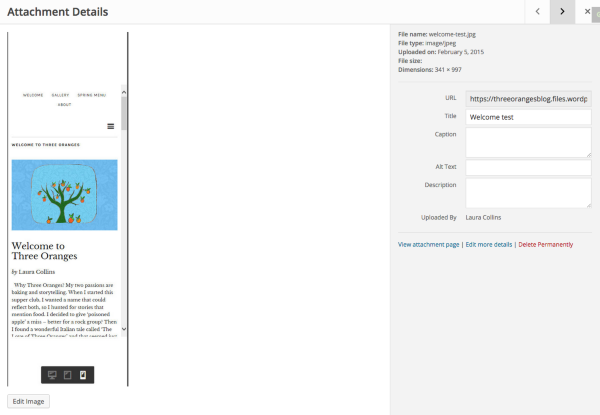
https://cloudup.com/i_5stFEq8FWAll five images in your Media Library have the Mobile icon on the right highlighted,
Could you please take/upload a few new images with the desktop icon displayed?
Also, most importantly I need to know if the cutoff images are being viewed on your live site in your browser at http://threeoranges.london/, not just the Customizer.
Thank you again!
-
Hi Robyn,
Sorry for the confusion. I sent you the screenshot of the Desktop view as an email attachment. You seem to have gone to my media library. I have now uploaded the screenshot I wanted you to look at into my media library: it’s called “test1”. You can see that it’s in Desktop view.
I also raised a separate support topic ‘Mobile View’ on 5th February when I tested my website in Desktop, Tablet and Mobile view. In Mobile view some of the images and text were chopped off. Alex Gustafson responded to this and asked me to upload examples. This is perhaps what you were looking at. They are all called ‘…test’. He thinks there is a bug in the Customizer and has forwarded it to the developers.
Sorry, I raised the issue that you’re handling because I thought it was 2 different issues. This one is about images not sizing properly in the widgets in Desktop view. I thought it was 2 different problems. Maybe it’s all the same thing.
-
Hi Laura!
Aha! Now I see. We can’t receive email attachments when you respond to our forum conversations :) That’s why they need to be added to the Media Library! Got it!
Seeing the image “test1” was very helpful.
Could you please give me a link to where I can find that on your site? When I go to the Ingredients Category page (http://threeoranges.london/category/ingredients/), I’m just seeing a list.
It would help to know where you’re viewing this. I’m unable to find it via your menu.
Thanks for the assistance :)
-
Hi Robyn,
The images are in in the ‘On the menu’ section. I think this has solved itself. I changed the widget setting from ‘medium thumbnail’ to ‘bigger thumbnail’and now the images resize properly to fit in the space. So it’s all OK. Thanks for your help.
I still do have one puzzle which I can’t understand. I placed a ‘Zuki: Big Recent Posts: About Three Oranges’ in the ‘Front Page – Post Content 1’ area. The category slug is ‘Supperclub’. I have a post called ‘About Three Oranges’ and applied the category ‘Supperclub’. This post isn’t displayed at all and I can’t figure out what I’m doing wrong. Can you help?
-
Hey Laura,
Take a look at the Demo…and let me know which item on the Demo best displays your goal:
https://zukidemo.wordpress.com/I also wonder if you’ve seen the Zuki setup video:
https://wordpress.com/themes/zuki/support/I think it’s pretty helpful in walking you through the steps of setting up your front page.
Thanks much.
-
Yes, I’ve looked at both the Zuki demo and the Zuki setup video – several times each! I’ve checked everything over and over. My other widgets are working – it’s just that particular one that doesn’t, and I can’t see what I’m doing wrong. Never mind – I’ll contact the Zuki support. Thanks for your help.
-
Sounds good Laura,
The Zuki developers will be able to assist you in getting to the bottom of the issue.
Thanks so much for letting me know you’re contacting them.


- The topic ‘Can I control the order of posts in a widget?’ is closed to new replies.
 WordPress.com Forums