

Can I rename a page?
-
I would like to rename the page called Special Event to News, so that it will display when the url usawg.wordpress.com/news is entered in the browser address bar. The ‘trashed’ old News page displays instead. The Special Event page does display if News is selected from the main menu, but we have already published the /News URL as a link to register for the event .
I tried deleting the News item from the primary menu bar, then adding a page (Special Event) and renaming the navigation to News, but that did not work. We have already tried to edit the old News page but somehow it got turned into a Post page and we can’t delete the post. Help!!WP.com: Yes
Correct account: YesThe blog I need help with is: (visible only to logged in users)
-
Hi there,
I would like to rename the page called Special Event to News, so that it will display when the url usawg.wordpress.com/news is entered in the browser address bar.
To rename the url please follow below process.
>Open the page called “Special Event” in editor from your_site->All_pages->Pages
>On the editor, from the right sidebar you will find the “Permalink” section.
>Edit the url name from “URL Slug” box to newsHere is a screenshot
>Update the page after the change.
Here is the detailed instruction given https://wordpress.com/support/permalinks-and-slugs/#posts-amp-pagesThe Special Event page does display if News is selected from the main menu, but we have already published the /News URL as a link to register for the event .
However, If you want to change the link of menu please go to your_site->Appearance->Customize
>From the next screen left sidebar click on Menus->Select_your_menu
>Select the menu item “News” & remove it. So, you can re-add the menu item with the correct url.
>After that, click on the add items button and select the “News” page you published from pages.
>Click “Save changes button”
Here are detailed instruction which will help you to learn more https://wordpress.com/support/menus/create-a-menu/#video-tutorialI tried deleting the News item from the primary menu bar, then adding a page (Special Event) and renaming the navigation to News, but that did not work.
As you have added the page (Special Event), by changing the navigation label name won’t change the url of “Special Event” page. So, please follow the process written up. Hope it will help you.
We have already tried to edit the old News page but somehow it got turned into a Post page and we can’t delete the post.
You can easily copy all the contents of your post and paste them as a page by creating a new page. Follow the below process to copy all the contents of your post and paste as a page.
>Go to your_site->Posts
>Open the post in editor you want to copy
>Click the ellipses menu in the top right of the editor and Select Copy All Content
>Create a new page and then right-click → paste or use ctrl + v (PC) or cmd + v (Mac) to paste the content.
>Publish the page
Below image for you reference
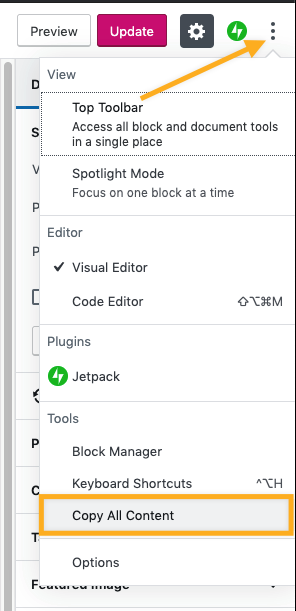
Here are more details https://wordpress.com/support/copy-a-post-or-page/#copy-all-content
To delete the post:
>go to your_site->Posts->All_posts.
>Click the ellipses menu on the right side of the post you want to delete.
>Now select “Trash”.

>If you want to delete the post permanently, you can delete it from the trash folder using the same process.
Here are more detailed instruction https://wordpress.com/support/trash/#moving-a-post-or-page-to-trashHope this helps. Let us know here
Thanks


- The topic ‘Can I rename a page?’ is closed to new replies.
 WordPress.com Forums