

Can I set a unique image for each post that won't be interfered by my sidebar?
-
I want to use the images *in* my posts when i share links to my blog. I also wish to have a widget for instagram and while it was on my page everything I shared had an instagram image featured and not what I posted in the thread.
The blog I need help with is: (visible only to logged in users)
-
Hi Kimberly,
When you’re sharing the posts on your blog, are you referring to how they appear when you’re manually sharing them or when they’re automatically shared through Publicize?
Images in Publicize are selected in the order described here:
http://en.support.wordpress.com/publicize/#images-in-publicize
For the best possible result, you’ll want to select a featured image for each one of your posts as described here:
Can you give that a try?
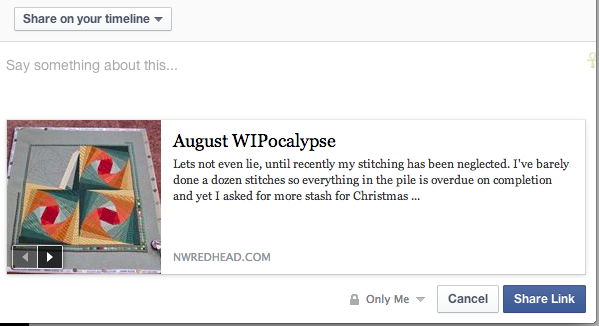
When you’re manually sharing a post, you should see an arrow set beneath the image where you can select exactly what image is going to be shared as shown here:
-
I share links both with publicize and by pasting the page short url. After I noticed the instagram photo and pulled the widget as it was completely unrelated to what i was sharing.
On the order that the images are publicized, that disagrees with what I saw. I have The Twenty Fourteen Theme and Instagram was on the right side bar. The post had an image and it wasn’t used.
Several of my posts use photos from elsewhere, depending on the type of photo some are uploaded elsewhere to make managing them easier for me so I don’t see that I can use the featured image for that scenario unless I’m missing something on the window?
-
Hey Kimberly,
On the order that the images are publicized, that disagrees with what I saw. I have The Twenty Fourteen Theme and Instagram was on the right side bar. The post had an image and it wasn’t used.
Could you put the Instagram widget back in your sidebar and point me to the post you’re referring to just so I can give this a test? I’ll be able to troubleshoot more once I see this in action.
Several of my posts use photos from elsewhere, depending on the type of photo some are uploaded elsewhere to make managing them easier for me so I don’t see that I can use the featured image for that scenario unless I’m missing something on the window?
That is correct. Right now, in order to use an image as a featured image, it will need to be uploaded directly to your blog. Images hosted elsewhere cannot be set as a featured image.
-
http://nwredhead.com/2014/08/07/procrastination-at-its-best/ is the post it happened on and the widget is back as it was
-
Hey Kimberly,
I bet the Instagram image won out on Facebook due to size. It looks like the Instagram images are actually around 640×640 at full size. The image within your post is 380x500ish. In that case, Facebook opts for the larger image.
Unfortunately, there isn’t much we can do here other than increasing the size of the image within the post. If you check out the information Facebook has on your post, you’ll see the correct image is set (under og:image):
I would suggest either using a Featured Image or uploading a slightly larger image going forward!
-
It did the same on google+ the same rules apply? Considering how low res the istagram image is that still seems implausible
-
Hey Kimberly,
The same likely applies to Google +. The social network is trying to select the best image possible to share alongside your post.
Can you try setting a featured image for your next post and see if this happens again (the Instagram image is selected instead)?
-
Well that was predictable. Same process, this time it worked the way I wanted so I’m not sure what its up to
-
Hey Kimberly,
Great! I’m glad it worked this time. The featured image should take precedence over other images provided it’s big enough. Can you try this for your next several posts and let me know if you run into any issues?


- The topic ‘Can I set a unique image for each post that won't be interfered by my sidebar?’ is closed to new replies.
 WordPress.com Forums