

Can I transfer my premium $99/year to my new site after deleting old one?
-
I purchased this yesterday but I had to delete that site after messing up terribly. So, I began a new site today. What happens to my premium that I paid for? Does it automatically transfer to my account below? As you can see I choice the free option for my new site.
Also, on my site below I am having trouble creating a static home page and a static about page. Only 1 page shows up on my account and the other one disappears.
Laurel Jernigan
The blog I need help with is: (visible only to logged in users)
-
Hi Laurel,
I see where you had the Premium free trial on a site that has been deleted.
No transfers necessary now. That free trial is removed and you won’t be charged. You can just begin a Premium plan free trial on the new site here:
Also, on my site below I am having trouble creating a static home page and a static about page. Only 1 page shows up on my account and the other one disappears.
I see where you have an About page created, but it’s currently set to Private. If you’re wanting to keep the site private while building it, visit your settings here:
https://wordpress.com/settings/general
And choose “I would like my site to be private, visible only to users I choose”, then save changes.
But after that, edit your ‘About’ page and remove its privacy setting. To make sure it appears correctly in your menus and such, your primary pages will need to be open. Private pages are good for storing content only meant for site users.
Next, let’s make a Home page and make it your front page.
- Visit here to make a new page: https://wordpress.com/page
- Title that page “Home” and add a few words to the body.
- Publish the page.
- Visit your /wp-admin/ reading settings here:
https://wanderinggypsylaurel.wordpress.com/wp-admin/options-reading.php
- For the setting called “Front page displays” choose ‘a static page’ and in the drop down for Front page choose ‘Home.”
- Scroll down and save changes
No need to set a posts page yet, unless you want a Blog page as well.
Let me know if you hit any snags. :)
-Alex G.
-
Hi Alex,
Your instructions are clear but when I click on your links I do not have access to the options you want me to follow. Is my theme the culprit? Can you make these changes for me? I just want to have a static home page and about page. Perhaps you can suggest an easy theme for me to use? I am also not against having you erase my content as I start over again. So sorry… Really, I'm not technologically challenged, just wordpress challenged.Laurel
-
Hi Laurel,
Your instructions are clear but when I click on your links I do not have access to the options you want me to follow.
It sounds like you went to your Reading Settings before make a public Home page. The “Front Page Displays setting” won’t be available until you do that. Right now your reading settings look like this:
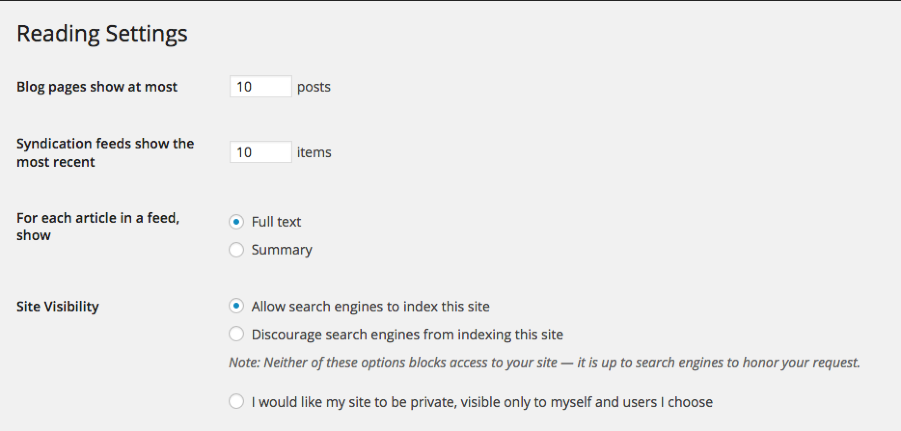
But once you follow steps #1-3, and your new ‘Home’ page is public, not private, they’ll look like this:
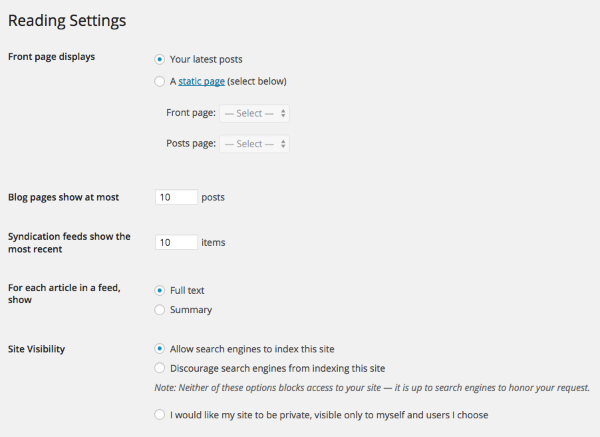
Can you make these changes for me? I just want to have a static home page and about page. Perhaps you can suggest an easy theme for me to use? I am also not against having you erase my content as I start over again. So sorry… Really, I’m not technologically challenged, just wordpress challenged.
I think you’ll feel better doing it yourself. You’ll be a WordPress pro soon! But here’s a video of me doing it on a test site to help. ;)
-Alex G.
-
Hi Alex,
Got it, at least for the Home page. But I still cannot find my About page when I view my site. Also, there used to be a tab to Home and a tab for About.Is there any way I can get these tabs back or at least show on my site that I have a Home page and an About page
Is this something that I need to use the menu for?
Finally, is there a better template I should be using or will purchasing the premium plan take care of this?
Thank you for all of your patience with me. I am sorry I am so needy.
Laurel
-
No apologies necessary, that’s why I’m here to help. :)
I see that you got the home page working and that the About page is no longer set to private. Doing great!
Here’s how to get those tabs back:
- Visit your menu settings here: https://wanderinggypsylaurel.wordpress.com/wp-admin/nav-menus.php
- Under ‘Pages’ to the left, click on the boxes for Home and About and then Add to Menu (Example)
- Once they appear in the menu, click the Blue “Save Menu” button
Since that menu was already assigned to the “Primary Menu” location, that’s all you need. :)
If your site is mostly going to consist of pages, you might want to check that option for “Automatically add new top-level pages to this menu” and save it again for ease later.
Finally, is there a better template I should be using or will purchasing the premium plan take care of this?
So far, all of these functions we’ve worked on would be exactly the same even if you had the Premium plan or a different theme.
Picking a theme is mostly about the look-and-feel of your site, so it’s really a personal choice about what you think projects your content the best. :)
-
Alex! You are awesome and kind and patient and smart and you explain well too!!!! So, for now I can automatically add new top-level pages to this menu and then later when I am out traveling and working I can just have posts?
Did I forget to mention that you are a genius too and a nice person and I feel unfrustrated????
Thank you!
Laurel -
Yay! So glad you’re not frustrated now. :)
And those are very nice things to say. Thanks!
So, for now I can automatically add new top-level pages to this menu and then later when I am out traveling and working I can just have posts?
Yup! If you want to start using posts (which is a good thing!) we’ll need to make a Posts page for you as well. The steps to do that would be:
- Create a new page and name it Blog/News/Thoughts/Posts, whatever you like :)
- Publish that page
- Go to your reading settings again here: https://wanderinggypsylaurel.wordpress.com/wp-admin/options-reading.php
- For the “Posts Page” option, select your new Blog/News/whatever-you-chose page from the drop down.
- Scroll down and save changes.
Once you do that, every new post you make will appear on that page.
Some advice here on when to make a Page vs. when to make a Post:


- The topic ‘Can I transfer my premium $99/year to my new site after deleting old one?’ is closed to new replies.
 WordPress.com Forums