

Can not make Gateway header taller
-
I chose the Gateway theme because in their demo the header section seemed big, and was marked as “flexible header”: https://gatewaydemo.wordpress.com/
However, when customizing it I cannot put a picture with a height superior to 640 pixels. Only a small slice of the picture shows.
Any way to make the header taller, as in the demo?
Without adding anything to the headerThe blog I am setting up is:
trenerendin.wordpress.comThe blog I need help with is: (visible only to logged in users)
-
You’ll get the taller homepage header – like you see on the demo – by using a static homepage with the Home Page template assigned to it and a featured image uploaded.
There’s a step-by-step guide to that on the Gateway showcase page. Scroll down to the “Homepage Template” section.
https://theme.wordpress.com/themes/gateway/
Let me know how it goes.
-
Hello again
That did not fix my problem.
And in addition, by adding a featured picture I will not be able to use the several headers I have as a slideshow.Any other ideas?
Best regards
Robert
-
Looks like you you set your front page to a static page, but you haven’t yet assigned the Home Page template to it – it’s still using the default template.
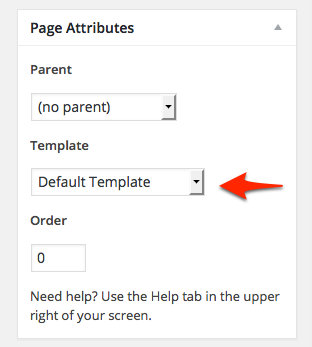
Try assigning Home Page template to it and that should make the header area taller as long as your image is tall enough.
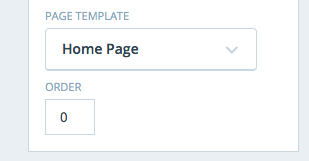
-
Hello once again.
It did not make a change in the header to add the Homepage to the template.
Adding a featured picture, just made that picture come up beside my post and did not even come out wide enough. It did nothing towards my header.
is it possible to do anything in CSS?Robert
-
We’re getting there. :) Right now, the homepage hero-section element is empty, which is why the header isn’t as tall as in the demo.
<div class="hero-section"> </div>If you’re not planning to any of the supported elements to the homepage hero area – such as some text or a call to action, which you can add via the Customizer > Theme Options > Homepage Template – you can definitely try adding some custom CSS to open it up instead.
.hero-section {
  min-height: 390px;
}
Additionally, you could wrap that in a media query so it only applies to larger screens. You can learn more about using media queries that target certain screen sizes here:
http://en.support.wordpress.com/custom-design/custom-css-media-queries/
http://css-tricks.com/snippets/css/media-queries-for-standard-devices/
http://webdesignerwall.com/tutorials/responsive-design-with-css3-media-queriesLet me know how it goes.
-
Hi
I’ve got the same problem but I saw thishttps://en.forums.wordpress.com/topic/gateway-theme-cannot-make-header-bigger?replies=6#post-2470270
The trick mentioned in the last update works.
Best
-
Hi kathrynwp,
Could you also help me with my Gateway theme? I would like to use the homepage style, but I do not want any blog or featured content. I set a static page to be the homepage, but it still has the “nothing found” for the blog at the bottom. Is there any way I can remove this?
Here is my website:
-
iacobones – you could remove the featured posts area on the homepage template in Gateway by adding this to your custom CSS:
.featured-posts { display: none; } -
Perfect!! You are amazing.
Is there also a way to remove the “Home” title in the white section, and leave the menu bar as “Home – Contact Us”?
This way the homepage would have no text at all in the white section. Thank you for your help!
-
iacobones – could you please start a new thread in the CSS customization forum? Thanks!


- The topic ‘Can not make Gateway header taller’ is closed to new replies.
 WordPress.com Forums