

can u help me with the page setting and visibility of the widgets?
-
Hi, I am the creator of laurina86.wordpress.com. I addedd the instagram widget tonight but I would like the page to display my last instagram pic, not a random one as it is currently displaying. It is possible with the setting I chose? what should i do to change it if it is possible?
Also, I would like to know where I can visualize the number of people who are following me? I do not see it anywhere.
Last thing: is it possible to have the widget displayed when i open each recipe. it does not seem that it s displaying them but i can only see them when I open the page “about the author”.
I hope u can help me.
thanks!
The blog I need help with is: (visible only to logged in users)
-
Hi there,
I would like the page to display my last instagram pic, not a random one as it is currently displaying.
It should show your most recent Instagram pic, and I see it currently is. When you upload a new Instagram it can take 15 minutes or so to update in the widget.
Also, I would like to know where I can visualize the number of people who are following me?
Yep, you can see this by going to Stats and then clicking the ‘blog’ link under the follower count in the “Totals, Followers, & Shares” module at the bottom:
http://wordpress.com/my-stats/is it possible to have the widget displayed when i open each recipe.
Your theme, Autofocus, only displays the sidebar on static pages, not on post pages. There’s no way to change this, but most themes show the sidebar on posts, so you might see if there’s another theme you like just as well that does:
http://themes.wordpress.com/ -
Hi! Thanks for replying so fast. I appreciate a lot.
About the Instagram, I checked again and it is not displaying the last picture, it is displaying an old one. How do I change it?
And about the followers, is there a way to show the number of followers on the page of the blog? not only something I can see, but something others can see too.
Let me know. Thanks!
-
Hi there!
I see that your Instagram widget is displaying the most recent picture now. If you’re having trouble seeing it, you might be looking at a cached version. Could you please try clearing your browser cache first?
If you use the Follow Blog widget, you can check the option to ‘Show total number of followers.’ Here is more information about that widget:
http://en.support.wordpress.com/widgets/follow-blog-widget/
You might also like the My Community widget, which gives you options for displaying the people who are following or interacting with your site!
http://en.support.wordpress.com/widgets/my-community/
Let me know if that helps.
-
Hi again,
I am sorry for bothering you again with a question I have already asked, but it seems that I cannot work it out. I really tried hard to make it work, but this Instagram picture widget is not working. The pictures displayed are not even pics I posted on instagram, so I do not know where the blog takes them from.
Also, I was able to find where I can see displayed the # of followers, but I was wondering if I can have it displayed on my blog too.
Thanks for your help (and patience!)
Laura.
-
Hi Laura!
When I look at your site, I see these three pictures displayed in your Instagram widget:
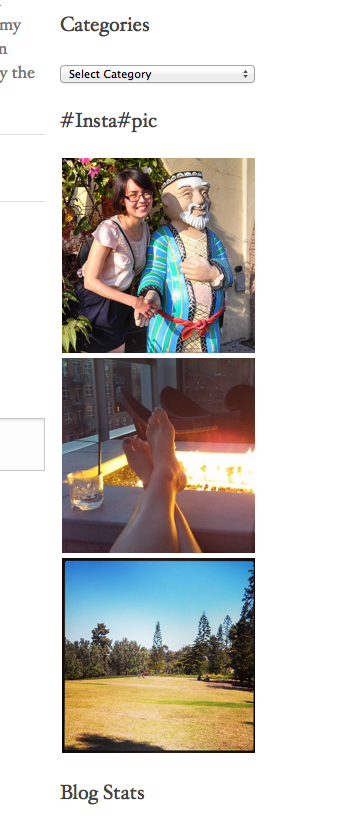
When I check your Instagram account online, I see that those are the most recent three photos in your account. It looks like everything is correct, check it out here:
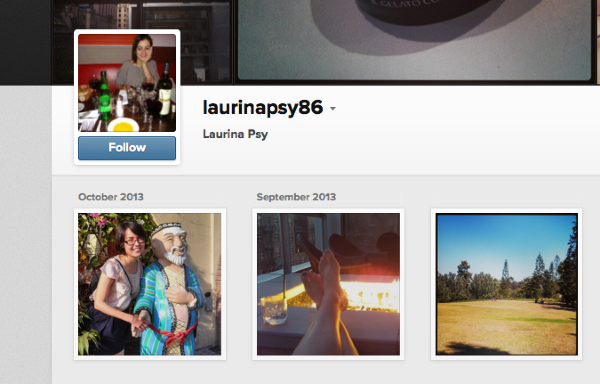
Could you tell me what you’re seeing, exactly? It would help if you sent me a screenshot. Here are instructions that will guide you through how to do that:
I checked out your follower count, and it was already showing but it was being bumped out of the way by the length of your blog name in the little icon. I unclicked ‘Show blog name’ in the Follow Button widget settings. You can see that now there’s enough room to show the followers:
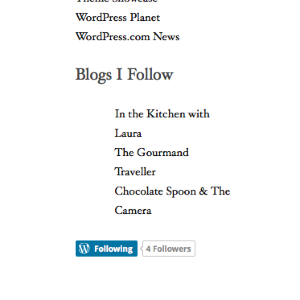
Let me know if you have any questions, I’d be happy to discuss further!


- The topic ‘can u help me with the page setting and visibility of the widgets?’ is closed to new replies.
 WordPress.com Forums